
Google Drive: A Comprehensive Guide
Introduction
In today’s digital age, it’s essential to have a reliable way to store and share files online. Google Drive is a powerful tool that allows you to do just that. In this guide, we’ll take you through the ins and outs of using Google Drive, from creating an account to sharing files with others.
What is Google Drive?
Google Drive is a cloud storage service provided by Google. It allows you to store files online and access them from anywhere, on any device. With Google Drive, you can store documents, images, videos, and more, all in one place.
Creating an Account
To use Google Drive, you’ll need to create a Google account. This is a simple process that involves providing some basic information and choosing a password.
- Go to the Google website and click on the “Create account” button.
- Fill out the required information, including your name, email address, and password.
- Choose a username and password for your account.
- Click on the “Next” button to proceed with creating your account.
Accessing Google Drive
Once you’ve created an account, you can access Google Drive by visiting the Google website and clicking on the “Drive” tab.
- Log in to your Google account using your email address and password.
- Click on the “Drive” tab at the top of the page.
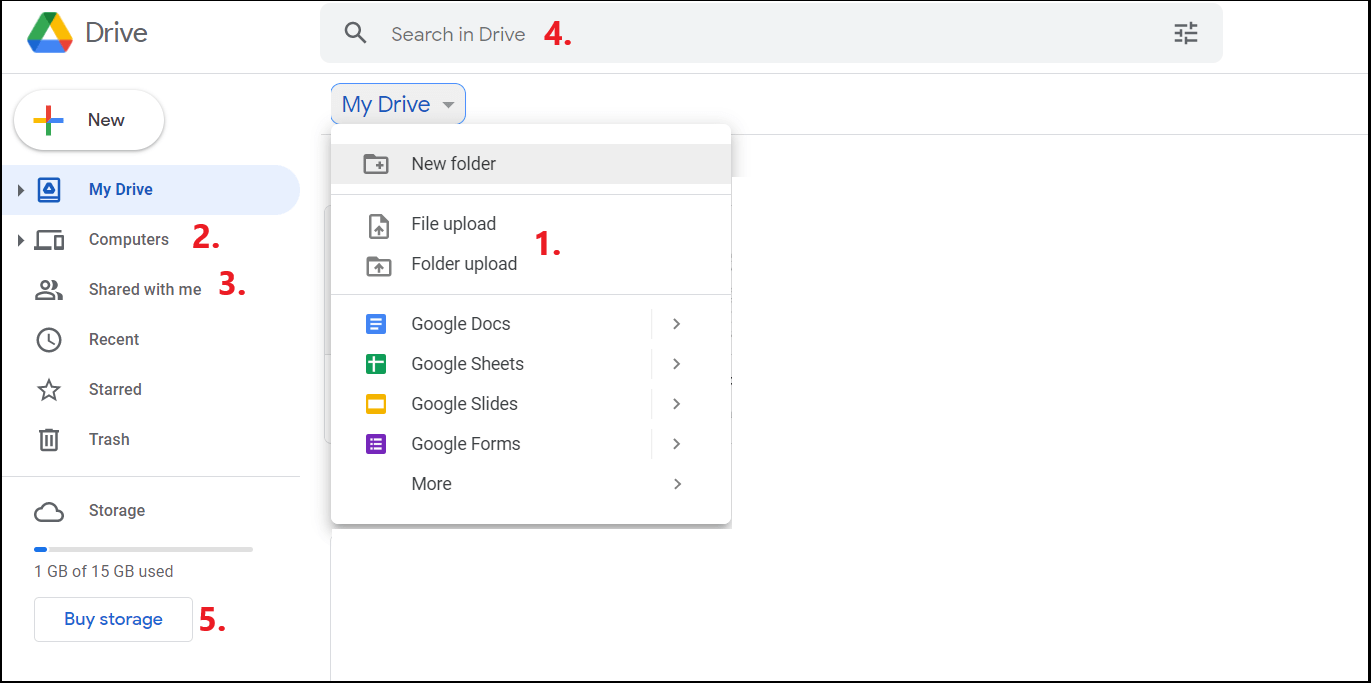
- You’ll be taken to the Google Drive dashboard, where you can view all of your stored files.
Using Google Drive
Google Drive offers a range of features that make it easy to use and share files online.
- Uploading Files: To upload files to Google Drive, simply click on the “New” button and select the file you want to upload.
- Sharing Files: To share files with others, click on the “Share” button next to the file you want to share.
- Collaborating on Documents: Google Drive allows you to collaborate on documents in real-time. Simply invite others to edit your document and they’ll be able to make changes simultaneously.
Google Drive Features
Google Drive offers a range of features that make it a powerful tool for storing and sharing files online.
- File Sharing: Share files with others, either by sending them an email or by granting them access to the file.
- Collaboration: Collaborate on documents in real-time, making it easy to work with others on projects.
- File Backup: Automatically backup your files to Google Drive, ensuring that they’re safe and secure.
- File Sharing: Share files publicly or privately, depending on your needs.
Google Drive on Mobile Devices
Google Drive can be accessed on mobile devices, including Android and iOS smartphones and tablets.
- Android App: Download the Google Drive app from the Google Play Store to access Google Drive on your Android device.
- Ios App: Download the Google Drive app from the App Store to access Google Drive on your iOS device.
- Web Access: You can also access Google Drive online, using any web browser.
Google Drive For PC
Google Drive can be accessed on desktop computers, including Windows and Mac devices.
- Desktop App: Download the Google Drive desktop app to access Google Drive on your PC.
- Web Access: You can also access Google Drive online, using any web browser.
Conclusion
Google Drive is a powerful tool that offers a range of features for storing and sharing files online. With its easy-to-use interface and collaborative capabilities, it’s the perfect solution for individuals and businesses alike.
Faqs
- What is Google Drive?
Google Drive is a cloud storage service provided by Google. - How do I Create an Account?
To create an account, visit the Google website and click on the “Create account” button. - How do I Access Google Drive?
You can access Google Drive online, using any web browser or by downloading the Google Drive app on your mobile device. - What Features Does Google Drive Offer?
Google Drive offers a range of features, including file sharing, collaboration, file backup, and more. - Can I Use Google Drive on my Mobile Device?
Yes, you can access Google Drive on your mobile device using the Google Drive app for Android or iOS. - Can I Use Google Drive on my Pc?
Yes, you can access Google Drive on your desktop computer using the Google Drive desktop app or by accessing it online through any web browser. - How do I Share Files With Others?
To share files with others, click on the “Share” button next to the file you want to share and enter their email address. - Can I Collaborate on Documents in Real-time?
Yes, Google Drive allows you to collaborate on documents in real-time, making it easy to work with others on projects.
Conclusion
In conclusion, Google Drive is a powerful tool that offers a range of features for storing and sharing files online. With its easy-to-use interface and collaborative capabilities, it’s the perfect solution for individuals and businesses alike.


