
Google My Business: Unlocking Your Online Presence
Are you a small business owner looking to increase your online visibility? Do you want to reach new customers and grow your business? Look no further than Google My Business, a free service that can help you achieve just that.
What is Google My Business?
Google My Business is a platform that allows you to manage your online presence across Google’s services, including Google Search and Google Maps. By creating a profile on Google My Business, you can provide accurate and up-to-date information about your business, including its address, hours of operation, and contact details.
Why Use Google My Business?
There are many benefits to using Google My Business, including:
- Increased Online Visibility: By creating a profile on Google My Business, you can increase your chances of being found by potential customers searching for businesses like yours.
- Improved Local Search Rankings: Google My Business profiles are given preference in local search results, making it easier for people to find your business when they’re searching for products or services in your area.
- Better Customer Engagement: By responding to reviews and messages on Google My Business, you can engage with potential customers and build trust and loyalty with existing ones.
How to Create a Google My Business Profile
Creating a profile on Google My Business is easy. Here’s a step-by-step guide:
- Create a Google Account: If you don’t already have a Google account, create one by signing up at google.Com.
- Access The Google My Business Dashboard: Sign in to your Google account and navigate to the Google My Business dashboard.
- Add Your Business: Click on the “Add your business” button and follow the prompts to enter your business’s details, including its name, address, and contact information.
- Verify Your Business: Google will send you a postcard with a verification code that you’ll need to enter into your dashboard to complete the verification process.
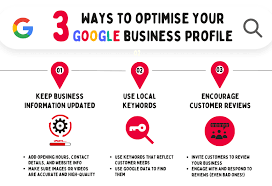
Tips For Optimizing Your Google My Business Profile
Here are some tips for optimizing your Google My Business profile:
- Use Accurate And Up-to-date Information: Make sure your business’s details, including its address and hours of operation, are accurate and up-to-date.
- Respond to Reviews And Messages: Engage with potential customers by responding to reviews and messages on Google My Business.
- Use High-quality Photos: Add high-quality photos of your business’s exterior and interior to give customers a sense of what they can expect when visiting you.
Managing Your Google My Business Profile
Once you’ve created a profile on Google My Business, you’ll need to manage it regularly to ensure that it remains accurate and up-to-date. Here are some tips for managing your profile:
- Regularly Update Your Business’s Details: Make sure your business’s details, including its address and hours of operation, are accurate and up-to-date.
- Respond to Reviews And Messages: Engage with potential customers by responding to reviews and messages on Google My Business.
- Monitor Your Online Reputation: Keep an eye on what people are saying about your business online and respond promptly to any negative feedback.
Conclusion
Google My Business is a powerful tool that can help you increase your online visibility, improve local search rankings, and engage with potential customers. By following the tips outlined in this article, you can optimize your profile and manage it effectively to achieve these benefits and grow your business.
Frequently Asked Questions (FAQs)
- What is Google My Business?
Google My Business is a free service that allows businesses to create profiles on Google Search and Google Maps, providing accurate and up-to-date information about their business.
- Why Use Google My Business?
Using Google My Business can increase your online visibility, improve local search rankings, and engage with potential customers by responding to reviews and messages.
- How do I Create a Profile on Google My Business?
To create a profile on Google My Business, you’ll need to create a Google account and access the Google My Business dashboard. From there, follow the prompts to add your business’s details and verify it through a postcard with a verification code.
- What Are The Benefits of Using Google My Business?
The benefits of using Google My Business include increased online visibility, improved local search rankings, and better customer engagement by responding to reviews and messages.
- How do I Respond to Reviews on Google My Business?
To respond to reviews on Google My Business, sign in to your dashboard and navigate to the “Reviews” section. From there, find the review you want to respond to and click on the “Respond” button.
- Can I Use Google My Business if my Business Doesn’t Have a Physical Location?
Yes, you can still use Google My Business even if your business doesn’t have a physical location. You’ll need to verify your business through other means, such as using a phone number or email address.
- How do I Manage my Google My Business Profile Regularly?
To manage your Google My Business profile regularly, make sure to update your business’s details, respond to reviews and messages, and monitor your online reputation by keeping an eye on what people are saying about your business online.
- What if I Have Multiple Locations For my Business?
If you have multiple locations for your business, you can create separate profiles for each location on Google My Business.


