
Google Wallet: The Evolution of Electronic Payments
In a world where technology is rapidly evolving, digital payments have become an essential part of our daily lives. One such innovation is Google Wallet, previously known as Google Pay, which has revolutionized the way we make transactions online and offline. In this article, we will delve into the world of Google Wallet, exploring its features, benefits, and how to use it on various devices.
What is Google Wallet?
Google Wallet is a digital wallet service that allows users to store their payment cards, tickets, passes, and other rewards in one place. It’s an evolution of Google Pay, which was first introduced in 2015 as Android Pay. In 2017, Google merged Android Pay with its existing Wallet service to create Google Pay, later rebranded as Google Wallet.
How Does Google Wallet Work?
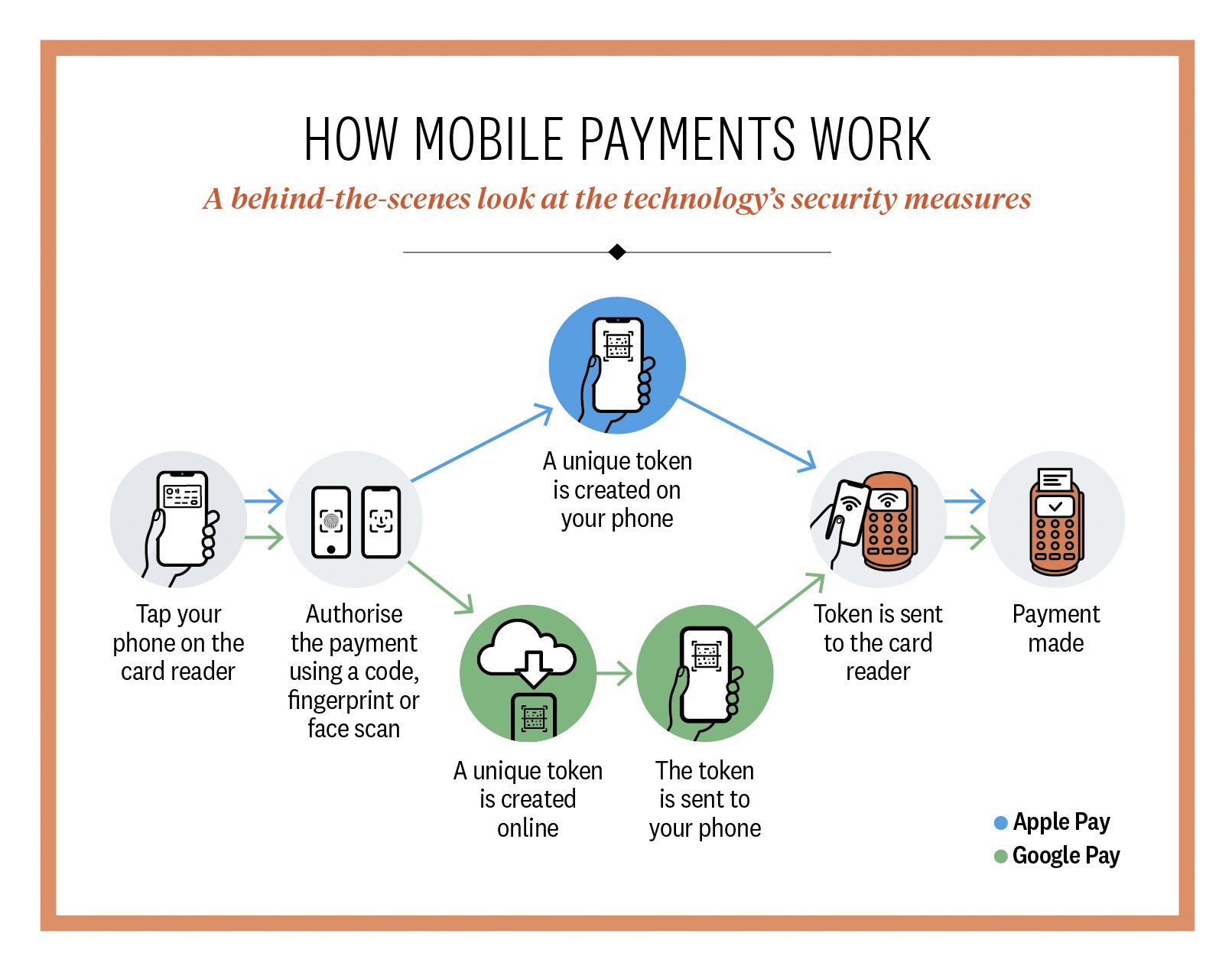
Google Wallet uses a system of cryptography, based on HTTPS and TLS, to ensure the security of your payment data. When you make a transaction using Google Wallet, the app communicates with the merchant’s point-of-sale (POS) terminal via near-field communication (NFC). This technology enables contactless payments without the need for physical card insertion.
Requirements For Using Google Wallet
To use Google Wallet, you’ll need:
- A compatible device with Android 5.0 Or higher and NFC support.
- A valid payment card (credit, debit, or prepaid) from a supported bank.
- A Google account associated with your device.
- The Google Wallet app installed on your device.
Using Google Wallet on Android Devices
To set up Google Wallet on an Android device:
- Download the Google Wallet app from the Play Store.
- Open the app and link it to your Google account.
- Add a payment card by tapping on “Add a card” and following the prompts.
- Configure your NFC settings to enable contactless payments.
Using Google Wallet on Iphone Devices
Unfortunately, Google Wallet is not available on iOS devices in Italy. However, Apple has its own wallet service, Apple Wallet, which offers similar functionality.
Using Google Wallet on Computer
You can also use Google Wallet online by accessing the Google Payments Centre website and logging in with your Google account. Follow the prompts to add a payment card or other forms of payment.
Using Google Wallet in Physical Stores
To make payments using Google Wallet in physical stores:
- Ensure your device supports NFC.
- Approach the POS terminal with your device enabled for NFC.
- Authenticate the transaction by following the on-screen instructions.
Banks And Partners Supported by Google Wallet
Google Wallet partners with various banks to support payment cards from these institutions. Check the official Google Wallet website for a list of supported banks and cards.
Alternatives to Google Wallet
If you don’t have a compatible device or prefer alternative options, consider:
- HYPE: A digital wallet service that integrates with Google Pay.
- Revolut: A digital bank account that offers contactless payments.
Conclusion
Google Wallet has revolutionized the way we make transactions online and offline. With its user-friendly interface, contactless payments, and support for various payment cards, it’s an essential tool for anyone looking to upgrade their digital wallet experience. Whether you’re using a smartphone or computer, Google Wallet makes it easy to manage your payments and rewards in one place.
Frequently Asked Questions (FAQs)
- Q: What is The Difference Between Google Wallet And Google Pay?
A: Google Wallet is an evolution of Google Pay, which was first introduced as Android Pay. - Q: Do I Need a Compatible Device to Use Google Wallet?
A: Yes, you’ll need a device with NFC support and Android 5.0 Or higher. - Q: Can I Use Google Wallet on my Iphone?
A: Unfortunately, Google Wallet is not available on iOS devices in Italy, but Apple has its own wallet service, Apple Wallet. - Q: How do I Add a Payment Card to Google Wallet?
A: Tap on “Add a card” within the app and follow the prompts. - Q: Is Google Wallet Secure?
A: Yes, Google Wallet uses cryptography based on HTTPS and TLS for secure transactions. - Q: Can I Use Google Wallet Online or Only in Physical Stores?
A: Both! You can make payments using Google Wallet online through the Google Payments Centre website or in physical stores via NFC contactless payments. - Q: What if I Don’t Have a Supported Bank Card?
A: Consider alternative digital wallets like HYPE or Revolut. - Q: Can I Save Tickets, Passes, And Rewards in Google Wallet?
A: Yes! You can store these items alongside your payment cards for easy access.
Remember to stay up-to-date with the latest developments on Google Wallet by visiting their official website or checking this article for any updates. Happy shopping and transactions!


