
How I Edit My Videos: A Step-by-step Guide
Are you tired of having imperfect videos that you can’t share with your friends? Do you want to learn how to edit your videos like a pro? Look no further! In this article, we will guide you through the process of editing your videos on both computer and smartphone.
Why Edit My Videos?
Editing your videos is an essential step in making them look professional and engaging. By removing unwanted parts, adding transitions, and enhancing audio quality, you can create a video that showcases your creativity and personality.
Choosing The Right Software
There are many video editing software options available for both computer and smartphone users. Here are some of the most popular ones:
For Computer Users:
- Avidemux: A free, open-source video editor that’s perfect for beginners.
- Davinci Resolve: A professional-level video editor that’s free to use and offers advanced features.
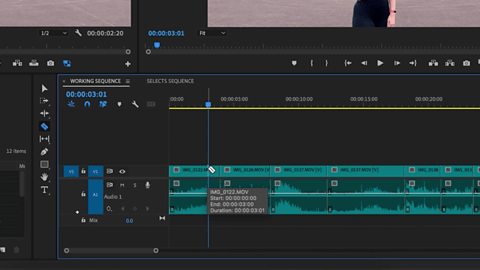
- Adobe Premiere Pro: A commercial software that’s widely used in the industry and offers a wide range of features.
For Smartphone Users:
- Kinemaster: A popular video editing app for Android and iOS devices that offers a wide range of features.
- Imovie: A free video editing app developed by Apple that’s perfect for beginners.
How to Edit My Videos on Computer
To edit your videos on computer, you’ll need to download the software of your choice and follow these steps:
- Download the software from the official website or App Store.
- Install the software on your computer.
- Import the video you want to edit into the software.
- Use the software’s tools to trim, cut, and enhance the video.
- Export the edited video in the desired format.
How to Edit My Videos on Smartphone
To edit your videos on smartphone, you’ll need to download the app of your choice and follow these steps:
- Download the app from the App Store or Google Play Store.
- Install the app on your smartphone.
- Import the video you want to edit into the app.
- Use the app’s tools to trim, cut, and enhance the video.
- Export the edited video in the desired format.
Tips And Tricks:
- Use High-quality Footage: The quality of your footage will directly affect the final outcome of your edited video. Make sure to use high-quality footage that’s clear and well-lit.
- Keep it Simple: Don’t overcomplicate your edit. Keep it simple and focus on the main message you want to convey.
- Use Transitions: Transitions can help to create a smooth flow between different scenes or clips in your video.
Conclusion:
Editing your videos is an essential step in making them look professional and engaging. By choosing the right software and following these steps, you can create a video that showcases your creativity and personality. Remember to keep it simple, use high-quality footage, and experiment with transitions to create a unique style.
Frequently Asked Questions:
- What is The Best Video Editing Software For Beginners?
- Avidemux is a great option for beginners as it’s free, easy to use, and offers a wide range of features.
- How do I Edit Videos on my Smartphone?
- You can edit videos on your smartphone using apps like KineMaster or iMovie.
- What Are The Most Important Tips For Editing Videos?
- Keep it simple, use high-quality footage, and experiment with transitions to create a unique style.
References:
- Avidemux official website
- DaVinci Resolve official website
- Adobe Premiere Pro official website
- KineMaster official app page
- IMovie official app page


