
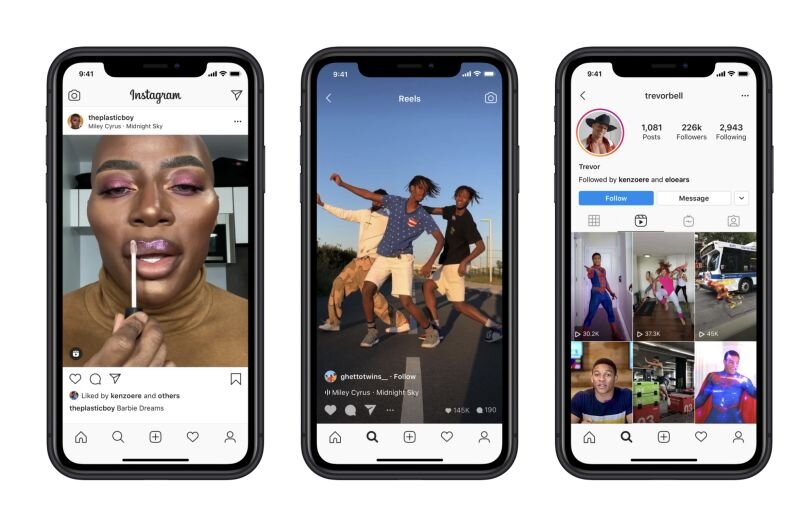
What is Instagram Reels?
Instagram Reels is a feature introduced by Instagram in August 2020 that allows users to create, modify, and publish short videos on the social media platform. These videos can be up to 90 seconds long and can include music, filters, effects, and more.
How Do I Create an Instagram Reel?
To create an Instagram Reel, follow these steps:
- Open the Instagram app on your smartphone.
- Tap on the “+” icon in the bottom-right corner of the screen.
- Select “Reel” from the menu.
- Choose to record a video using the camera, use one of the pre-recorded options, or select an existing video from your gallery.
- Add music, filters, and effects to your video as desired.
- Adjust the duration of your Reel to be between 15 seconds and 90 seconds.
- Tap on the “Share” button to post your Reel.
How Do I Issue a Reel?
To issue a Reel, follow these steps:
- Open the Instagram app on your smartphone or computer.
- Go to the “Reels” section of your profile.
- Select the Reel you want to issue.
- Tap on the “Share” button.
- Choose who you want to share the Reel with (e.G., Followers, friends, public).
- Add a caption and hashtags as desired.
- Post the Reel.
How Do I See Instagram Reels?
To see Instagram Reels, follow these steps:
- Open the Instagram app on your smartphone or computer.
- Go to the “Reels” section of any user’s profile.
- Tap on the “Reels” icon (a camera) in the bottom-right corner of the screen.
- Select a Reel to view.
What is The Difference Between Instagram Reels And Igtv?
Instagram Reels are short videos up to 90 seconds long, while IGTV allows users to upload longer-form content up to 60 minutes. Reels are designed for a more casual, snackable experience, while IGTV is better suited for more in-depth or educational content.
How Do I Use Instagram Reels For Business?
Instagram Reels can be used by businesses to showcase their products or services, share company news and updates, or engage with customers. To use Reels for business, follow these steps:
- Create a business account on Instagram.
- Use the “Reels” feature to create short videos showcasing your product or service.
- Add music, filters, and effects as desired.
- Share your Reel with your followers.
- Engage with customers by responding to comments and messages.
How Do I Get Started With Instagram Reels?
To get started with Instagram Reels, follow these steps:
- Open the Instagram app on your smartphone or computer.
- Tap on the “+” icon in the bottom-right corner of the screen.
- Select “Reel” from the menu.
- Follow the prompts to create and issue a Reel.
What Are The Benefits of Using Instagram Reels?
The benefits of using Instagram Reels include:
- Increased engagement with your followers
- Improved brand awareness
- Ability to showcase products or services in a visually appealing way
- Opportunity to reach a wider audience
Conclusion:
Instagram Reels is a powerful feature that can help businesses and individuals engage with their audience, increase brand awareness, and showcase products or services in a visually appealing way. By following the steps outlined above, you can get started with Instagram Reels today.
Frequently Asked Questions (FAQs):
- What is Instagram Reels?
Instagram Reels is a feature that allows users to create, modify, and publish short videos on the social media platform. - How do I Create an Instagram Reel?
To create an Instagram Reel, follow these steps: Open the app, tap on the “+” icon, select “Reel”, choose a recording option, add music and effects as desired, adjust the duration, and share the Reel. - How do I Issue a Reel?
To issue a Reel, follow these steps: Go to the “Reels” section of your profile, select the Reel you want to issue, tap on the “Share” button, choose who to share with, add a caption and hashtags as desired, and post the Reel. - How do I See Instagram Reels?
To see Instagram Reels, follow these steps: Open the app, go to the “Reels” section of any user’s profile, tap on the “Reels” icon in the bottom-right corner of the screen, and select a Reel to view. - What is The Difference Between Instagram Reels And Igtv?
Instagram Reels are short videos up to 90 seconds long, while IGTV allows users to upload longer-form content up to 60 minutes. - How do I Use Instagram Reels For Business?
To use Instagram Reels for business, follow these steps: Create a business account on Instagram, use the “Reels” feature to create short videos showcasing your product or service, add music and effects as desired, share the Reel with your followers, and engage with customers by responding to comments and messages. - How do I Get Started With Instagram Reels?
To get started with Instagram Reels, follow these steps: Open the app, tap on the “+” icon in the bottom-right corner of the screen, select “Reel” from the menu, and follow the prompts to create and issue a Reel. - What Are The Benefits of Using Instagram Reels?
The benefits of using Instagram Reels include increased engagement with your followers, improved brand awareness, ability to showcase products or services in a visually appealing way, and opportunity to reach a wider audience.
Conclusion:
Instagram Reels is a powerful feature that can help businesses and individuals engage with their audience, increase brand awareness, and showcase products or services in a visually appealing way. By following the steps outlined above, you can get started with Instagram Reels today.


