
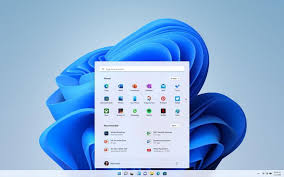
Windows 11: A Comprehensive Guide
Are you among the many users hesitant to update to Windows 11? Do you want to know what’s new, what’s improved, and what’s changed in this latest operating system release? Look no further! In this article, we’ll take a detailed look at the requirements, features, and functionality of Windows 11.
System Requirements
Before we dive into the juicy stuff, let’s get the basics out of the way. To run Windows 11, your PC must meet certain minimum requirements:
- Processor: At least 1 GHz, 2 or more cores with 64-bit compatibility
- RAM: Not less than 4 GB
- Storage: At least 64 GB available on disk
- Graphics: Compatible with DirectX 12 or later and WDDM 2.0 Driver
- Firmware: UEFI-compatible, Secure Boot-enabled, and Trusted Platform Module (TPM) version 2.0
Versions And Prices
Windows 11 comes in two main versions:
- Home Edition: Designed for personal use, this version is ideal for home users or those who don’t need advanced features.
- Pro Edition: Targeted at businesses and organizations, this version offers more advanced features, such as assigned access, dynamic provisioning, and Azure enterprise roaming.
The prices for these versions are:
- Windows 11 Home: €145
- Windows 11 Pro: €259
Downloading And Installing Windows 11
If your PC meets the requirements, you can download and install Windows 11 directly from Microsoft’s website. The process is relatively straightforward and can be completed in a short amount of time.
What’s New in Windows 11
So, what’s new and exciting in Windows 11? Here are some of the key features:
- New Start Menu: A revised menu that combines live tiles with traditional app icons.
- Taskbar Overflow: A feature that allows you to view multiple applications on the taskbar when there isn’t enough space.
- Widgets: A new way to interact with information, such as news and weather updates, directly from the desktop.
The Bar of Applications
One of the most notable changes in Windows 11 is the revamped bar of applications. This feature allows you to quickly access frequently used apps and files, making it easier to get work done.
- Adding And Removing Apps: You can add or remove apps from this bar by clicking on them with your right mouse button.
- Customizing The Bar: You can also customize the bar by dragging and dropping applications into the desired order.
The Start Menu
The Start menu has undergone significant changes in Windows 11. It now features a more modern design, making it easier to find and launch apps.
- Quick Access: The Start menu provides quick access to frequently used apps, files, and documents.
- Customizing The Menu: You can also customize the menu by adding or removing shortcuts, as well as changing its size and position.
Searching in Windows 11
Windows 11 introduces a new search function that allows you to quickly find and launch applications, documents, and other files.
- Improved Search Results: The search results are now more accurate and relevant, making it easier to find what you’re looking for.
- Refining Search Results: You can also refine your search results by selecting specific categories or types of files.
Novelties For Gamers
Windows 11 offers several novelties that cater specifically to gamers:
- Hdr Mode: A feature that enhances colors and provides a more immersive gaming experience.
- Directstorage: A technology that reduces loading times and provides smoother gameplay.
- Integration With Xbox: Windows 11 now integrates better with Xbox, allowing for seamless streaming and playability.
What’s Missing in Windows 11
While Windows 11 offers many exciting features, some users might feel a sense of loss. Here are some of the things that have been removed or discontinued:
- Cortana: The digital assistant has been replaced by other features.
- Tablet Mode: This feature is no longer available in Windows 11.
- Internet Explorer: Internet Explorer has been replaced by Microsoft Edge.
Conclusion
Windows 11 offers many exciting features and improvements, making it a compelling choice for users looking to upgrade their operating system. With its revised Start menu, revamped bar of applications, and improved search function, Windows 11 is definitely worth considering.
Frequently Asked Questions (FAQs)
- Q: What Are The Minimum Requirements For Running Windows 11?
A: The minimum requirements include a processor with at least 1 GHz, 2 or more cores with 64-bit compatibility, not less than 4 GB of RAM, and at least 64 GB available on disk. - Q: How Much Does Windows 11 Cost?
A: The prices for Windows 11 Home and Pro are €145 and €259 respectively. - Q: Can I Download And Install Windows 11 Manually?
A: Yes, you can download and install Windows 11 directly from Microsoft’s website if your PC meets the requirements. - Q: What’s New in Windows 11?
A: Some of the key features include a revised Start menu, taskbar overflow, widgets, and improved search functionality. - Q: Is Cortana Still Available in Windows 11?
A: No, Cortana has been replaced by other features in Windows 11. - Q: Can I Use Internet Explorer in Windows 11?
A: No, Internet Explorer has been replaced by Microsoft Edge in Windows 11. - Q: What’s The Difference Between Windows 11 Home And Pro?
A: The main differences are that Windows 11 Pro offers advanced features such as assigned access, dynamic provisioning, and Azure enterprise roaming. - Q: Can I Update to Windows 11 From an Older Version of Windows?
A: Yes, you can update to Windows 11 from an older version of Windows if your PC meets the requirements.


