
How to Stop Unwanted Tagging on Instagram: A Step-by-step Guide
Are you tired of being tagged in unwanted posts or stories on Instagram? Do you want to regain control over your online presence and prevent spam from flooding your notifications? You’re not alone! In this article, we’ll show you how to stop unwanted tagging on Instagram using both the app and the website.
Why Unwanted Tagging is a Problem
Unwanted tagging can be frustrating and annoying, especially when it’s done by spammers or bots. Not only does it clog up your notifications, but it also makes your profile look less professional and organized. Moreover, if you’re not careful, unwanted tagging can lead to spammy content being posted on your account, which can damage your reputation and credibility.
How to Stop Unwanted Tagging on Instagram (App)
If you’re using the Instagram app on your smartphone or tablet, here’s how to stop unwanted tagging:
- Open The Instagram App: Launch the Instagram app on your device.
- Go to Your Profile: Tap on your profile picture in the bottom-right corner of the screen.
- Tap on The Three Horizontal Lines: In the top-right corner of the screen, tap on the three horizontal lines (≡).
- Select Settings And Privacy: From the menu that appears, select “Settings and Privacy.”
- Choose Tag And Mention: Scroll down to the “Tag and Mention” section.
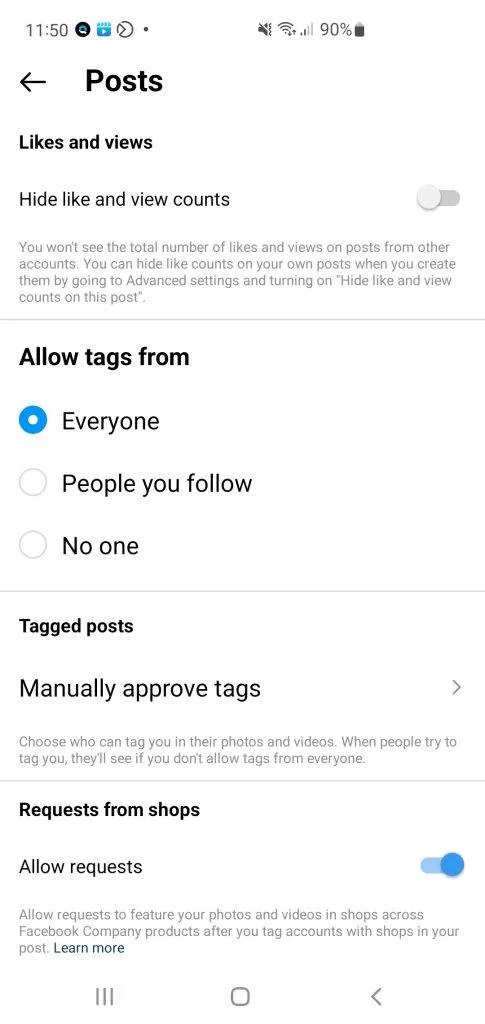
- Select Your Preference: Choose from the following options:
- Consent to being tagged by people you follow (this will allow people who follow you to tag you in their posts).
- Consent to being tagged by anyone (this will allow anyone, including spammers, to tag you in their posts).
- Do not consent to being tagged (this will prevent anyone from tagging you in their posts).
How to Stop Unwanted Tagging on Instagram (Website)
If you’re using the Instagram website on your computer or laptop, here’s how to stop unwanted tagging:
- Open The Instagram Website: Go to instagram.Com and log in to your account.
- Click on Your Profile Picture: Click on your profile picture in the top-right corner of the screen.
- Select Settings: From the dropdown menu that appears, select “Settings.”
- Choose Tag And Mention: Scroll down to the “Tag and Mention” section.
- Select Your Preference: Choose from the following options:
- Consent to being tagged by people you follow (this will allow people who follow you to tag you in their posts).
- Consent to being tagged by anyone (this will allow anyone, including spammers, to tag you in their posts).
- Do not consent to being tagged (this will prevent anyone from tagging you in their posts).
How to Stop Unwanted Tagging on Instagram Stories
If you’re concerned about unwanted tagging in your Instagram stories, here’s how to stop it:
- Open The Instagram App: Launch the Instagram app on your device.
- Go to Your Profile: Tap on your profile picture in the bottom-right corner of the screen.
- Tap on The Three Horizontal Lines: In the top-right corner of the screen, tap on the three horizontal lines (≡).
- Select Settings And Privacy: From the menu that appears, select “Settings and Privacy.”
- Choose Tag And Mention: Scroll down to the “Tag and Mention” section.
- Select Your Preference: Choose from the following options:
- Consent to being tagged by people you follow (this will allow people who follow you to tag you in their stories).
- Do not consent to being tagged (this will prevent anyone from tagging you in your stories).
How to Stop Unwanted Tagging on Instagram Comments
If you’re concerned about unwanted tagging in the comments section of your posts, here’s how to stop it:
- Open The Instagram App: Launch the Instagram app on your device.
- Go to Your Profile: Tap on your profile picture in the bottom-right corner of the screen.
- Tap on The Three Horizontal Lines: In the top-right corner of the screen, tap on the three horizontal lines (≡).
- Select Settings And Privacy: From the menu that appears, select “Settings and Privacy.”
- Choose Tag And Mention: Scroll down to the “Tag and Mention” section.
- Select Your Preference: Choose from the following options:
- Consent to being tagged by people you follow (this will allow people who follow you to tag you in their comments).
- Do not consent to being tagged (this will prevent anyone from tagging you in your comments).
Conclusion
Stopping unwanted tagging on Instagram is a straightforward process that can be completed using both the app and the website. By following these steps, you’ll be able to regain control over your online presence and prevent spam from flooding your notifications. Remember to always check your settings periodically to ensure that your preferences are still in place.


