
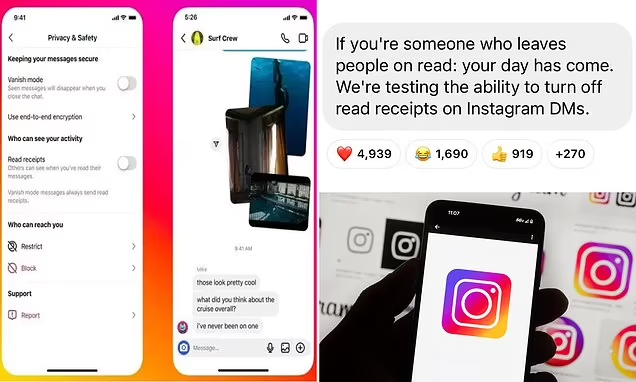
How to Not Get Messages on Instagram Without Blocking: A Step-by-step Guide
Are you tired of being bombarded with messages on Instagram, but don’t want to block your friends or followers? Look no further! In this article, we’ll show you how to not get messages on Instagram without blocking, using various methods and settings that will help you filter out unwanted messages.
Why Do I Get So Many Messages on Instagram?
Before we dive into the solutions, let’s take a look at why you might be getting so many messages on Instagram in the first place. Here are some possible reasons:
- You have a large number of followers or friends
- You’ve participated in conversations or groups that have attracted unwanted attention
- You’ve posted content that has sparked discussions or debates
Method 1: Using Request Filters to Not Get Messages on Instagram
One way to not get messages on Instagram without blocking is by using request filters. This feature allows you to filter out messages from specific users or categories, so they don’t appear in your main message inbox.
Here’s how to use request filters:
- Access The Settings And Privacy Section of Instagram
- Select Messages And Answers to The Histories
- Choose Controls For The Messages
On mobile devices, follow these steps:
- Open Instagram and go to your profile
- Tap the three horizontal lines (⋮) at the top-right corner
- Select Settings and privacy
- Scroll down to Messages and answers to the histories
- Choose Controls for the messages
On desktop computers, follow these steps:
- Go to the Instagram website
- Click on the three horizontal dots at the top-right corner
- Select Settings
- Scroll down to Messages and answers to the histories
- Choose Controls for the messages
Method 2: Adding Accounts to Restricted Lists
Another way to not get messages on Instagram without blocking is by adding accounts to restricted lists. This feature allows you to limit interactions with specific users, either temporarily or permanently.
Here’s how to add accounts to restricted lists:
- Search For The Account you want to restrict
- Select The Three Horizontal Lines (⋮) at the top-right corner
- Choose Apply Restrictions
This will temporarily block messages and comments from that account.
Method 3: Limiting Interactions on Instagram
If you want to limit interactions with specific users, you can use the “Interactions limited” feature. This allows you to restrict interactions (including messaging) with certain accounts for a set period of time.
Here’s how to limit interactions:
- Go to Settings And Privacy
- Select Interactions Limited
- Choose Who You Want to Limit Interactions With (e.G., Non-followers, recent followers)
- Set The Duration of The Limitation (e.G., A week)
Additional Tips For Not Getting Messages on Instagram
While these methods can help filter out unwanted messages, here are some additional tips to keep in mind:
- Be Cautious When Posting Content that may attract attention or spark discussions
- Use Hashtags Strategically, especially if you’re trying to reach specific audiences
- Consider Blocking Accounts that consistently send unwanted messages or engage in harassment
Conclusion
Not getting messages on Instagram without blocking is achievable using various methods and settings. By employing request filters, adding accounts to restricted lists, limiting interactions, and being mindful of your online presence, you can enjoy a more peaceful experience on the platform.
Remember, these tips are meant to help you manage unwanted messages, not suppress constructive conversations or connections with friends and followers who genuinely care about you!
Best Hashtags For Art
If you’re an artist looking to showcase your work on Instagram, here are some popular hashtags to consider:
-
Artist
-
Paint
-
Pencil
-
Doodle
-
Drawing
-
Illustration
-
Artwork
-
Design
-
Painting
-
Draw
-
Sketch
-
Streetart
-
Ink
Additional Tips For Artists
As an artist, you may want to consider using more specific hashtags that reflect your style or medium. Here are some additional tips:
- Use a Mix of Niche And Broad Hashtags, to reach both local and global audiences
- Consider Creating a Branded Hashtag for your art studio or business
- Engage With Other Artists and share their work, to build relationships and grow your audience
Best Hashtags For Outdoors
If you’re an outdoors enthusiast looking to showcase your adventures on Instagram, here are some popular hashtags to consider:
-
Ocean
-
Water
-
Sand
-
Seaside
-
Sea
-
Waves
-
Island
-
Boat
-
Surf
-
Wave
-
Coast
-
Beachlife
Additional Tips For Outdoors Enthusiasts
As an outdoors enthusiast, you may want to consider using more specific hashtags that reflect your interests or activities. Here are some additional tips:
- Use a Mix of Niche And Broad Hashtags, to reach both local and global audiences
- Consider Creating a Branded Hashtag for your outdoor adventures
- Engage With Other Outdoors Enthusiasts and share their work, to build relationships and grow your audience


