
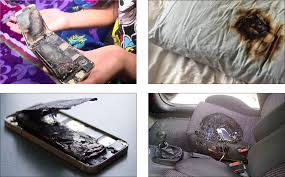
Avoiding Battery Damage: Tips And Tricks For Iphone Users
As an iPhone user, you want to ensure that your device remains in top condition, especially when it comes to its battery life. A damaged battery can lead to reduced performance, shortened lifespan, and even costly repairs. In this article, we’ll provide you with valuable tips and tricks on how to avoid damaging the battery of your iPhone.
Why is Battery Damage a Concern?
Battery damage is a common issue that affects many iPhone users. When the battery is not used or charged properly, it can lead to premature aging, reduced capacity, and even complete failure. This can result in costly repairs or even render your device unusable.
Tip 1: Avoid Leaving Your Iphone Connected For Too Long
One of the most common mistakes iPhone users make is leaving their device connected to a charger for too long. Even when your iPhone has reached its maximum charge capacity, it’s still essential to unplug it from the charger to prevent overheating and battery degradation.
Tip 2: Don’t Leave Your Iphone in Extreme Temperatures
Extreme temperatures can also affect the health of your iPhone’s battery. Avoid leaving your device near a heat source, such as a stove or oven, or in freezing cold environments. The ideal temperature range for optimal battery performance is between 16°C and 22°C.
Tip 3: Use a Power Bank or Car Charger
If you’re going to be away from a power source for an extended period, consider using a portable power bank or car charger to keep your iPhone charged. This can help prevent the battery from draining completely, which can lead to damage.
Tip 4: Monitor Your Battery’s State of Health
Regularly monitoring your battery’s state of health can help you identify any potential issues before they become major problems. To do this, go to Settings > Battery and look for any signs of unusual behavior or degradation.
Tip 5: Update Your Ios Regularly
Keeping your iPhone up-to-date with the latest version of iOS is crucial for maintaining optimal battery performance. Updates often include energy-saving features and bug fixes that can help prolong the life of your battery.
How to Monitor Your Battery’s State
To monitor your battery’s state, follow these simple steps:
- Go to Settings > Battery.
- Tap on the “Battery Health” option.
- Look for any signs of degradation or unusual behavior.
When to Replace Your Iphone’s Battery
If you’ve noticed significant degradation in your iPhone’s battery health or performance, it may be time to consider replacing it. Contact Apple or an authorized service provider to determine the best course of action.
Conclusion
Taking care of your iPhone’s battery is essential for maintaining optimal performance and prolonging its lifespan. By following these simple tips and tricks, you can avoid damaging your device’s battery and ensure that it remains in top condition for years to come.
Frequently Asked Questions (FAQs)
- Q: How Often Should I Charge my Iphone?
A: It’s recommended to charge your iPhone when the battery level falls below 20%. - Q: Can I Use a Third-party Charger With my Iphone?
A: Yes, but ensure that it meets Apple’s MFi (Made for iPhone) certification standards. - Q: What Should I do if my Iphone’s Battery is Damaged?
A: Contact Apple or an authorized service provider to determine the best course of action. - Q: Can I Use a Power Bank or Car Charger With my Iphone?
A: Yes, but ensure that it meets Apple’s MFi certification standards. - Q: How Can I Prevent Battery Degradation on my Iphone?
A: Regularly update your iOS, avoid extreme temperatures, and monitor your battery’s state of health. - Q: Can I Replace The Battery in my Iphone Myself?
A: It’s not recommended to attempt a DIY repair, as it can cause further damage or harm your device. - Q: What is The Ideal Temperature Range For Optimal Battery Performance?
A: The ideal temperature range is between 16°C and 22°C.
Additional Resources
For more information on iPhone battery care and maintenance, consult Apple’s official resources:


