
How to Stop Sharing Instagram Stories on Facebook: A Step-by-step Guide
Are you tired of your Instagram stories being shared automatically on Facebook? Do you want to maintain some level of control over what appears on your social media profiles? Look no further! In this article, we’ll show you how to stop sharing your Instagram stories on Facebook.
Why Would You Want to Stop Sharing Instagram Stories on Facebook?
While having a connected account between Instagram and Facebook can be convenient, there are times when you might want to share certain content only on one platform. Perhaps you’re not comfortable with the idea of your friends seeing your Instagram stories on Facebook, or maybe you just prefer to keep your online presence separate.
How to Stop Sharing Instagram Stories on Facebook From Your Smartphone or Tablet
To stop sharing your Instagram stories on Facebook using your smartphone or tablet, follow these simple steps:
- Open The Instagram App: Find the Instagram icon on your device and tap on it.
- Tap on The Profile Picture: This will take you to your profile page.
- Tap on The Three Horizontal Lines: Located in the top-right corner of the screen, this will open up a menu.
- Select Settings And Privacy: From here, choose “Settings and privacy” to access your account settings.
- Manage Account: Tap on “Account” to view your account management options.
- Share on Several Profiles: Select “Share on several profiles” from the menu.
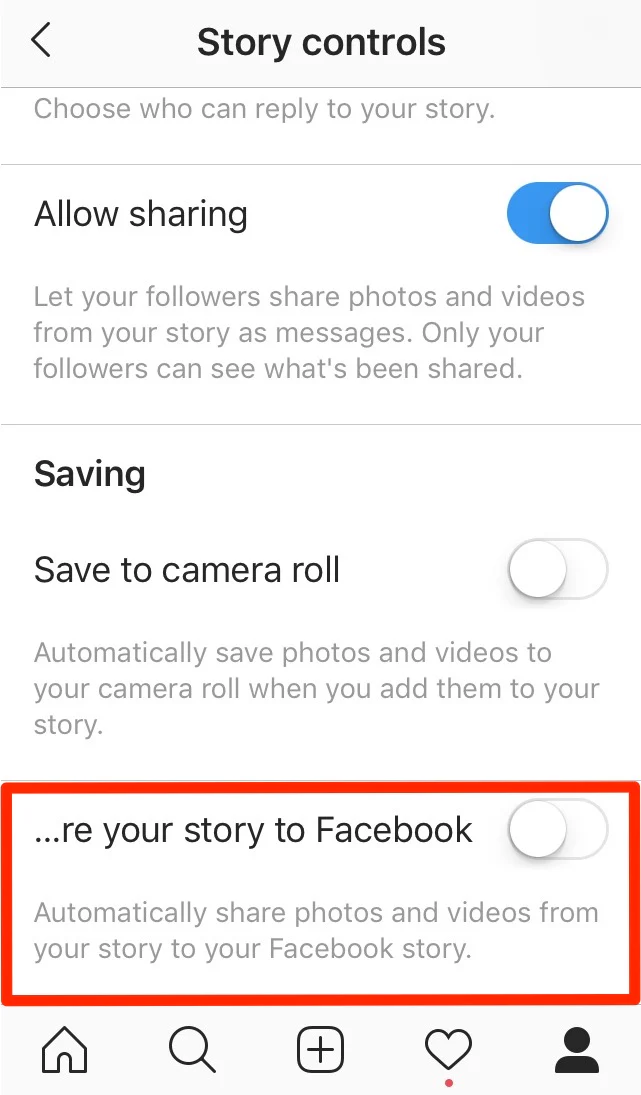
- Disable Automatic Sharing: Scroll down to the section labeled “Automatic Sharing” and toggle off the switch next to “Your Instagram story.”
That’s it! You’ve successfully stopped sharing your Instagram stories on Facebook.
How to Stop Sharing Instagram Stories on Facebook From Your Computer
If you prefer to use a computer to manage your social media accounts, follow these steps:
- Log in to Instagram: Open the Instagram website and sign in using your credentials.
- Click on The Profile Picture: This will take you to your profile page.
- Click on Settings: Located in the top-right corner of the screen, this will open up a menu.
- Account: Select “Account” from the menu to view your account management options.
- Sharing on Several Profiles: Choose “Sharing on several profiles” from the list.
- Disable Automatic Sharing: Scroll down to the section labeled “Automatic Sharing” and toggle off the switch next to “Your Instagram story.”
You’re done! You’ve successfully stopped sharing your Instagram stories on Facebook.
How to Delete Your Facebook Account From Instagram
If you want to take a more drastic approach, you can delete your Facebook account from Instagram altogether. This will prevent any cross-posting of content between the two platforms.
- Open The Instagram App: Find the Instagram icon on your device and tap on it.
- Tap on The Profile Picture: This will take you to your profile page.
- Tap on Settings And Privacy: Located in the top-right corner, this will open up a menu.
- Account: Select “Account” from the menu to view your account management options.
- Manage Account: Tap on “Manage account” to access your account settings.
- Stir up Account: Choose “Stir up account” and confirm that you want to delete your Facebook account.
Please note that deleting your Facebook account will also prevent you from using it to log in to other services, such as Facebook Login.
Frequently Asked Questions
Q: How do I share my Instagram stories only on one platform?
A: To share your Instagram stories only on one platform, follow the steps outlined above for either your smartphone or computer.
Q: Can I delete my Facebook account and still use it to log in to other services?
A: No, deleting your Facebook account will prevent you from using it to log in to other services.
Q: Will deleting my Facebook account affect my Instagram account?
A: Deleting your Facebook account will not directly affect your Instagram account. However, you may experience some inconvenience when trying to access certain features that require a connected account between the two platforms.
Conclusion
Stopping sharing your Instagram stories on Facebook is a simple process that can be completed using either your smartphone or computer. By following the steps outlined in this article, you’ll be able to maintain more control over what appears on your social media profiles.


