
How to Use Paypal: A Step-by-step Guide
Are you new to online payments? Do you want to learn how to use PayPal like a pro? Look no further! In this comprehensive guide, we’ll take you through the ins and outs of using PayPal for personal and business transactions.
Understanding Paypal’s Functionality
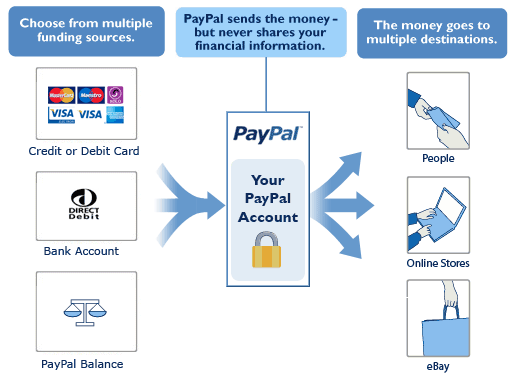
Before we dive into the nitty-gritty, let’s quickly understand what PayPal is all about. PayPal is an online payment service that allows users to send and receive payments without revealing their credit card or bank account information. It’s a secure way to make online purchases, pay bills, and transfer money.
Creating a Personal Account
To get started with PayPal, you’ll need to create a personal account. Here’s how:
- Go to the PayPal website (www.Paypal.Com) and click on “Sign Up” in the top right corner.
- Choose whether you want to sign up for a Personal Account or a Business Account.
- Enter your name, email address, password, and other required information.
- Confirm your email address by clicking on the verification link sent by PayPal.
Associating a Card or Bank Account
Once you have a personal account, you can associate a credit card or bank account to make payments easier. Here’s how:
- Log in to your PayPal account and click on “Wallet” in the top right corner.
- Click on “Link a card or bank account.”
- Enter your card details or bank account information.
- Confirm the association by clicking on the “Link” button.
Making Payments With Paypal
Now that you have a personal account and associated a payment method, let’s talk about making payments. Here are some ways to pay using PayPal:
- Paypal Button: When shopping online, look for the PayPal button on the merchant’s website. Clicking on it will direct you to your PayPal account where you can confirm the payment.
- Phone Number And Pin: You can also use your phone number and PIN to make payments.
- QR Code: Some merchants offer a contactless payment method using QR codes. Scan the code with your smartphone, and the payment will be processed.
Transferring Money to Another Account
Sometimes you might need to transfer money from one account to another. Here’s how to do it:
- Log in to your PayPal account.
- Click on “Balance” in the top right corner.
- Select the option to transfer money.
- Choose the source and destination accounts.
- Confirm the transfer by clicking on the “Transfer” button.
Using Paypal Me
PayPal Me is a feature that allows you to create a personalized link to receive payments from others. Here’s how to use it:
- Log in to your PayPal account.
- Click on “Me” in the top right corner.
- Select the option to create a PayPal Me link.
- Enter a nickname for your PayPal Me link.
- Share the link with others.
Paypal Business Account
A PayPal Business Account is designed for businesses and freelancers who want to manage their online payments more efficiently. Here are some benefits of using a PayPal Business Account:
- Instruments Contacted: You’ll have access to tools like the Commerce Platform, which simplifies payment processing.
- Transaction Monitoring: You can track your transactions in real-time.
- Anti-recycling Controls: Protect yourself from unauthorized transactions.
Conclusion
Using PayPal is easier than you think! By following these steps, you’ll be able to create a personal account, associate a payment method, make payments, and even transfer money to another account. If you’re a business owner or freelancer, consider using a PayPal Business Account for more advanced features. Happy shopping and paying!
Frequently Asked Questions (FAQs)
- Q: How do I Create a Paypal Account?
A: Go to the PayPal website, sign up, and follow the prompts. - Q: Can I Associate Multiple Payment Methods?
A: Yes, you can link multiple credit cards or bank accounts to your PayPal account. - Q: What Are The Fees Associated With Using Paypal?
A: Fees vary depending on the type of transaction and location. Check the PayPal website for more information. - Q: Is my Paypal Account Protected?
A: Yes, PayPal has robust security measures in place to protect your account and transactions. - Q: Can I Use Paypal Me to Receive Payments?
A: Yes, you can create a personalized link using PayPal Me to receive payments from others. - Q: How do I Transfer Money Between Accounts on Paypal?
A: Log in to your PayPal account, click on “Balance,” and select the option to transfer money. - Q: What is The Difference Between a Personal And Business Paypal Account?
A: A business account offers more advanced features like transaction monitoring and anti-recycling controls. - Q: Can I Cancel my Paypal Account?
A: Yes, you can cancel your PayPal account by contacting their customer support team.
Further Reading
If you’re interested in learning more about using PayPal for personal or business transactions, check out the following resources:


