
The Ultimate Guide to Scribd: Your One-stop Solution For Reading And Entertainment
Are you tired of searching for the perfect platform to access a vast library of e-books, audiobooks, podcasts, and more? Look no further than Scribd! In this comprehensive guide, we’ll delve into the world of Scribd, exploring its features, benefits, and how to use it on your computer and mobile devices.
What is Scribd?
Scribd is a subscription-based online library that offers access to thousands of e-books, audiobooks, podcasts, journals, documents, and even sheet music. With Scribd, you can enjoy unlimited reading and listening without any additional costs. Whether you’re a bookworm or an avid podcast listener, Scribd has something for everyone.
How to Use Scribd on Your Computer
To get started with Scribd, follow these simple steps:
- Go to the Scribd website and sign up for a free trial account.
- Create a profile by providing basic information such as your name, email address, and password.
- Choose your subscription plan, either monthly or annually.
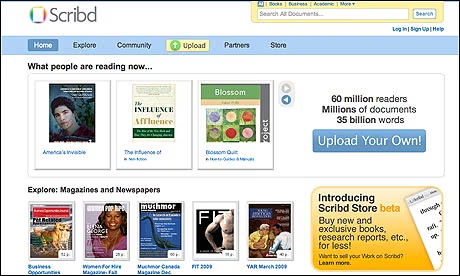
- Start browsing through the vast library of content by selecting categories like e-books, audiobooks, journals, podcasts, and more.
- Search for specific titles or authors using the search bar.
- Click on the “Read” button to access the content.
Features And Benefits
Scribd offers a plethora of features that make it an ideal platform for readers and listeners:
- Unlimited Access: With Scribd, you can access thousands of e-books, audiobooks, podcasts, and more without any additional costs.
- Offline Reading: Download your favorite titles for offline reading or listening, perfect for commutes or travel.
- Personalization: Create a personalized library by saving your favorite books, authors, or topics.
- Recommendations: Get tailored recommendations based on your reading habits and preferences.
- Community: Join the Scribd community to connect with fellow readers and listeners.
Using Scribd on Your Mobile Device
Scribd is also available as an app for both Android and iOS devices. Follow these steps to get started:
- Download the Scribd app from the App Store or Google Play Store.
- Sign up for a free trial account or log in with your existing credentials.
- Start browsing through the library of content by selecting categories or searching for specific titles.
- Click on the “Read” button to access the content.
How to Upload Content to Scribd
Want to share your own content with the world? Scribd makes it easy to upload e-books, documents, and more:
- Log in to your Scribd account and click on the “Upload” button.
- Choose the file type you want to upload (e.G., E-book, document, audio).
- Select the content you want to share and follow the prompts to upload it.
Benefits of Using Scribd
By using Scribd, you’ll enjoy:
- Convenience: Access a vast library of content from anywhere, at any time.
- Cost-effectiveness: Enjoy unlimited reading and listening without additional costs.
- Personalization: Get tailored recommendations based on your preferences.
- Community: Join the Scribd community to connect with fellow readers and listeners.
Conclusion
Scribd is an excellent platform for anyone looking to access a vast library of e-books, audiobooks, podcasts, and more. With its user-friendly interface, personalized recommendations, and offline reading capabilities, Scribd makes it easy to enjoy your favorite content anywhere, anytime. Whether you’re a bookworm or an avid podcast listener, Scribd has something for everyone.
Frequently Asked Questions
- What is The Cost of Using Scribd?
Scribd offers a monthly subscription plan at $10.99/Month and an annual plan at $84.99/Year. - Can I Access Content Offline?
Yes, you can download your favorite titles for offline reading or listening. - How do I Upload Content to Scribd?
Log in to your Scribd account, click on the “Upload” button, choose the file type, and follow the prompts. - Is Scribd Available on Mobile Devices?
Yes, Scribd is available as an app for both Android and iOS devices. - Can I Cancel my Subscription at Any Time?
Yes, you can cancel your subscription at any time by contacting customer support.
Additional Resources


