
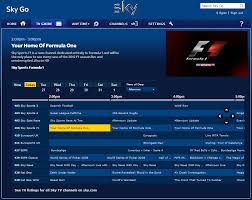
How to Use Sky Go: A Comprehensive Guide
Are you tired of missing your favorite TV shows because someone else is using the TV? Do you want to be able to watch Sky content on your computer or mobile device? Look no further than Sky Go, the streaming service offered by Sky Italia.
What is Sky Go?
Sky Go is a streaming service that allows subscribers to access their Sky subscription on multiple devices. This means you can watch your favorite TV shows and movies on your computer, smartphone, tablet, or even Smart TV (with some additional setup). The best part? It’s free for all Sky subscribers!
Requirements And Compatible Devices
To use Sky Go, you’ll need:
- A computer with Windows 7 or macOS 10.9
- A processor with at least Intel Dual Core or AMD with 2.1 GHz
- 2 GB of RAM on Windows or 4 GB DDR2 on macOS
- A graphics card with at least 1 GB RAM on Windows and 512 MB on macOS
You can also use Sky Go on your smartphone and tablet, but only if they have Android 5.1 Or later or iOS 12 or later.
How to Use Sky Go
Using Sky Go is easy!
- Download the Sky Go app from the official website
- Install the app on your device
- Log in with your Sky ID
- Browse through the available channels and content
You can also record TV shows and movies using the “Record” option.
Additional Features
Sky Go has some additional features that make it a great service:
- On-demand content: Watch TV shows and movies without waiting for them to be broadcast live
- Downloadable content: Download your favorite shows and movies for offline viewing
- Personalized recommendations: Get suggestions based on your viewing history
Tips And Tricks
Here are some tips to help you get the most out of Sky Go:
- Use the “My List” feature to save your favorite channels and shows
- Access the complete catalogue of content by selecting a category from the menu
- Download content for offline viewing using the “Download” option
Sky Go Abroad
If you’re planning to travel abroad, don’t worry! Sky Go is available in Italy, San Marino, Vatican City, Norway, Iceland, and Liechtenstein. However, be aware that you’ll need to download the app before leaving Italy and access it periodically while abroad to avoid losing your subscription.
Troubleshooting
If you’re experiencing issues with Sky Go, here are some troubleshooting tips:
- Check your internet connection
- Make sure you have the latest version of the app
- Try restarting your device
Conclusion
Sky Go is a great service that offers a lot of value for Sky subscribers. With its user-friendly interface and range of features, it’s easy to see why it’s become so popular. Whether you’re looking to catch up on your favorite TV shows or explore new content, Sky Go has got you covered.
Frequently Asked Questions
- Is Sky Go Free?
Yes, Sky Go is free for all Sky subscribers. - What Devices Can I Use With Sky Go?
You can use Sky Go on your computer, smartphone, tablet, and Smart TV (with some additional setup). - Do I Need a Strong Internet Connection to Use Sky Go?
Yes, you’ll need a stable internet connection to access Sky Go. - Can I Record TV Shows Using Sky Go?
Yes, you can record TV shows using the “Record” option. - Is Sky Go Available Abroad?
Yes, Sky Go is available in Italy, San Marino, Vatican City, Norway, Iceland, and Liechtenstein. - Do I Need to Download Sky Go Before Leaving Italy?
Yes, it’s recommended that you download Sky Go before leaving Italy to avoid losing your subscription. - Can I Use Sky Go on Multiple Devices at The Same Time?
No, you can only access Sky Go on one device at a time. - Do I Need to Have a Specific Version of Ios or Android to Use Sky Go?
Yes, you’ll need at least iOS 12 or Android 5.1 To use Sky Go.


