
The Act of Stability: Understanding Pos Obligations And Electronic Payments
In 2016, the Act of Stability was introduced, which imposed an obligation on professionals and merchants to own a Point of Sale (POS) system that accepts electronic payments. This means that all dealers must adapt to this new requirement or risk facing sanctions for each electronic transaction refused.
What Does This Mean For Merchants?
If you’re still unsure about the POS obligation or are struggling with the bureaucracy surrounding it, don’t worry! You can opt for more innovative and easy-to-use instruments like SumUp. No more worrying about complex procedures or commissions on transactions!
Introducing Sumup: A Revolutionary Payment System
SumUp is a system that allows merchants to accept electronic payments through credit cards, debit cards, and smartphones (using NFC technology). It utilizes a portable device reader of cards. With SumUp, you can easily process transactions without the need for a traditional POS machine.
How Does Sumup Work?
To use SumUp, simply access their website, click on “Access,” and follow the prompts. You’ll need to input your email address and password, select your country from the dropdown menu, agree to the terms of service, and then complete some forms with your company details, personal data, and bank information.
Understanding Sumup’s Features
SumUp offers several features that make it an attractive option for merchants:
- Connectivity: SumUp devices can be connected to a smartphone or tablet using Bluetooth technology.
- Autonomy: The device has an internal battery that provides sufficient autonomy to process around 500 transactions on a single charge.
- Compatibility: SumUp devices are compatible with Android 6 or later and iOS 12.0 Or later operating systems.
Using Sumup For Payments
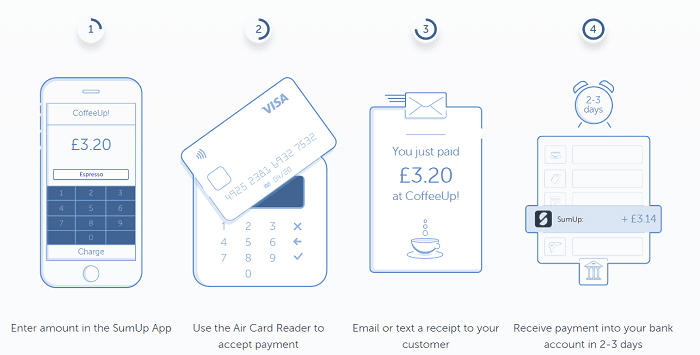
To process payments using SumUp, simply open the application on your smartphone or tablet, access it with your credentials, input the transaction amount, and select “Debit.” The client will then be prompted to place their card or device NFC on the reader’s top part. Once authorized, the transaction is confirmed, and you can forward a receipt to the client via email or SMS.
Other Sumup Devices: 3G + Printer And Solo
In addition to the traditional SumUp device, there are two other versions available:
- Sumup 3G + Printer: This device features a built-in printer that allows for instant receipts. It has an integrated SIM card, providing mobile data and voice calls.
- Sumup Solo: This is a more compact version of the traditional SumUp device. It’s designed to provide maximum mobility while minimizing space.
Installing And Using Sumup Devices
To install and use these devices, simply follow these steps:
- Activate Bluetooth on your smartphone or tablet.
- Install the SumUp application from the Play Store or App Store.
- Access the app with your credentials, input the transaction amount, and select “Debit.”
- The client will be prompted to place their card or device NFC on the reader’s top part.
- Once authorized, the transaction is confirmed, and you can forward a receipt to the client via email or SMS.
The Benefits of Using Sumup
By using SumUp for electronic payments, merchants can benefit from:
- Convenience: Process transactions quickly and easily with minimal equipment required.
- Cost-effectiveness: No more worrying about complex procedures or commissions on transactions!
- Flexibility: Accept a wide range of payment methods, including credit cards, debit cards, and mobile payments.
Conclusion
In conclusion, SumUp is an innovative payment system that provides merchants with a convenient and cost-effective way to process electronic transactions. With its user-friendly interface and advanced features, SumUp is the perfect solution for businesses looking to adapt to the Act of Stability’s POS obligations. By understanding how SumUp works and utilizing it effectively, merchants can streamline their payment processes, reduce errors, and improve customer satisfaction.
Frequently Asked Questions (FAQs)
Here are some additional FAQs about using SumUp:
-
Q: What is Sumup?
A: SumUp is a system that allows merchants to accept electronic payments through credit cards, debit cards, and smartphones using NFC technology.
-
Q: How Does Sumup Work?
A: To use SumUp, access their website, click on “Access,” and follow the prompts. You’ll need to input your email address and password, select your country from the dropdown menu, agree to the terms of service, and then complete some forms with your company details, personal data, and bank information.
-
Q: What Devices Are Available?
A: There are three versions of SumUp devices available:
- The traditional SumUp device
- SumUp 3G + Printer (features a built-in printer)
- SumUp Solo (a more compact version)
-
Q: How do I Process Payments With Sumup?
A: To process payments using SumUp, open the application on your smartphone or tablet, access it with your credentials, input the transaction amount, and select “Debit.” The client will then be prompted to place their card or device NFC on the reader’s top part. Once authorized, the transaction is confirmed, and you can forward a receipt to the client via email or SMS.
-
Q: What Are The Benefits of Using Sumup?
A: By using SumUp for electronic payments, merchants can benefit from convenience, cost-effectiveness, flexibility, and improved customer satisfaction.
-
Q: Are There Any Additional Fees Associated With Sumup?
A: No, there are no additional fees associated with SumUp. The only costs involved are the device itself and a commission of 1.95% On all successful transactions.
-
Q: Can I Use Sumup Without Internet Access?
A: Yes, you can use SumUp even when offline. Simply input the transaction amount, select “Debit,” and follow the prompts. Once authorized, the transaction is confirmed, and you can forward a receipt to the client via email or SMS.
-
Q: How do I Troubleshoot Issues With Sumup?
A: If you experience any issues with SumUp, refer to their official website for troubleshooting guides and support resources.


