
The Fascinating World of Touch Screens: How They Work And What You Need to Know
In today’s digital age, touch screens have become an integral part of our daily lives. From smartphones and tablets to computers and gaming consoles, the technology has revolutionized the way we interact with devices. But have you ever wondered how these magical screens work? In this article, we’ll delve into the fascinating world of touch screens, exploring their history, principles of operation, and what you need to know if your screen stops working.
A Brief History of Touch Screens
The concept of touch screens dates back to the 1960s, when the first touchscreen device was developed by a team of researchers at the Royal Radar Establishment in the UK. However, it wasn’t until the 1980s that touch screens began to gain popularity, with the introduction of the Apple Newton and other early tablet computers.
How Touch Screens Work
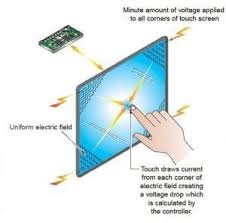
So, how do touch screens work? The answer lies in the technology used to detect user input. There are two main types of touch screens: Capacitive and resistive.
- Capacitive Touch Screens: These screens use a layer of conductive material to detect changes in capacitance (the ability of a material to store electric charge) when a user touches the screen with their finger or a conductive object. The screen is made up of a glass substrate, a touch-sensitive layer, and a protective overlay.
- Resistive Touch Screens: These screens use a flexible plastic sheet and a conductive grid to detect changes in resistance when a user presses on the screen. The screen consists of two flexible sheets with conductive grids, separated by a gap.
The Principles of Operation
When a user touches a capacitive touch screen with their finger or a conductive object, it creates an electric field that disturbs the capacitance of the screen. This disturbance is detected by sensors located in the screen, which then send signals to the device’s processor to interpret the touch event.
In contrast, resistive touch screens rely on physical pressure to detect changes in resistance between the two conductive sheets. When a user presses on the screen, it creates a connection between the two sheets, allowing current to flow and triggering a signal to be sent to the device’s processor.
The Advantages And Disadvantages of Touch Screens
Touch screens offer several advantages over traditional input methods, including:
- Intuitive Interface: Touch screens provide an intuitive way for users to interact with devices, eliminating the need for physical keyboards or mice.
- Increased Portability: Touch screens enable devices to be designed with more compact form factors, making them easier to carry around.
- Improved Accessibility: Touch screens can be designed to accommodate a wide range of user inputs, including gestures and voice commands.
However, touch screens also have some limitations, such as:
- Accuracy Issues: Touch screens can struggle to accurately detect small or precise touches, particularly in environments with high levels of ambient noise.
- Durability Concerns: Touch screens are more prone to damage than traditional input methods, particularly if they are subject to physical stress or liquid exposure.
Troubleshooting Touch Screen Issues
If your touch screen stops working, there are several troubleshooting steps you can take:
- Restart The Device: Sometimes, a simple reboot is all that’s needed to resolve touch screen issues.
- Clean The Screen: Dirt and debris on the screen can interfere with touch screen functionality, so try cleaning it gently with a soft cloth and water.
- Check For Software Updates: Firmware updates can often fix bugs or improve performance, so make sure your device is running the latest software.
If none of these steps resolve the issue, you may need to consult a professional for further assistance.
Conclusion
Touch screens have revolutionized the way we interact with devices, offering an intuitive and engaging user experience. By understanding how touch screens work and troubleshooting common issues, you can get the most out of your device and enjoy a seamless user experience.
Frequently Asked Questions (FAQs)
Here are some frequently asked questions about touch screens:
Q: What is the difference between capacitive and resistive touch screens?
A: Capacitive touch screens use conductive material to detect changes in capacitance, while resistive touch screens rely on physical pressure to detect changes in resistance.
Q: Can I use a stylus with touch screens?
A: Yes, many modern touch screens are compatible with styluses, which can provide more precise input than fingers.
Q: How do I troubleshoot touch screen issues?
A: Try restarting the device, cleaning the screen, and checking for software updates. If none of these steps resolve the issue, consult a professional for further assistance.
Q: Are touch screens durable?
A: Touch screens are generally durable but can be prone to damage if subject to physical stress or liquid exposure.
Q: Can I customize my touch screen settings?
A: Yes, most devices allow you to adjust touch screen settings, such as sensitivity and gesture recognition.


