
Unlocking The Power of Tiktok: A Comprehensive Guide to Visualisations
As a social media platform, TikTok has taken the world by storm with its unique blend of short-form videos, catchy music, and engaging community. With over a billion active users, it’s no wonder that businesses, creators, and individuals alike are eager to tap into the platform’s vast potential. In this article, we’ll delve into the intricacies of TikTok’s algorithm and provide you with actionable tips on how to boost your visualisations.
Understanding The Algorithm
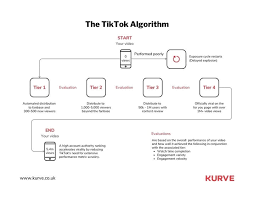
TikTok’s algorithm is the backbone of the platform, responsible for serving users a curated feed of videos tailored to their interests. This algorithm takes into account various factors, including:
- Interactions: Likes, comments, shares, and saves
- Video metadata: Hashtags, captions, and audio used in the video
- Device settings: Location, language, and device type
- Account settings: User preferences, follow/unfollow history, and comment sections
Tips to Enhance Your Visualisations
To increase your visualisations on TikTok, consider the following strategies:
- High-quality Content: Create engaging, informative, and entertaining content that resonates with your audience.
- Hashtag Game: Utilize relevant hashtags to reach a broader audience and make your content more discoverable.
- Engage With Your Audience: Respond to comments, engage in conversations, and build relationships with your followers.
- Collaborate With Other Users: Partner with influencers or other users in your niche to expand your reach and credibility.
- Consistency is Key: Regularly post high-quality content to maintain a strong presence and keep your audience engaged.
- Analyze Your Performance: Use TikTok’s built-in analytics tool to track your performance, identify areas for improvement, and adjust your strategy accordingly.
Visualisations on Your Profile
Want to know who has visited your profile? On the TikTok app for Android (also available on alternative stores) or iPhone, access your account, navigate to your profile screen, and tap on the icon of the footprints. You’ll see the names of users who have viewed your profile, along with their usernames. If you’d like to disable this feature at any time, go to the Visualisations section of your profile, toggle off the Chronology of visualisations.
Analyzing Your Performance
To gain a deeper understanding of your performance on TikTok, use the Analytical section, accessible from both smartphones and computers. After logging into your account, tap on the menu icon on your smartphone or select the Informazioni analytical option on your computer. This will give you access to sections like Visualisations of the profile, Visualisations video, and Follower analysis.
Conclusion
TikTok’s vast potential can be unlocked by understanding its algorithm and implementing effective strategies. By creating high-quality content, engaging with your audience, collaborating with other users, maintaining consistency, analyzing your performance, and utilizing relevant hashtags, you’ll be well on your way to boosting your visualisations and achieving success on the platform.
Frequently Asked Questions (FAQs)
Here are eight FAQs that may help clarify some of the points discussed above:
- Q: How Does Tiktok’s Algorithm Work?
A: The algorithm takes into account various factors, including interactions, video metadata, device settings, and account settings. - Q: What Are Some Tips to Enhance my Visualisations on Tiktok?
A: Consider creating high-quality content, using relevant hashtags, engaging with your audience, collaborating with other users, maintaining consistency, analyzing your performance, and utilizing the built-in analytics tool. - Q: How Can I See Who Has Visited my Profile on Tiktok?
A: On the TikTok app for Android or iPhone, access your account, navigate to your profile screen, and tap on the icon of the footprints. - Q: Can I Disable The Feature That Shows me Who Has Viewed my Profile?
A: Yes, go to the Visualisations section of your profile, toggle off the Chronology of visualisations. - Q: How Can I Analyze my Performance on Tiktok?
A: Use the Analytical section, accessible from both smartphones and computers. - Q: What Are Some Key Metrics to Track in The Analytical Section?
A: Track your follower count, engagement rates, video views, and other relevant metrics to gain a deeper understanding of your performance. - Q: Can I Collaborate With Influencers or Other Users on Tiktok?
A: Yes, consider partnering with influencers or other users in your niche to expand your reach and credibility. - Q: How Often Should I Post Content on Tiktok?
A: Aim for consistency by posting high-quality content regularly, ideally 3-5 times per week.


