
Accessing Prime Video: A Comprehensive Guide
Are you excited to dive into the world of Prime Video, but unsure how to access it? Look no further! This guide will walk you through the step-by-step process of accessing Prime Video on your PC, smartphone, tablet, Smart TV, and even Sky.
What is Prime Video?
Prime Video is a streaming service offered by Amazon that provides users with access to a vast library of movies, TV shows, and original content. With an Amazon Prime subscription, you can enjoy free shipping, music streaming, and photo storage, among other benefits.
Accessing Prime Video on PC
To access Prime Video on your PC:
- Activate Amazon Prime: Log in to your Amazon account and activate your Prime membership.
- Open Prime Video: Click on the Prime Video icon on the top right corner of your browser or search for “Prime Video” in the Amazon website.
- Sign In: Enter your Amazon login credentials and click on the “Access” button.
- Start Watching: Browse through the vast library of content and start watching your favorite shows and movies.
Accessing Prime Video on Smartphone And Tablet
To access Prime Video on your smartphone or tablet:
- Download The App: Download the Prime Video app from the Apple App Store (for iOS devices) or Google Play Store (for Android devices).
- Log In: Enter your Amazon login credentials and click on the “Access” button.
- Start Watching: Browse through the vast library of content and start watching your favorite shows and movies.
Accessing Prime Video on Smart TV
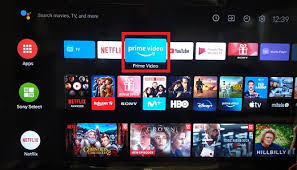
To access Prime Video on your Smart TV:
- Choose a Method: Select either the code method or QR code method to associate your Amazon account with your Smart TV.
- Code Method: Go to the Prime Video website on your PC, smartphone, or tablet and enter the code displayed on your Smart TV screen.
- QR Code Method: Scan the QR code on your Smart TV using your smartphone or tablet camera.
- Associate Account: Complete the association process by entering your Amazon login credentials.
Accessing Prime Video With Sky
To access Prime Video with Sky:
- Activate Amazon Prime: Log in to your Amazon account and activate your Prime membership.
- Open Prime Video: Go to the Prime Video app on your Sky Q box or Sky Glass.
- Choose a Method: Select either the code method or QR code method to associate your Amazon account with your Smart TV.
Accessing Prime Video With Another Account
To access Prime Video with another account:
- Disconnect Current Account: Go to the Prime Video website and disconnect your current Amazon account.
- Log In With New Account: Log in with your new Amazon account credentials.
- Start Watching: Browse through the vast library of content and start watching your favorite shows and movies.
Accessing Prime Video Without Password
Unfortunately, it is not possible to access Prime Video without a password. You will need to enter your Amazon login credentials, including your password, to access Prime Video.
Conclusion
Accessing Prime Video is a straightforward process that can be completed on various devices, including PC, smartphone, tablet, Smart TV, and even Sky. By following the step-by-step guide outlined above, you’ll be enjoying your favorite shows and movies in no time!
Frequently Asked Questions (FAQs)
- Q: What is Prime Video?
A: Prime Video is a streaming service offered by Amazon that provides users with access to a vast library of movies, TV shows, and original content. - Q: How do I Activate Amazon Prime?
A: Log in to your Amazon account and follow the activation process to become an Amazon Prime member. - Q: Can I Access Prime Video Without a Password?
A: Unfortunately, it is not possible to access Prime Video without a password. - Q: How do I Associate my Amazon Account With my Smart Tv?
A: Choose either the code method or QR code method and follow the on-screen instructions to complete the association process. - Q: Can I Use Another Account to Access Prime Video?
A: Yes, you can use another account to access Prime Video by disconnecting your current Amazon account and logging in with your new account credentials. - Q: Is Prime Video Available on my Device?
A: Check the Amazon website or visit the app store to see if Prime Video is available on your device. - Q: How do I Recover my Password if I Forget It?
A: Go to the Prime Video website and follow the recovery process to reset your password. - Q: Can I Access Prime Video Without a Subscription?
A: Unfortunately, you will need an Amazon Prime subscription to access Prime Video.
I hope this comprehensive guide has helped you understand how to access Prime Video on various devices! If you have any further questions or concerns, feel free to ask in the comments below.


