
The Ultimate Guide to Accessing The Social Club in Gta Games
Are you an avid player of Grand Theft Auto (GTA) games? Do you want to experience the thrill of playing with other players online? If yes, then this article is for you! In this guide, we will walk you through the process of accessing the Social Club in GTA games.
What is The Social Club?
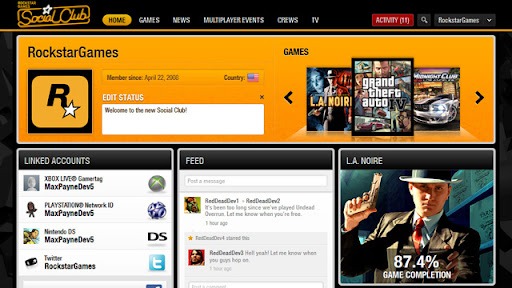
The Social Club is an online platform developed by Rockstar Games that allows users to connect with each other and access various services associated with their favorite GTA titles. With a Social Club account, you can share your gaming experience with friends, join clubs, participate in challenges, and much more.
How to Enroll in The Social Club?
To enroll in the Social Club, follow these steps:
- Create a Social Club Account: Go to the official website of the Social Club and click on the “Join” button.
- Fill Out The Registration Form: Provide your date of birth, email address, password, nickname, and nation of origin.
- Agree to The Terms of Service: Read and accept the terms of service by checking the box.
How to Access The Social Club?
Once you have created a Social Club account, accessing it is easy! Here are some ways to access the Social Club:
- Through The Rockstar Games Launcher: If you have installed the Rockstar Games Launcher on your PC or console, you can access the Social Club directly from there.
- In-game Access: Once you initiate a GTA game that supports the Social Club, you will be prompted to log in with your Social Club account.
- Through The Official Website: You can also access the Social Club through the official website of Rockstar Games.
Accessing The Social Club Through Rockstar Games Launcher
If you have not installed the Rockstar Games Launcher on your PC or console, here’s how to do it:
- Download The Launcher: Go to the official website of Rockstar Games and download the launcher for your platform.
- Install The Launcher: Follow the installation prompts to install the launcher on your device.
- Log in With Your Social Club Account: Once installed, log in with your Social Club account to access the various services associated with it.
Accessing The Social Club In-game
If you have initiated a GTA game that supports the Social Club, here’s how to access it:
- Launch The Game: Initiate the GTA game that supports the Social Club.
- Log in With Your Social Club Account: Once the game is launched, log in with your Social Club account.
- Access The Social Club Panel: You will be taken to the Social Club panel, where you can access various services associated with it.
What Services Can I Access Through The Social Club?
As a member of the Social Club, you can access various services, including:
- Virtual Shop: Purchase in-game items and accessories.
- News Feed: Stay up-to-date with the latest news and updates on your favorite GTA titles.
- Friend List: Connect with friends and join clubs to play together.
- Leaderboards: Compete with other players and climb the ranks.
Conclusion
Accessing the Social Club in GTA games is easy! By following these simple steps, you can create a Social Club account, access it through various platforms, and enjoy the numerous services associated with it. Whether you’re a seasoned gamer or a newcomer to the world of GTA, the Social Club is an exciting way to enhance your gaming experience.
Frequently Asked Questions
- What is The Purpose of The Social Club?
The Social Club allows users to connect with each other and access various services associated with their favorite GTA titles. - How do I Create a Social Club Account?
To create a Social Club account, go to the official website of Rockstar Games and fill out the registration form. - What Are The Benefits of Having a Social Club Account?
With a Social Club account, you can share your gaming experience with friends, join clubs, participate in challenges, and much more. - Can I Access The Social Club Through Multiple Platforms?
Yes, you can access the Social Club through various platforms, including the Rockstar Games Launcher, in-game access, and the official website of Rockstar Games. - How do I Link my Psn or Xbox Live Account to The Social Club?
To link your PSN or Xbox Live account to the Social Club, go to the Social Club panel and follow the prompts to connect your account. - Can I Access The Social Club on Multiple Consoles?
Yes, you can access the Social Club on multiple consoles, including PC, PlayStation, and Xbox. - Is The Social Club Free to Join?
Yes, joining the Social Club is free! - How do I Report Issues or Problems With The Social Club?
To report issues or problems with the Social Club, contact Rockstar Games support team through their official website or social media channels.


