
How to Use Imessage on Your Apple Devices
Are you tired of using traditional messaging apps like SMS? Do you want to experience the convenience and security of end-to-end encryption on your Apple devices? Look no further than iMessage! In this article, we’ll guide you through the process of setting up and using iMessage on your iPhone, iPad, Mac, and even your Apple Watch.
What is Imessage?
IMessage is a messaging service developed by Apple that allows users to send free messages, photos, videos, and more to other Apple device owners. With iMessage, you can communicate with friends, family, and colleagues without worrying about the costs associated with traditional SMS or MMS messaging.
Costs of Using Imessage
The best part about using iMessage is that it’s completely free! You won’t incur any additional costs for sending messages to other Apple device owners. However, if you receive an international message from a non-Apple device user, the recipient may be charged a small fee by their carrier.
Actuating Imessage on Your Iphone
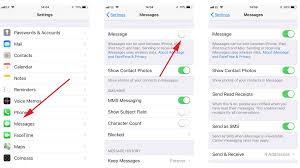
To set up iMessage on your iPhone, follow these simple steps:
- Access the Settings app and tap on “Messages.”
- Toggle the switch next to “iMessage” to enable it.
- Choose whether you want to use your phone number or email address associated with your Apple ID to send messages.
Actuating Imessage on Your Ipad
The process of setting up iMessage on your iPad is similar to that of your iPhone:
- Access the Settings app and tap on “Messages.”
- Toggle the switch next to “iMessage” to enable it.
- Choose whether you want to use your phone number or email address associated with your Apple ID to send messages.
Actuating Imessage on Your Mac
To set up iMessage on your Mac, follow these steps:
- Click on the Messages app icon in the Dock or Launchpad.
- Enter your Apple ID and password to access the app.
- Toggle the switch next to “iMessage” to enable it.
Benefits of Using Imessage
Using iMessage offers several benefits, including:
- Free Messaging: Send messages, photos, videos, and more without incurring any additional costs.
- End-to-end Encryption: Enjoy secure communication with friends and family using end-to-end encryption.
- Group Conversations: Create group conversations to stay connected with multiple people at once.
Tips For Using Imessage
Here are some helpful tips to get the most out of your iMessage experience:
- Use Imessage With Your Apple Watch: If you have an Apple Watch, you can use it to send and receive messages from your iPhone.
- Customize Your Messaging Settings: Personalize your messaging experience by customizing your settings, such as forwarding messages or reading receipts.
Frequently Asked Questions (FAQs)
Here are some frequently asked questions about iMessage:
Q: Is iMessage free?
A: Yes, iMessage is completely free to use.
Q: Can I use iMessage on my Mac?
A: Yes, you can set up and use iMessage on your Mac.
Q: Do I need an Apple device to use iMessage?
A: No, you don’t necessarily need an Apple device to receive messages from someone using iMessage. However, the sender must have an Apple device with iMessage enabled.
Conclusion
In conclusion, using iMessage is a convenient and secure way to communicate with friends and family on your Apple devices. By following these simple steps, you can set up and use iMessage on your iPhone, iPad, Mac, or even your Apple Watch. Enjoy the benefits of free messaging, end-to-end encryption, and group conversations!
Additional Resources
For more information about iMessage and other Apple services, visit the official Apple website.
- How to Set Up Imessage: A step-by-step guide on setting up iMessage on your Apple device.
- Imessage Faqs: A comprehensive list of frequently asked questions about iMessage.
- Apple Support: Get help with any issues related to iMessage or other Apple services.


