
Unlocking Instagram’s Power: A Comprehensive Guide to Using Insights
As a content creator or business owner, having an effective online presence is crucial in today’s digital age. One of the most popular social media platforms is Instagram, with over 1 billion active users. But did you know that you can unlock even more power and insights from your Instagram account? In this article, we’ll delve into the world of Instagram Insights, a feature that allows you to visualize your profile’s statistical data.
What Are Instagram Insights?
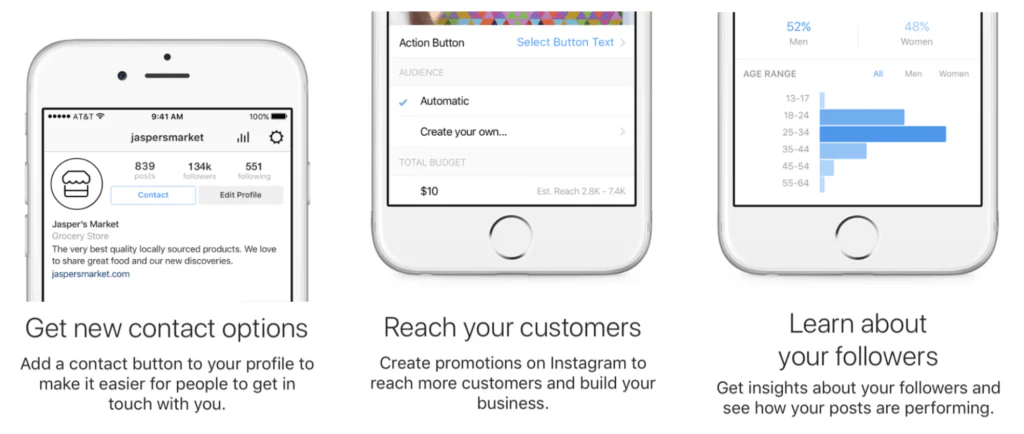
Instagram Insights is a powerful tool that provides you with detailed information about your profile’s performance. It’s available for business and creator accounts only, so if you’re interested in using this feature, you’ll need to convert your personal account into a professional one. Don’t worry; it’s a simple process that we’ll cover later on.
Why Use Instagram Insights?
By utilizing Instagram Insights, you can gain valuable insights into your profile’s performance, including:
- Engagement: Understand how users interact with your content, including likes, comments, and saves.
- Reach: See the total number of users who viewed your content, even if they didn’t engage with it.
- Follower Growth: Track the growth of your follower base over time.
- Content Performance: Identify which types of content perform best for you.
How to Activate Instagram Insights
To activate Instagram Insights, follow these steps:
On Mobile Devices
- Open the Instagram app and go to your profile page.
- Tap on the three horizontal lines (≡) in the top-right corner.
- Select “Settings.”
- Scroll down and tap on “Account.”
- Tap on “Switch to Business Profile.”
On Desktop
- Go to Instagram.Com and log in to your account.
- Click on the three dots (…) in the top-right corner.
- Select “Settings.”
- Scroll down and click on “Account.”
- Click on “Switch to Business Profile.”
How to Use Instagram Insights
Once you’ve activated Instagram Insights, here’s how to use it:
On Mobile Devices
- Tap on the three horizontal lines (≡) in the top-right corner.
- Select “Insights.”
- Scroll through the various sections, such as “Content,” “Reach,” and “Engagement.”
On Desktop
- Go to Instagram.Com and log in to your account.
- Click on the three dots (…) in the top-right corner.
- Select “Settings.”
- Scroll down and click on “Insights.”
- Scroll through the various sections, such as “Content,” “Reach,” and “Engagement.”
Tips For Optimizing Your Instagram Insights
To get the most out of Instagram Insights, follow these tips:
- Post Consistently: Regularly posting high-quality content will help you understand what works best for your audience.
- Use Relevant Hashtags: Hashtags can increase the reach of your content and provide valuable insights into which topics resonate with your audience.
- Engage With Your Followers: Respond to comments and messages, as this will help you understand how users interact with your content.
By following these tips and using Instagram Insights effectively, you’ll be able to create a more engaging profile that resonates with your target audience. Happy posting!
Conclusion
Instagram Insights is an incredibly powerful tool that can help you gain valuable insights into your profile’s performance. By understanding which types of content work best for your audience, you can optimize your strategy and increase engagement.
Whether you’re a content creator or business owner, Instagram Insights is a must-have feature for any serious online presence. So go ahead, convert your personal account to a professional one, and unlock the full potential of Instagram’s power!
Frequently Asked Questions
Here are some additional questions and answers about Instagram Insights:
Q: Do I need to have a large following to use Instagram Insights?
A: No, you don’t need a large following to use Instagram Insights. This feature is available for all business and creator accounts.
Q: Can I see my followers’ demographic information using Instagram Insights?
A: Yes, with Instagram Insights, you can view your followers’ demographic information, including age, gender, and location.
Q: How often should I post on Instagram to get the most out of Instagram Insights?
A: The frequency of posting depends on your target audience and the type of content you’re sharing. Experiment with different posting schedules to see what works best for you.
Q: Can I use Instagram Insights on both mobile and desktop devices?
A: Yes, Instagram Insights is available on both mobile devices (iOS and Android) and desktop computers.
I hope this comprehensive guide has helped you unlock the power of Instagram Insights! If you have any further questions or need more guidance, feel free to reach out.


