
Actuating Subscriptions on Twitch: A Step-by-step Guide
As a content creator, building a loyal community is crucial for success. On platforms like Twitch, subscribers play a significant role in supporting your channel through monetary contributions and exclusive benefits. In this article, we’ll guide you through the process of actuating subscriptions on Twitch.
What Are Subscriptions on Twitch?
Subscriptions are a way for viewers to support their favorite streamers by paying a recurring fee. This fee is usually monthly or yearly, and in return, subscribers receive exclusive benefits such as:
- Access to subscriber-only content
- Exclusive emotes and badges
- Priority access to your channel
- A chance to participate in subscriber-only chat rooms
Requirements For Subscriptions
Before you can enable subscriptions on your Twitch channel, you need to meet the following requirements:
- 50 Followers: Your channel must have at least 50 followers.
- 8 Hours of Streaming: You’ve streamed a total of at least 8 hours in the last 30 days.
- 3 Or More Simultaneous Viewers: On average, you had at least 3 simultaneous viewers during your streams.
How to Actuate Subscriptions on Twitch
To enable subscriptions on your Twitch channel:
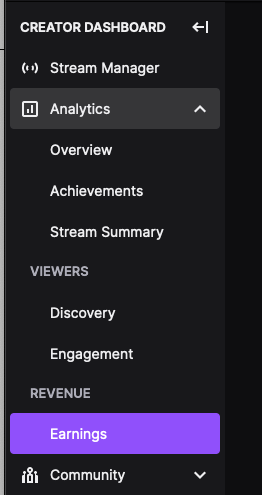
- Connect to Your Channel Dashboard: Log in to your Twitch account and navigate to your channel’s dashboard.
- Access The Settings Menu: Click on the gear icon next to your profile picture, then select “Settings.”
- Scroll Down to Subscriptions: In the settings menu, scroll down to the “Subscriptions” section.
- Click on Enable Subscriptions: Click on the toggle button to enable subscriptions.
Managing Your Subscribers
Once you’ve enabled subscriptions, you can manage your subscribers by:
- Naming Subscription Levels: You can customize the names of subscription levels (e.G., “Subscriber,” “Moderator,” etc.).
- Assigning Emotes And Badges: You can assign unique emotes and badges to your subscribers.
- Rewarding Subscribers: You can reward your subscribers with exclusive content, priority access, or other perks.
Benefits of Subscriptions For Viewers
Subscriptions offer several benefits for viewers:
- Exclusive Content: Subscribers get access to exclusive content that’s not available to the general audience.
- Priority Access: Subscribers have priority access to your channel and can participate in subscriber-only chat rooms.
- Supporting Your Channel: Subscriptions help you earn revenue, which allows you to invest in better equipment, software, or other resources for your stream.
Conclusion
Subscriptions are a powerful tool for content creators on Twitch. By enabling subscriptions, you can build a loyal community and generate revenue from viewers who appreciate your content. Remember to meet the requirements, follow the steps outlined above, and manage your subscribers effectively to maximize the benefits of subscriptions on your channel.
Frequently Asked Questions
-
What Are The Benefits of Subscription on Twitch?
Subscriptions offer exclusive benefits such as access to subscriber-only content, priority access to your channel, and a chance to participate in subscriber-only chat rooms.
2. How do I Enable Subscriptions on my Twitch Channel?To enable subscriptions on your Twitch channel, you need to meet the requirements (50 followers, 8 hours of streaming, and 3 or more simultaneous viewers), connect to your channel dashboard, access the settings menu, scroll down to subscriptions, and click on enable subscriptions.
3. Can I Manage my Subscribers?Yes, once you’ve enabled subscriptions, you can manage your subscribers by naming subscription levels, assigning emotes and badges, and rewarding subscribers with exclusive content or priority access.
4. What Are The Benefits of Subscriptions For Viewers?Subscriptions offer several benefits for viewers, including exclusive content, priority access to the channel, and support for their favorite streamer.
5. How do I Reward my Subscribers?You can reward your subscribers by offering them exclusive content, priority access, or other perks that make them feel special and valued.
6. Can I Use Subscriptions on my Smartphone or Tablet?Unfortunately, it’s not possible to enable subscriptions directly from the Twitch app on your smartphone or tablet. However, you can manage your channel settings through the browser version of Twitch.
7. How do I Track my Earnings From Subscriptions?You can track your earnings from subscriptions by accessing your account dashboard and navigating to the “Subscriptions” section.
I hope this helps! Let me know if you have any further questions.


