
Activating Vodafone Hotspot on Your Mobile Device: A Step-by-step Guide
Are you tired of struggling with internet connectivity issues? Do you want to share your mobile data with other devices without incurring additional costs? Look no further! This article will guide you through the process of activating Vodafone hotspot on your mobile device, be it an Android or iPhone.
Understanding The Basics of Hotspot
Before we dive into the step-by-step instructions, let’s first understand what hotspot is. Hotspot is a feature that allows you to share your mobile data with other devices, such as laptops, tablets, or even other smartphones, using Wi-Fi technology. This means that you can turn your mobile device into a mini-router, providing internet access to multiple devices at once.
Benefits of Using Vodafone Hotspot
Using Vodafone hotspot offers several benefits, including:
- Convenience: No need to carry around a separate router or modem.
- Cost-effective: No additional costs for using hotspot, especially if you have an unlimited data plan.
- Flexibility: Share your internet connection with multiple devices, making it perfect for traveling or working on-the-go.
Pre-requisites For Activating Hotspot
Before activating hotspot on your mobile device, make sure you meet the following pre-requisites:
- Your Vodafone SIM card has a valid internet connection.
- You have an active data plan that includes hotspot usage.
- Your mobile device is compatible with hotspot functionality (most modern smartphones are).
Activating Hotspot on Android Devices
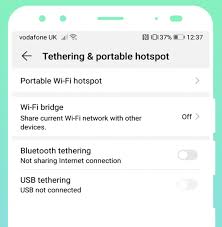
If you’re using an Android device, follow these steps to activate hotspot:
- Go to your phone’s Settings app.
- Scroll down and select “Connections” or “Wireless and networks.”
- Tap on “Tethering or Hotspot portable” and toggle it ON.
- You may see additional options, such as Wi-Fi channel and password settings. Configure these according to your preferences.
Activating Hotspot on Iphone Devices
If you’re using an iPhone, follow these steps to activate hotspot:
- Go to your phone’s Settings app.
- Tap on “Hotspot staff” and toggle it ON.
- You may see additional options, such as Wi-Fi password settings. Configure these according to your preferences.
Tips And Tricks
Here are some additional tips and tricks to keep in mind when using hotspot:
- Be mindful of your data usage, especially if you’re sharing internet with multiple devices.
- Keep an eye on your battery life, as hotspot can consume more power than regular mobile data usage.
- Consider configuring a separate Wi-Fi network for your hotspot to avoid conflicts with your personal Wi-Fi network.
Deactivating The Block Internet Feature
If you’ve previously activated the Block Internet feature on your Vodafone SIM card, follow these steps to deactivate it:
- Log in to your Vodafone account online or through the mobile app.
- Go to the “Services” section and look for the “Block Internet” option.
- Tap on the toggle button to disable the service.
Conclusion
Activating Vodafone hotspot on your mobile device is a straightforward process that can provide you with convenient and cost-effective internet access. By following these step-by-step instructions, you’ll be able to share your mobile data with other devices, making it perfect for traveling or working on-the-go. Remember to always monitor your data usage and keep an eye on your battery life when using hotspot.
Frequently Asked Questions
Q: Can I use Vodafone hotspot on multiple devices at once?
A: Yes, you can use Vodafone hotspot on multiple devices simultaneously.
Q: Is there a limit to the number of devices I can connect to my hotspot?
A: Theoretically, there’s no limit to the number of devices you can connect. However, performance may degrade with excessive device connections.
Q: Can I use Vodafone hotspot abroad?
A: Yes, you can use Vodafone hotspot while traveling abroad, but be aware that international data roaming rates may apply.
Q: Is Vodafone hotspot secure?
A: Hotspot functionality itself is secure, but it’s essential to configure a strong Wi-Fi password and keep your device software up-to-date to avoid security risks.
Q: Can I use Vodafone hotspot with my tablet or laptop?
A: Yes, you can use Vodafone hotspot with any device that supports Wi-Fi connectivity, including tablets, laptops, and smartphones.
Q: Are there any additional costs associated with using Vodafone hotspot?
A: No, using Vodafone hotspot is included in your mobile data plan, unless you’ve exceeded your monthly data allowance.
Q: Can I activate Vodafone hotspot on my device without a SIM card?
A: Yes, but you’ll need to configure a separate Wi-Fi network for your hotspot and ensure that your device supports hotspot functionality.


