
Unlocking The Secrets of Vodafone Pass: A Comprehensive Guide
Are you curious about how to activate Vodafone Pass? Look no further! In this article, we’ll delve into the world of Vodafone’s entertainment platform, exploring its features, benefits, and activation process.
What is Vodafone Pass?
Vodafone Pass is a promotion that allows both new and existing clients to enjoy various services on a chosen platform at a discounted price. This includes popular options like Netflix, Audible, and Infinity+, among others. The best part? You can get access to these services for free for the first month, and then pay just 6.99 Euros per month thereafter.
Preliminary Information: Understanding Vodafone Pass
Before we dive into the nitty-gritty of activating Vodafone Pass, it’s essential to understand what this promotion entails. Vodafone Pass is a type of pass that allows users to enjoy various entertainment services at a discounted price. This includes music streaming (e.G., Spotify), social networks (e.G., Facebook), messaging apps (e.G., WhatsApp), video platforms (e.G., YouTube), and VoIP services (e.G., Skype). However, please note that these specific services are not currently available as part of Vodafone Pass.
Activating Vodafone Pass: A Step-by-step Guide
Now that you know what Vodafone Pass is all about, it’s time to learn how to activate it. Here’s a step-by-step guide:
Using The Online Area (Do)
If you have access to a computer or prefer using the online area, follow these steps:
- Open your preferred web browser and navigate to the Vodafone website.
- Click on the “Login” button at the top right corner of the page.
- Enter your username or email address and password in the respective fields.
- Click on the “Access” button to log in to your account.
- Once logged in, click on the “My Account” dropdown menu and select “Services.”
- Scroll down to the “All Services” section and find the “Entertainment Pass” option.
- Click on the “Add Service” button next to it.
- Confirm your selection by clicking on the “Continue” button.
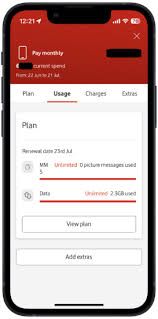
Using The My Vodafone App
If you prefer using a mobile app, follow these steps:
- Download and install the My Vodafone app from the Google Play Store (for Android devices) or the Apple App Store (for iOS/iPadOS devices).
- Open the app and log in to your account by entering your username or email address and password.
- Once logged in, click on the “My Account” dropdown menu and select “Services.”
- Scroll down to the “All Services” section and find the “Entertainment Pass” option.
- Click on the “Add Service” button next to it.
- Confirm your selection by clicking on the “Continue” button.
Activating Vodafone Pass Over The Phone
If you prefer speaking with a human, follow these steps:
- Call the dedicated Vodafone number, 42070, for free.
- Follow the voice prompts to access the service management menu.
- Select option 3 (service management) and then select option 4 (activate/deactivate service).
- Choose the Entertainment Pass service and follow the instructions to activate it.
Troubleshooting: Common Issues With Vodafone Pass
If you encounter any issues while activating Vodafone Pass, don’t worry! We’ve got you covered. Here are some common problems and their solutions:
- Error Messages: If you receive an error message during activation, try restarting the process or contacting Vodafone’s customer support.
- Service Not Available: If a service is not available on your device, ensure that it has been correctly installed and configured.
- Account Issues: If you’re experiencing problems with your account, try logging out and back in, or contact Vodafone’s customer support for assistance.
Conclusion: Unlocking The Full Potential of Vodafone Pass
Now that you’ve activated Vodafone Pass, it’s time to explore its features and benefits. Enjoy free access to various entertainment services on a chosen platform, with the option to pay just 6.99 Euros per month thereafter. Don’t forget to troubleshoot any issues that may arise during activation.
Faqs: Frequently Asked Questions About Vodafone Pass
Here are some frequently asked questions about Vodafone Pass:
- Q: What is Vodafone Pass?
- A: Vodafone Pass is a promotion that allows users to enjoy various entertainment services on a chosen platform at a discounted price.
- Q: How much does Vodafone Pass cost?
- A: The first month is free, and then you pay just 6.99 Euros per month thereafter.
- Q: Can I activate Vodafone Pass over the phone?
- A: Yes, you can call the dedicated Vodafone number, 42070, for free to activate Vodafone Pass over the phone.
Additional Resources: More Information on Vodafone Pass
For more information about Vodafone Pass, check out these additional resources:
- Vodafone Website: Visit the official Vodafone website for more details about Vodafone Pass and other services.
- My Vodafone App: Download the My Vodafone app to access your account, manage your services, and activate Vodafone Pass.
- Vodafone Customer Support: Contact Vodafone’s customer support for assistance with any issues related to Vodafone Pass.


