
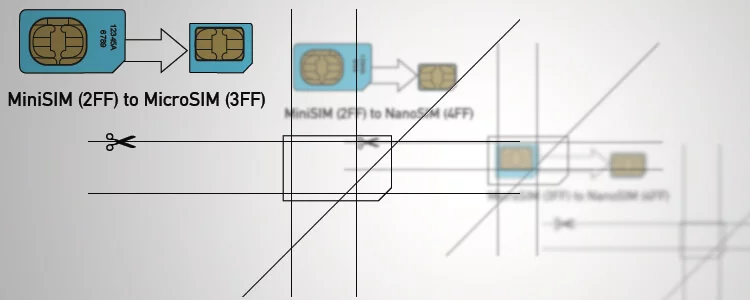
Adapting a Sim Card to a Microsim: A Step-by-step Guide
Are you struggling to adapt your old SIM card to the new MicroSIM required by your smartphone or tablet? Don’t worry, we’ve got you covered! In this article, we’ll guide you through the process of adapting a SIM card to a MicroSIM in a step-by-step manner.
Understanding The Differences Between Sim And Microsim
Before we dive into the adaptation process, it’s essential to understand the differences between SIM and MicroSIM. While both cards serve the same purpose, they have different dimensions. Here are some key differences:
- Dimensions: SIM cards measure 86×54 mm, while MicroSIMs (or NanoSIMs) measure 15×12 mm.
- Thickness: SIM cards are thicker than MicroSIMs, measuring 0.76 Mm compared to the latter’s 0.67 Mm thickness.
What You’ll Need
To adapt your SIM card to a MicroSIM, you’ll need the following materials:
- A printer
- A paper (A4 size) on which to print the pattern of the MicroSIM
- Double-sided tape
- A pen (indelible)
- Scissors or a pair of cutters
- A craft knife or sandpaper
Step 1: Print The Pattern
First, you’ll need to print the pattern of the MicroSIM on an A4 paper. You can find this pattern online by searching for “how to cut Mini and Micro SIM to Nano SIM” in your browser. Download the PDF file and open it in your preferred browser.
Step 2: Print The Pattern With Precision
When printing the pattern, ensure that you set the zoom to 100% and don’t alter any parameters. If you compromise on this step, you risk creating a pattern with incorrect measurements.
Step 3: Cut The Sim Card
Using scissors or a pair of cutters, carefully cut along the lines guide on the printed pattern. Be sure not to notch the chip on your SIM card, as this can render it unusable.
Step 4: Refine The Edges
Use a craft knife or sandpaper to refine the edges of the cut SIM card.
Step 5: Insert The Adapted Sim Card
Insert the adapted SIM card into your smartphone or tablet. If everything goes smoothly, your device should recognize the new MicroSIM and allow you to connect to the internet.
Alternative Methods
If you’re not comfortable using scissors or a pair of cutters, you can opt for a SIM cutter. These specialized tools are designed to cut your SIM card with precision and accuracy. You can find SIM cutters online or in electronics shops.
Alternatively, you can use a MicroSIM adapter to convert your MicroSIM to a standard SIM card. This adapter can be found online or in electronics shops. Simply insert the MicroSIM into the adapter and then insert the adapter into your smartphone or tablet’s SIM card slot.
Conclusion
Adapting a SIM card to a MicroSIM may seem daunting at first, but with this step-by-step guide, you should be able to accomplish it successfully. Remember to be patient and take your time when cutting the SIM card, as any mistakes can render it unusable. If you’re not comfortable using scissors or a pair of cutters, consider investing in a SIM cutter or using a MicroSIM adapter.
Frequently Asked Questions (FAQs)
- What is The Difference Between Sim And Microsim?
The main difference between SIM and MicroSIM is their dimension. While SIM cards measure 86×54 mm, MicroSIMs (or NanoSIMs) measure 15×12 mm. - How do I Adapt a Sim Card to a Microsim?
To adapt a SIM card to a MicroSIM, you’ll need to print the pattern of the MicroSIM on an A4 paper and then cut along the lines guide using scissors or a pair of cutters. - Can I Use a Sim Cutter Instead of Scissors or a Pair of Cutters?
Yes, you can use a SIM cutter if you’re not comfortable using scissors or a pair of cutters. These specialized tools are designed to cut your SIM card with precision and accuracy. - How Much Does it Cost to Adapt a Sim Card to a Microsim?
The costs of adapting a SIM card to a MicroSIM vary depending on the method used. If you use scissors or a pair of cutters, there’s no additional cost involved. However, if you opt for a SIM cutter or a MicroSIM adapter, the costs range from 4-15 euros. - Can I Get my Operator to Help me With The Adaptation Process?
Yes, your operator can assist you with adapting your SIM card to a MicroSIM.


