
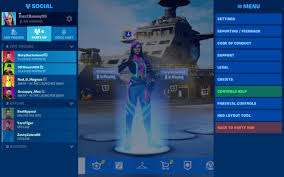
How to Add Friends on Fortnite: A Comprehensive Guide
Are you tired of playing Fortnite alone? Do you want to team up with your friends and take on the challenges of the game together? Look no further! In this article, we will guide you through the process of adding friends on Fortnite, regardless of the platform you are using.
Understanding Fortnite’s Cross-platform Play
Fortnite is a popular online multiplayer game that allows players to play together across different platforms. This means that you can play with your friends who use PlayStation 4, Xbox One, Nintendo Switch, PC, or mobile devices. To add friends on Fortnite, you need to follow the steps outlined below.
Adding Friends on Fortnite: A Step-by-step Guide
How to Add Friends on Fortnite (PS4)
If you are playing Fortnite on your PS4 and want to add a friend who also uses this console, here’s what you need to do:
- Ensure Your Console is Connected to The Playstation Network: Before adding friends, make sure that your PS4 is connected to the PlayStation Network.
- Access The Settings Menu: Go to the settings menu on your PS4 and select “Network.”
- Check Connection Internet: Ensure that your internet connection is stable and working properly.
- Search For Friends: Select “Search” from the menu, and type in the name of the friend you want to add.
- Send a Friend Request: Once you’ve found your friend’s name, select it, and send them a friend request.
How to Add Friends on Fortnite (Xbox One)
If you are playing Fortnite on your Xbox One and want to add a friend who also uses this console, here’s what you need to do:
- Ensure Your Console is Connected to The Xbox Network: Before adding friends, make sure that your Xbox One is connected to the Xbox network.
- Access The Settings Menu: Go to the settings menu on your Xbox One and select “Settings.”
- Check Connection Internet: Ensure that your internet connection is stable and working properly.
- Search For Friends: Select “Search” from the menu, and type in the name of the friend you want to add.
- Send a Friend Request: Once you’ve found your friend’s name, select it, and send them a friend request.
How to Add Friends on Fortnite (Nintendo Switch)
If you are playing Fortnite on your Nintendo Switch and want to add a friend who also uses this console, here’s what you need to do:
- Ensure Your Console is Connected to The Nintendo Network: Before adding friends, make sure that your Nintendo Switch is connected to the Nintendo network.
- Access The Settings Menu: Go to the settings menu on your Nintendo Switch and select “Settings.”
- Check Connection Internet: Ensure that your internet connection is stable and working properly.
- Search For Friends: Select “Search” from the menu, and type in the name of the friend you want to add.
- Send a Friend Request: Once you’ve found your friend’s name, select it, and send them a friend request.
How to Add Friends on Fortnite (PC)
If you are playing Fortnite on your PC and want to add a friend who also uses this platform, here’s what you need to do:
- Launch The Epic Games Launcher: Before adding friends, make sure that you have launched the Epic Games launcher.
- Access The Friend Menu: Go to the friend menu and select “Add Friend.”
- Search For Friends: Type in the name of the friend you want to add, or enter their email address.
- Send a Friend Request: Once you’ve found your friend’s name or entered their email address, send them a friend request.
How to Add Friends on Fortnite (Mobile)
If you are playing Fortnite on your mobile device and want to add a friend who also uses this platform, here’s what you need to do:
- Launch The Fortnite Mobile App: Before adding friends, make sure that you have launched the Fortnite mobile app.
- Access The Friend Menu: Go to the friend menu and select “Add Friend.”
- Search For Friends: Type in the name of the friend you want to add, or enter their email address.
- Send a Friend Request: Once you’ve found your friend’s name or entered their email address, send them a friend request.
Conclusion
Adding friends on Fortnite is a straightforward process that can be completed in just a few steps. Whether you’re playing on PS4, Xbox One, Nintendo Switch, PC, or mobile devices, the process remains the same. By following the steps outlined above, you’ll be able to add your friends and play together in no time.
Faqs
- Can I Play Fortnite With my Friends Who Use Different Platforms?
Yes, Fortnite allows cross-platform play, which means that you can play with friends who use different platforms. - How do I Add Friends on Fortnite?
To add friends on Fortnite, follow the steps outlined above for your specific platform. - Can I Add Friends Who Don’t Have an Epic Games Account?
Yes, you can add friends who don’t have an Epic Games account by sending them a friend request and inviting them to join your game. - How do I Know if my Friend Has Accepted my Friend Request?
You’ll receive a notification when your friend accepts your friend request. - Can I Play Fortnite With my Friends Who Use Different Languages?
Yes, Fortnite allows players from different languages to play together. - Is Cross-platform Play Available For All Fortnite Modes?
Cross-platform play is not available for all Fortnite modes, but it is available for the majority of game modes. - How do I Report a Player Who is Cheating or Using Exploits?
To report a player who is cheating or using exploits, follow the in-game reporting process or contact Epic Games support directly. - Can I Play Fortnite With my Friends Who Are Under 13 Years Old?
Yes, Fortnite allows players under 13 years old to play together, but parental consent is required for players under 18 years old.
We hope this article has been helpful!


