
How to Add Paypal to Your Mobile Device Wallet
Are you tired of carrying around multiple payment cards or having to manually enter your credit card information every time you make a purchase online? Do you want to enjoy the convenience of digital payments without worrying about security risks? Look no further than adding PayPal to your mobile device wallet!
What is Paypal And How Does It Work?
PayPal is a popular online payment service that allows users to send and receive money electronically. With PayPal, you can make purchases online or in-person using just your email address and password. You can also use PayPal to send money to friends and family, making it a great option for online shopping.
Adding Paypal to Your Mobile Device Wallet: A Step-by-step Guide
Whether you have an Android or iPhone device, adding PayPal to your mobile wallet is easy. Here’s a step-by-step guide to get you started:
Google Wallet (Android)
- Download And Install Google Wallet: If you haven’t already, download and install Google Wallet from the Google Play Store.
- Add Paypal as a Payment Method: Open Google Wallet, tap on “Payment methods,” and select “Add payment method.” Choose PayPal from the list of available options.
- Authorize Paypal to Use Your Device’s Nfc Capabilities: Allow Google Wallet to use your device’s NFC capabilities to facilitate contactless payments.
- Confirm Your Identity: Authenticate with PayPal using your email address and password, or through the PayPal app.
Paypal App (Android)
- Download And Install The Paypal App: If you haven’t already, download and install the PayPal app from the Google Play Store.
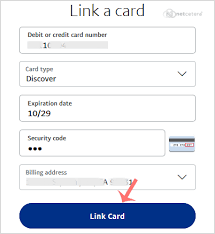
- Add a Card or Bank Account to Your Paypal Account: Tap on “Wallet” in the top right corner of the screen, then select “Add card” or “Link bank account.”
- Associate Your Paypal Account With Google Wallet: Go back to Google Wallet, tap on “Payment methods,” and select “Add payment method.” Choose PayPal from the list of available options.
Iphone (Apple Pay)
- Download And Install Apple Pay: If you haven’t already, download and install Apple Pay from the App Store.
- Add a Credit or Debit Card to Your Apple Pay Account: Tap on the “+” icon in the top right corner of the screen, then select “Add credit or debit card.”
- Authorize Paypal as a Payment Method: Go back to the Wallet app, tap on the “Payment methods” tab, and select “Add payment method.” Choose PayPal from the list of available options.
Benefits of Using Paypal With Your Mobile Device Wallet
Using PayPal with your mobile device wallet offers several benefits, including:
- Convenience: Make purchases online or in-person without having to carry multiple cards.
- Security: Enjoy enhanced security features, such as tokenization and encryption, to protect your sensitive information.
- Flexibility: Use PayPal to make purchases on websites, in apps, or through mobile devices.
Tips For Using Paypal With Your Mobile Device Wallet
To get the most out of using PayPal with your mobile device wallet, keep the following tips in mind:
- Keep Your Paypal Account Up-to-date: Make sure your PayPal account is active and has sufficient funds to avoid any disruptions.
- Regularly Review Your Payment History: Monitor your payment activity to ensure everything is accurate and secure.
- Take Advantage of Exclusive Offers: Check for special promotions and discounts available only to PayPal users.
Frequently Asked Questions (FAQs)
Here are some frequently asked questions about adding PayPal to your mobile device wallet:
Q: What devices support PayPal integration?
A: Both Android and iPhone devices can integrate with PayPal using Google Wallet or Apple Pay, respectively.
Q: How do I add a credit card to my PayPal account?
A: To add a credit card, open the PayPal app, tap on “Wallet,” then select “Add card” or “Link bank account.”
Q: Can I use PayPal for online shopping?
A: Yes! Use PayPal to make purchases on websites or through mobile apps.
Q: Is my information safe with PayPal?
A: PayPal uses advanced security features, such as tokenization and encryption, to protect your sensitive information.
Conclusion
Adding PayPal to your mobile device wallet is a simple process that can enhance your online shopping experience. By following the step-by-step guides provided above, you’ll be able to take advantage of the convenience, security, and flexibility offered by PayPal.


