
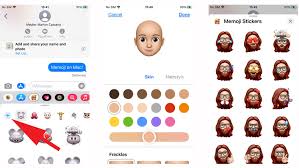
The Ultimate Guide to Adding Personalized Emojis on Whatsapp
Are you tired of using the same old emojis on WhatsApp? Do you want to add a personal touch to your conversations with friends and family? Look no further! In this comprehensive guide, we will walk you through the steps to add personalized emojis on WhatsApp, and explore other solutions to customize your chat experience.
Why Add Personalized Emojis on Whatsapp?
Adding personalized emojis on WhatsApp can elevate your conversation game by making it more engaging, fun, and expressive. With a wide range of emotions, objects, and animals at your fingertips, you can convey your feelings and humor in a more creative way. Whether you’re joking with friends or showing empathy with loved ones, personalized emojis can help you connect on a deeper level.
Method 1: Using The Built-in Emoji Keyboard
On Android devices, you can access the built-in emoji keyboard by going to Settings > System > Tongue and Insertion > Virtual Keyboard > Swiftkey > Emoji. On iPhone devices, tap on the emoji icon in the keyboard to access the emoji library. From there, you can browse through various categories and select your desired emojis.
Method 2: Using Bitmoji
Bitmoji is a popular app that allows you to create personalized avatars with different emotions, clothes, and accessories. To use Bitmoji on WhatsApp:
- Download and install the Bitmoji app from the Play Store or App Store.
- Create your avatar by choosing your complexion, hair, beard, and other features.
- Save your avatar and access it through the Settings > Tongue and Insertion > Virtual Keyboard on Android devices, or General > Keyboard > Keyboards > Add new keyboard on iPhone devices.
- Activate Bitmoji as a virtual keyboard, and you’ll be able to send personalized emojis with your avatar.
Method 3: Using Other Apps
If you’re not satisfied with the built-in emoji keyboard or Bitmoji, there are other apps that can help you create and add personalized emojis on WhatsApp:
- Emoji Sticker Editor (Android): A free app that allows you to create custom emojis using various shapes, colors, and expressions.
- Moji Maker (iOS): An app that enables you to create custom emojis from scratch, with a detailed editor and multiple features.
- Emotiyou (Online): A web service that lets you create custom emojis using your own photos or images.
Tips And Tricks
To get the most out of these methods:
- Experiment with different emojis and combinations to find the perfect fit for your personality.
- Share your favorite emojis with friends and family to spread the fun.
- Use personalized emojis to convey emotions, humor, or empathy in a more creative way.
- Don’t forget to save your changes or modifications to keep your avatar updated.
Conclusion
Adding personalized emojis on WhatsApp can revolutionize your chat experience by making it more engaging, fun, and expressive. With these methods and tips, you’ll be able to create and share custom emojis that reflect your personality and humor. Whether you’re joking with friends or showing empathy with loved ones, personalized emojis can help you connect on a deeper level.
Frequently Asked Questions (FAQs)
- Q: How do I Access The Built-in Emoji Keyboard on Android Devices?
A: Go to Settings > System > Tongue and Insertion > Virtual Keyboard > Swiftkey > Emoji. - Q: Can I Use Bitmoji on Both Android And Iphone Devices?
A: Yes, you can download and install the Bitmoji app from the Play Store or App Store on both platforms. - Q: How do I Save my Bitmoji Avatar?
A: Save your avatar by tapping on #Save in the Bitmoji app. - Q: Can I Use Other Apps to Create Custom Emojis?
A: Yes, there are several apps available that can help you create and add personalized emojis on WhatsApp, such as Emoji Sticker Editor, Moji Maker, and Emotiyou. - Q: How do I Share my Custom Emojis With Friends And Family?
A: Share your custom emojis by sending them in a chat or via email to others who use WhatsApp. - Q: Can I Modify my Bitmoji Avatar Later?
A: Yes, you can access the Bitmoji app and make changes to your avatar at any time. - Q: Are There Any Limitations to Using Personalized Emojis on Whatsapp?
A: No, there are no limitations to using personalized emojis on WhatsApp. However, some features may not be compatible with older devices or operating systems.
I hope this guide has been helpful in adding a personal touch to your WhatsApp conversations!


