
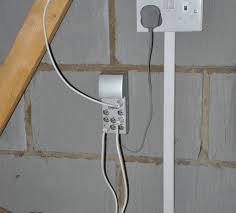
Regulating Amplifier Antenna Tv: A Comprehensive Guide
Are you tired of dealing with frustrating television channel reception problems? Do you suspect that an unstable signal and poor antenna quality are to blame? Look no further! In this article, we’ll explore the world of regulating amplifier antenna TV and provide you with a comprehensive guide on how to overcome these issues.
Understanding Amplifier Antenna TV
Before diving into the details, it’s essential to understand what an amplifier antenna TV is. An amplifier antenna TV is a device that amplifies weak television signals to improve reception quality. It’s designed to work in conjunction with your existing TV antenna, boosting the signal strength and helping you receive clearer channels.
How to Regulate Amplifier Antenna TV
To regulate an amplifier antenna TV, you’ll need to consider several factors:
- Signal Level: The ideal signal level for digital terrestrial television is between 45 dBµV and 70 dBµV. For satellite TV, it’s between 47-77 dBµV.
- Frequency Range: Make sure the amplifier covers the frequency range of your TV channels.
- Gain Adjustment: Adjust the gain to ensure optimal signal strength.
Measuring Signal Strength
To determine the correct gain setting, you’ll need to measure the signal strength using a signal analyzer or a cable tester. This will help you identify any issues with your antenna and make necessary adjustments.
Choosing The Right Amplifier
With so many amplifiers on the market, it can be overwhelming to choose the right one. Here are some factors to consider:
- Gain: Choose an amplifier with a gain that matches your signal strength requirements.
- Frequency Range: Ensure the amplifier covers the frequency range of your TV channels.
- Type: Decide between a passive or active amplifier, depending on your needs.
Tips For Installing Amplifier Antenna TV
To ensure smooth installation and optimal performance:
- Follow Manufacturer Instructions: Read the user manual carefully before installing the amplifier.
- Use High-quality Cables: Invest in good quality cables to minimize signal loss.
- Secure The Amplifier: Ensure the amplifier is securely fastened to prevent movement or damage.
The Benefits of Regulating Amplifier Antenna TV
Regulating an amplifier antenna TV offers numerous benefits, including:
- Improved Reception Quality: Enhance your TV viewing experience with clearer channels and better picture quality.
- Increased Signal Strength: Boost the signal strength to overcome issues with weak signals.
- Cost-effective Solution: Regulating an amplifier antenna TV is often a more cost-effective solution than replacing your existing TV or antenna.
Conclusion
Regulating an amplifier antenna TV is a straightforward process that can greatly improve your TV viewing experience. By understanding the factors involved, choosing the right amplifier, and following proper installation procedures, you’ll be able to enjoy clear and crisp TV channels without any issues. Remember to consider signal level, frequency range, gain adjustment, and signal strength measurement when regulating your amplifier antenna TV.
Faqs
- What is The Ideal Signal Level For Digital Terrestrial Television?
The ideal signal level for digital terrestrial television is between 45 dBµV and 70 dBµV. - How do I Measure Signal Strength?
You can use a signal analyzer or a cable tester to measure signal strength. - What Are The Benefits of Regulating an Amplifier Antenna Tv?
Regulating an amplifier antenna TV offers improved reception quality, increased signal strength, and cost-effective solution. - Can I Install an Amplifier Myself?
Yes, you can install an amplifier yourself if you follow manufacturer instructions and take necessary precautions. - How Often Should I Adjust The Gain on my Amplifier?
You may need to adjust the gain periodically depending on changes in your TV viewing habits or antenna position. - What Happens if I Don’t Regulate my Amplifier Correctly?
Incorrect regulation can lead to poor reception quality, increased signal loss, and decreased overall performance.
The Best Format Video For Youtube
When it comes to uploading videos to YouTube, choosing the right format is crucial. Here are some tips:
- Use Mp4: MP4 is the best format video for YouTube.
- Set Resolution to 16:9: Ensure your video has a resolution of 16:9.
- Choose Aac or H.264 Codec: Use AAC or H.264 Codec for audio and video, respectively.
The Best Format Video For Facebook
When uploading videos to Facebook:
- Use Mp4 or Mov: Choose between MP4 and MOV formats.
- Set Resolution to 16:9: Ensure your video has a resolution of 16:9.
- Choose H.264 Codec: Use H.264 Codec for video.
The Best Format Video For Instagram
When uploading videos to Instagram:
- Use Mp4 With Aac And H.264 Codec: Choose the best format video for Instagram.
- Set Frame Rate to 30 Fps: Ensure your video has a frame rate of 30 FPS.
- Choose Bitrate of 3500 Kbps: Set the bitrate to 3500 kbps.
The Best Format Video For TV
When it comes to storing videos on a TV:
- Use Mkv With H.264 Or H.265 Codec: Choose the best format video for TV.
- Set Resolution And Dimensions: Ensure your video has optimal resolution and dimensions.
- Leave Frame Rate Unchanged: Leave the frame rate unchanged.
Conclusion
Regulating amplifier antenna TV can greatly improve your TV viewing experience. By understanding signal strength, choosing the right amplifier, and following proper installation procedures, you’ll be able to enjoy clear and crisp TV channels without any issues.


