
How to Do Advertising on Google: A Comprehensive Guide
Are you looking for ways to promote your business or activity on the internet? Look no further than Google! In this article, we will explore the various options available to you, including doing advertising on Google with Ads, and how to optimize your website’s visibility on search engines.
Why Do Advertising on Google?
Advertising on Google is a great way to reach a targeted audience and increase brand awareness. With billions of people using Google every day, it’s an ideal platform to showcase your business or activity. Plus, with Google Ads, you only pay for the ads that are clicked on by users.
Understanding Google Ads
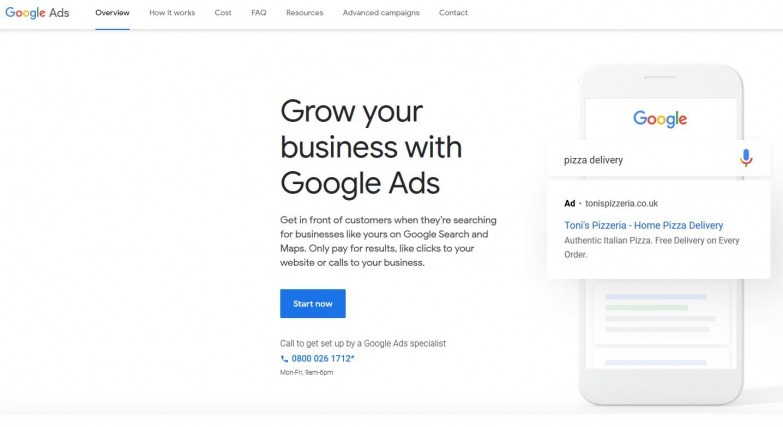
Google Ads allows you to create text-based ads that appear in search engine results pages (SERPs) and other websites across the web. You can choose from various ad formats, including:
- Text Ads: These are the most common type of ad and appear as a short text snippet above or below organic search results.
- Image Ads: These ads feature an image along with some text and can be used to grab users’ attention.
- Video Ads: These ads play a video clip when clicked on.
Step-by-step Guide to Creating Google Ads
To create a Google Ad, follow these steps:
- Sign in to Your Google Account: If you don’t have a Google account, create one now.
- Access The Google Ads Dashboard: Go to the Google Ads website and sign in to your account.
- Create a New Campaign: Click on the “Campaigns” tab and then click on “New Campaign.”
- Choose Your ad Format: Select the type of ad you want to create (text, image, or video).
- Define Your Target Audience: Choose the keywords that will trigger your ad to appear.
- Set Your Budget: Determine how much you’re willing to spend per day on ads.
- Write Your ad Copy: Craft a compelling headline and description for your ad.
- Upload Images or Videos (if Applicable): Add visuals to make your ad more engaging.
Tips For Effective Google Ads
To maximize the effectiveness of your Google Ads, keep these tips in mind:
- Use Relevant Keywords: Ensure that your ad copy includes the keywords that users are searching for.
- Keep Your ad Copy Concise: Use short and catchy headlines and descriptions.
- Optimize For Mobile Devices: More than half of internet users access websites through their smartphones.
- Monitor And Adjust: Regularly check your ad performance and make adjustments as needed.
How to Optimize Your Website’s Visibility on Google
While advertising on Google is a great way to reach new customers, optimizing your website’s visibility is crucial for long-term success. Here are some tips:
- Create High-quality Content: Develop informative, engaging, and relevant content that addresses users’ needs.
- Use Meta Tags And Descriptions: Ensure that your website has accurate and descriptive title tags and meta descriptions.
- Optimize Images: Use relevant alt text for images to help search engines understand their context.
- Build High-quality Backlinks: Earn links from authoritative websites to increase your website’s credibility.
Google Maps Advertising
If you want to reach customers in a specific geographic area, Google Maps advertising is an excellent option. You can create ads that appear on Google Maps and other platforms across the web.
To advertise on Google Maps:
- Sign in to Your Google Account: Ensure that you have a Google account.
- Access The Google Maps Dashboard: Go to the Google Maps website and sign in to your account.
- Add Your Business Listing: Claim your business listing and fill out the necessary information.
- Create an ad Campaign: Follow the same steps as creating a Google Ad, but choose the “Google Maps” option.
Conclusion
Advertising on Google is a powerful way to reach new customers and increase brand awareness. By following these tips and best practices, you can create effective Google Ads and optimize your website’s visibility for long-term success.
Frequently Asked Questions (FAQs)
- What is The Cost of Advertising on Google?
The cost of advertising on Google depends on several factors, including your budget, ad format, and target audience. - How do I Know Which Keywords to Use in my Ads?
Use tools like Google Keyword Planner or Keyword Tool to find relevant keywords for your business. - Can I Run Multiple ad Campaigns at The Same Time?
Yes, you can create multiple ad campaigns with different targeting options. - What is The Optimal Length of a Google Ad Headline And Description?
Keep headlines concise (under 30 characters) and descriptions short and engaging (under 80 words). - How Often Should I Review my ad Performance And Adjust Accordingly?
Regularly check your ad performance every week or two to ensure you’re getting the best possible results. - Can I Use Google Ads With Other Marketing Channels Like Social Media or Email Marketing?
Yes, Google Ads can be used in conjunction with other marketing channels to create a comprehensive marketing strategy. - How do I Measure The Success of my Google Ad Campaigns?
Use metrics like click-through rates (CTR), conversion rates, and cost per acquisition (CPA) to evaluate your ad performance. - What is The Difference Between Google Ads And Google Maps Advertising?
Google Ads targets users searching for specific keywords across the web, while Google Maps advertising focuses on reaching customers in a specific geographic area.
Additional Resources
For more information on advertising on Google or optimizing your website’s visibility, check out these additional resources:
- Google Ads Official Blog: Stay up-to-date with the latest news and tips from Google Ads.
- Google Search Console: Use this tool to monitor your website’s search engine rankings and optimize its visibility.
- Semrush: Get expert advice on SEO, PPC, and digital marketing from SEMrush.


