
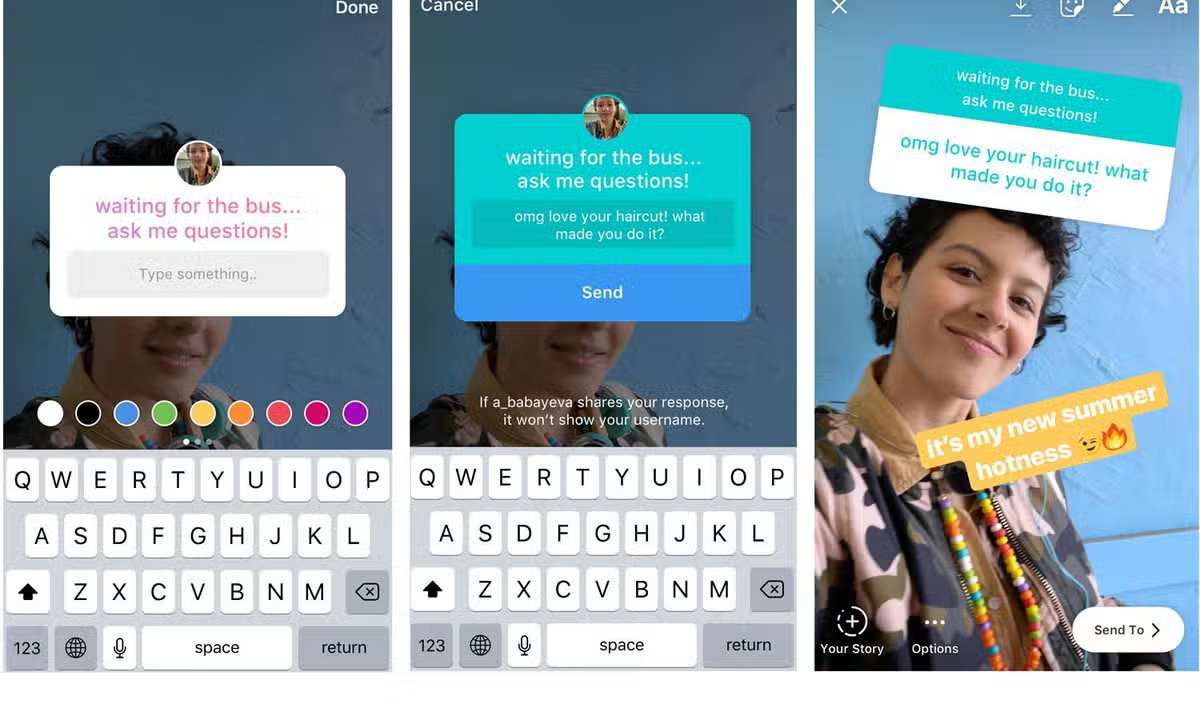
The Ultimate Guide to Answering Demands on Instagram
Are you tired of feeling overwhelmed by the demands on your Instagram account? Do you want to learn how to answer them efficiently and effectively? Look no further! In this article, we will delve into the world of Instagram’s “Answer” feature and show you how to use it like a pro.
What is The Answer Feature on Instagram?
The Answer feature on Instagram allows users to respond to comments, messages, and even direct messages in a quick and easy way. This feature is especially useful for businesses, influencers, and content creators who want to engage with their audience and build a loyal community.
How to Access The Answer Feature on Instagram
To access the Answer feature on Instagram, you need to have the latest version of the app installed on your smartphone. Once you’ve opened the app, tap on your profile picture in the top right corner, then select “Your activity” from the menu. From there, find the history that contains the demands you want to answer and swipe up to reveal the Answer feature.
How to Answer Demands on Instagram
To answer a demand on Instagram, simply tap on the answer button (represented by an envelope icon) next to the comment or message. You can then choose to respond privately or publicly, depending on your preference. If you choose to respond privately, the person who made the original comment will receive a direct message with your response.
Tips And Tricks For Answering Demands on Instagram
Here are some tips and tricks for answering demands on Instagram:
- Respond Quickly: The sooner you respond to comments and messages, the more likely it is that your audience will engage with your content.
- Keep it Concise: Keep your responses brief and to the point. This will make it easier for your audience to read and understand your message.
- Use Humor: Humor can be a great way to connect with your audience and build a loyal community.
- Be Authentic: Be true to yourself and your brand. Don’t try to be someone you’re not or pretend to have interests that you don’t really have.
How to Answer Demands on Instagram With The Background Feature
Did you know that you can answer demands on Instagram with a colored background? Yes, it’s possible! To do this, follow these steps:
- Open the Instagram app and select your profile picture in the top right corner.
- Tap on the history that contains the demand you want to answer.
- Swipe up to reveal the Answer feature.
- Select “Share the answer” from the menu.
- Choose a colored background from the options provided.
How to Answer Demands on Instagram With a Video
Want to respond to demands on Instagram with a video? You can! To do this, follow these steps:
- Open the Instagram app and select your profile picture in the top right corner.
- Tap on the history that contains the demand you want to answer.
- Swipe up to reveal the Answer feature.
- Select “Share the answer” from the menu.
- Choose the video option from the menu.
How to Answer Demands Issued by Other Users on Instagram
Do you want to respond to demands issued by other users on Instagram? You can! To do this, follow these steps:
- Open the Instagram app and select your profile picture in the top right corner.
- Tap on the history that contains the demand you want to answer.
- Swipe up to reveal the Answer feature.
- Select “Forward” from the menu.
How to Answer Anonymous Demands on Instagram
Can you answer anonymous demands on Instagram? Unfortunately, it’s not possible to completely avoid anonymity when using the Answer feature. However, there are ways to respond to anonymous comments and messages without revealing your identity. For example, you can use a second account or a third-party app like NGL.
Conclusion
Answering demands on Instagram is easier than ever with the Answer feature! By following these tips and tricks, you’ll be able to engage with your audience and build a loyal community in no time. Remember to respond quickly, keep it concise, use humor, and be authentic. Happy answering!
Frequently Asked Questions (FAQs)
- What is The Answer Feature on Instagram?
The Answer feature on Instagram allows users to respond to comments, messages, and direct messages in a quick and easy way.
- How do I Access The Answer Feature on Instagram?
To access the Answer feature on Instagram, open the app, tap on your profile picture, then select “Your activity” from the menu.
- Can I Answer Demands on Instagram With a Colored Background?
Yes, it’s possible to answer demands on Instagram with a colored background!
- How do I Respond to Demands Issued by Other Users on Instagram?
To respond to demands issued by other users on Instagram, follow these steps: Open the app, select your profile picture, tap on the history that contains the demand, swipe up to reveal the Answer feature, and select “Forward” from the menu.
- Can I Answer Anonymous Demands on Instagram?
Unfortunately, it’s not possible to completely avoid anonymity when using the Answer feature. However, there are ways to respond to anonymous comments and messages without revealing your identity.
- How do I Use a Colored Background When Answering Demands on Instagram?
To use a colored background when answering demands on Instagram, follow these steps: Open the app, select your profile picture, tap on the history that contains the demand, swipe up to reveal the Answer feature, and select “Share the answer” from the menu.
- Can I Respond to Demands on Instagram With a Video?
Yes, it’s possible to respond to demands on Instagram with a video!
- How do I Access my Profile Picture in The Top Right Corner of The Instagram App?
To access your profile picture in the top right corner of the Instagram app, tap on it and select “Your activity” from the menu.
- Can I Use a Second Account to Respond to Anonymous Demands on Instagram?
Yes, you can use a second account to respond to anonymous comments and messages without revealing your identity.
- What is Ngl?
NGL is a third-party app that allows users to forward and receive anonymous messages and share them in their Instagram histories.


