
How to Save Your Photos on Instagram: A Step-by-step Guide
Are you tired of losing your precious memories on Instagram? Do you want to save your photos and videos for future reference or to share with friends and family? Look no further! In this article, we will guide you through the process of saving your photos on Instagram, both on your smartphone and computer.
Why Save Your Photos on Instagram?
Saving your photos on Instagram is a great way to preserve memories and moments that are important to you. Whether it’s a special occasion, a vacation, or simply a funny moment, saving your photos can help you relive the experience whenever you want. Additionally, saving your photos can also be helpful for future reference, such as when you need to find a specific photo for a project or presentation.
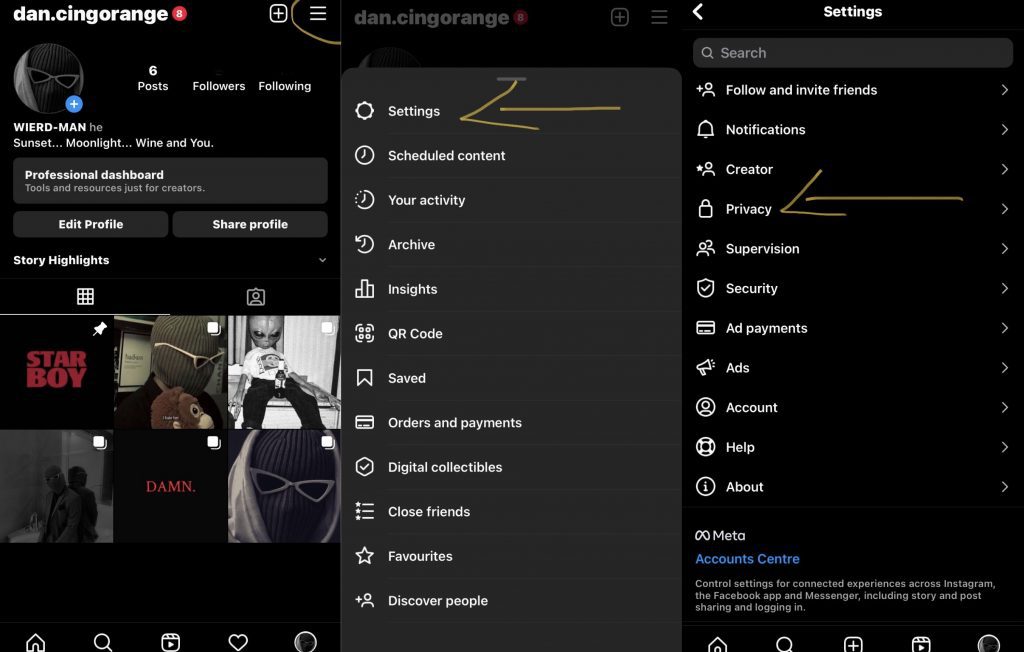
How to Save Your Photos on Instagram (Smartphone)
Saving your photos on Instagram is easy and can be done in just a few steps:
- Open The Instagram App: First, open the Instagram app on your smartphone.
- Access Your Profile: Tap on your profile picture at the bottom right corner of the screen to access your profile page.
- Select The Photo You Want to Save: Select the photo you want to save by tapping on it.
- Tap The Three Horizontal Lines: Tap the three horizontal lines at the top right corner of the screen.
- Select “Save”: From the menu that appears, select “Save”.
- Choose a Location to Save The Photo: Choose a location on your device where you want to save the photo.
How to Save Your Photos on Instagram (Computer)
Saving your photos on Instagram is also possible on your computer:
- Open Instagram in a Browser: Open Instagram in a browser on your computer.
- Access Your Profile: Click on your profile picture at the top right corner of the screen to access your profile page.
- Select The Photo You Want to Save: Select the photo you want to save by clicking on it.
- Click on The Three Dots: Click on the three dots at the top right corner of the screen.
- Select “Save”: From the menu that appears, select “Save”.
- Choose a Location to Save The Photo: Choose a location on your computer where you want to save the photo.
How to Save All Your Photos on Instagram
If you want to save all your photos on Instagram at once, you can do so by following these steps:
- Open The Instagram App: Open the Instagram app on your smartphone.
- Access Your Profile: Tap on your profile picture at the bottom right corner of the screen to access your profile page.
- Select “Your Activity”: Select “Your activity” from the menu that appears.
- Select “Photos And Videos”: From the menu that appears, select “Photos and videos”.
- Tap on The Three Horizontal Lines: Tap on the three horizontal lines at the top right corner of the screen.
- Select “Save”: From the menu that appears, select “Save”.
How to Save Your Instagram Profile Picture
If you want to save your Instagram profile picture, you can do so by following these steps:
- Open Instagram in a Browser: Open Instagram in a browser on your computer.
- Access Your Profile: Click on your profile picture at the top right corner of the screen to access your profile page.
- Click on The Three Dots: Click on the three dots at the top right corner of the screen.
- Select “Save”: From the menu that appears, select “Save”.
How to Save Your Instagram Direct Messages
If you want to save your Instagram direct messages, you can do so by following these steps:
- Open Instagram in a Browser: Open Instagram in a browser on your computer.
- Access Your Profile: Click on your profile picture at the top right corner of the screen to access your profile page.
- Click on The Three Dots: Click on the three dots at the top right corner of the screen.
- Select “Save”: From the menu that appears, select “Save”.
How to Save Your Instagram Stories
If you want to save your Instagram stories, you can do so by following these steps:
- Open Instagram in a Browser: Open Instagram in a browser on your computer.
- Access Your Profile: Click on your profile picture at the top right corner of the screen to access your profile page.
- Click on The Three Dots: Click on the three dots at the top right corner of the screen.
- Select “Save”: From the menu that appears, select “Save”.
How to Save Your Instagram Reels
If you want to save your Instagram reels, you can do so by following these steps:
- Open Instagram in a Browser: Open Instagram in a browser on your computer.
- Access Your Profile: Click on your profile picture at the top right corner of the screen to access your profile page.
- Click on The Three Dots: Click on the three dots at the top right corner of the screen.
- Select “Save”: From the menu that appears, select “Save”.
Conclusion
Saving your photos on Instagram is easy and can be done in just a few steps. Whether you want to save individual photos or all your photos at once, we have guided you through the process. We hope this article has been helpful in answering your questions about saving your photos on Instagram.
Frequently Asked Questions
- Can I save my Instagram profile picture?
- Yes, you can save your Instagram profile picture by following the steps outlined above.
- How do I save all my photos on Instagram at once?
- You can save all your photos on Instagram at once by following the steps outlined above.
- Can I save my Instagram direct messages?
- Yes, you can save your Instagram direct messages by following the steps outlined above.
- How do I save my Instagram stories?
- You can save your Instagram stories by following the steps outlined above.
- Can I save my Instagram reels?
- Yes, you can save your Instagram reels by following the steps outlined above.


