
How to Become Affiliated on Twitch: A Step-by-step Guide
Are you a passionate streamer looking to build a community online and monetize your channel? Look no further! In this article, we’ll guide you through the process of becoming affiliated on Twitch, one of the most popular live streaming platforms.
What is an Affiliate on Twitch?
Before we dive into the requirements, let’s define what it means to be an affiliate on Twitch. An affiliate is a streamer who has met certain criteria and can now monetize their channel through subscriptions, donations, and ad revenue. It’s a prestigious status that allows you to take your streaming career to the next level.
Requirements to Become Affiliated on Twitch
To become affiliated on Twitch, you’ll need to meet the following requirements:
- Own a Twitch Account: If you don’t have an account yet, create one and follow our guide on how to set up a new Twitch account.
- Create a Channel on Twitch: If you haven’t already, create a channel on Twitch and customize it with your branding, profile picture, and bio.
- Meet The Age Requirement: You must be at least 18 years old to apply for affiliation.
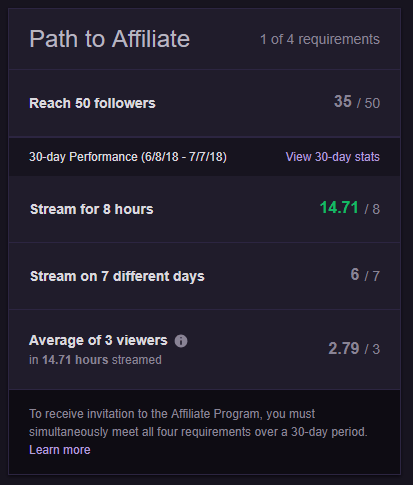
- Demonstrate Consistency: In the last 30 days, you’ll need to have broadcasted at least 8 hours of content in 7 different days.
How to Check Your Progress
To check your progress towards becoming affiliated on Twitch, follow these steps:
- Log in to your Twitch account.
- Click on your profile picture and select “Dashboard” from the dropdown menu.
- Navigate to the “Objective Analytics” section and click on it.
- Look for the “Becoming an Affiliate” tab and check your progress.
What Happens After You Become Affiliated?
Once you’ve become affiliated, you’ll need to complete a procedure of recording fiscal data. This involves:
- Recording Your Fiscal Data: Enter your tax information, including your name, surname, fiscal code, and address.
- Accepting The Affiliate Agreement: Review and accept the terms of service for affiliates on Twitch.
- Completing Two Fiscal Questionnaires: Fill out two forms related to royalties and services taxes.
- Choosing a Preferred Payment Method: Select how you’d like to receive payments from Twitch.
How to Become a Partner on Twitch
Are you looking to take your streaming career to the next level? Becoming a partner on Twitch can open doors to new opportunities, including:
- Increased Visibility: Get more exposure on the platform with exclusive promotions and features.
- Access to Exclusive Functionalities: Gain access to personalized features and tools that enhance the viewer experience.
- Sponsorship Opportunities: Attract sponsors and partners who want to collaborate with top-tier streamers.
To become a partner on Twitch, you’ll need to meet more stringent requirements, including:
- A Solid Base of Active Viewers: Reach at least 75 concurrent viewers during your live streams.
- Consistency in Streaming: Broadcast for at least 25 hours across 12 different days within the last 30 days.
Tips And Resources
Want to optimize your channel for maximum growth? Follow our guide on how to grow on Twitch, which includes tips and tricks on:
- Increasing Traffic
- Enhancing Quality of Content
- Building a Loyal Community
Conclusion
Becoming affiliated or a partner on Twitch requires dedication, hard work, and a willingness to continuously improve your streaming skills. By following these steps and guidelines, you can unlock new opportunities and take your streaming career to the next level.
Frequently Asked Questions (FAQs)
- What is The Difference Between Being an Affiliate And a Partner on Twitch?
An affiliate has met certain requirements but doesn’t have access to all the benefits of partnership, such as exclusive features and sponsorship opportunities. - How Long Does it Take to Become Affiliated on Twitch?
The process typically takes 30 days, during which you’ll need to meet the required streaming hours and viewer counts. - Can I Still Apply For Affiliation if I’m Under 18?
Yes, but your parent or guardian must accept the terms of service on your behalf. - What Happens if I Don’t Meet The Requirements?
You can try again after meeting the necessary criteria.


