
How to Block a Number on Your Phone
Are you tired of unwanted phone calls from telemarketers, friends, or family members who just won’t take no for an answer? Do you find yourself getting frustrated with the constant ringing and notifications on your phone? Well, you’re in luck! In this article, we’ll show you how to block a number on your phone, whether it’s on Android, iPhone, WhatsApp, or even a landline.
Why Block a Number?
Before we dive into the nitty-gritty of blocking numbers, let’s talk about why you might want to do so. Perhaps you’re trying to avoid calls from telemarketers who just won’t take no for an answer. Maybe you have a friend or family member who always calls at inconvenient times and refuses to respect your boundaries. Whatever the reason, blocking a number can be a great way to reclaim some peace and quiet in your life.
Blocking Numbers on Android
If you’re using an Android device, blocking numbers is relatively straightforward. Here’s how:
- Open The Phone App: First, open the Phone app on your Android device.
- Tap on Recent: Next, tap on the “Recent” tab at the bottom of the screen.
- Find The Number You Want to Block: Scroll through the list of recent calls and find the number you want to block.
- Long Press on The Number: Long press on the number you want to block until a menu appears.
- Tap on “Block”: Tap on the “Block” option from the menu.
- Confirm Your Choice: Confirm that you want to block the number by tapping on “OK”.
Blocking Numbers on Iphone
If you’re using an iPhone, blocking numbers is also relatively straightforward. Here’s how:
- Open The Phone App: First, open the Phone app on your iPhone.
- Tap on Recent: Next, tap on the “Recent” tab at the bottom of the screen.
- Find The Number You Want to Block: Scroll through the list of recent calls and find the number you want to block.
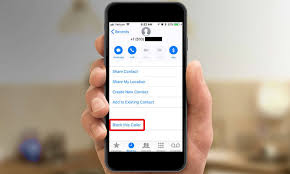
- Tap on The (i) Icon: Tap on the “(i)” icon next to the number you want to block.
- Scroll Down And Tap on “Block This Caller”: Scroll down and tap on the “Block this Caller” option.
- Confirm Your Choice: Confirm that you want to block the number by tapping on “Block Contact”.
Blocking Numbers on Whatsapp
If you’re using WhatsApp, blocking numbers is also relatively straightforward. Here’s how:
- Open Whatsapp: First, open WhatsApp on your device.
- Tap on The Three Dots: Next, tap on the three dots at the top right corner of the screen.
- Tap on Settings: Tap on the “Settings” option from the menu.
- Tap on Privacy: Scroll down and tap on the “Privacy” option.
- Tap on Contacts Blocked: Tap on the “Contacts blocked” option.
- Add The Contact You Want to Block: Add the contact you want to block by tapping on the “+” icon.
Blocking Numbers on Landline
If you’re using a landline, blocking numbers can be a bit more tricky. However, most modern landlines come with features that allow you to block specific numbers. Here’s how:
- Check Your Phone Manual: First, check your phone manual to see if it has a feature for blocking numbers.
- Contact Your Provider: If your phone doesn’t have this feature, contact your service provider to see if they can block the number for you.
Why Blocking Numbers is Important
Blocking numbers may seem like a minor issue to some, but it’s actually quite important. Here are just a few reasons why:
- Peace And Quiet: By blocking unwanted calls, you can reclaim some peace and quiet in your life.
- Reduced Stress: Unwanted calls can be stressful and frustrating. Blocking numbers can help reduce this stress.
- Improved Productivity: With fewer distractions, you can focus on what’s important – work, family, friends, or whatever it is that you need to do.
Conclusion
Blocking numbers may seem like a small thing, but it can have a big impact on your life. Whether it’s on Android, iPhone, WhatsApp, or even a landline, blocking unwanted calls can be a great way to reclaim some peace and quiet in your life. So next time you’re getting frustrated with an unwanted call, remember: You have the power to block that number!


