
Blocking Anonymous Calls on Iphone: A Comprehensive Guide
Are you tired of receiving unwanted calls from unknown numbers? Do you wish there was a way to block these pesky calls on your iPhone? Look no further! In this article, we will explore the various methods to block anonymous calls on your iPhone, ensuring you can enjoy peace and quiet without any disturbances.
Why Block Anonymous Calls?
Before we dive into the solutions, let’s talk about why blocking anonymous calls is essential. Receiving unwanted calls from unknown numbers can be frustrating and even disturbing. These calls often come from spammers or scammers trying to sell you something or extract sensitive information. By blocking these calls, you can protect yourself from potential scams and maintain a peaceful environment.
Method 1: Using The “Silence Unknown Calls” Feature
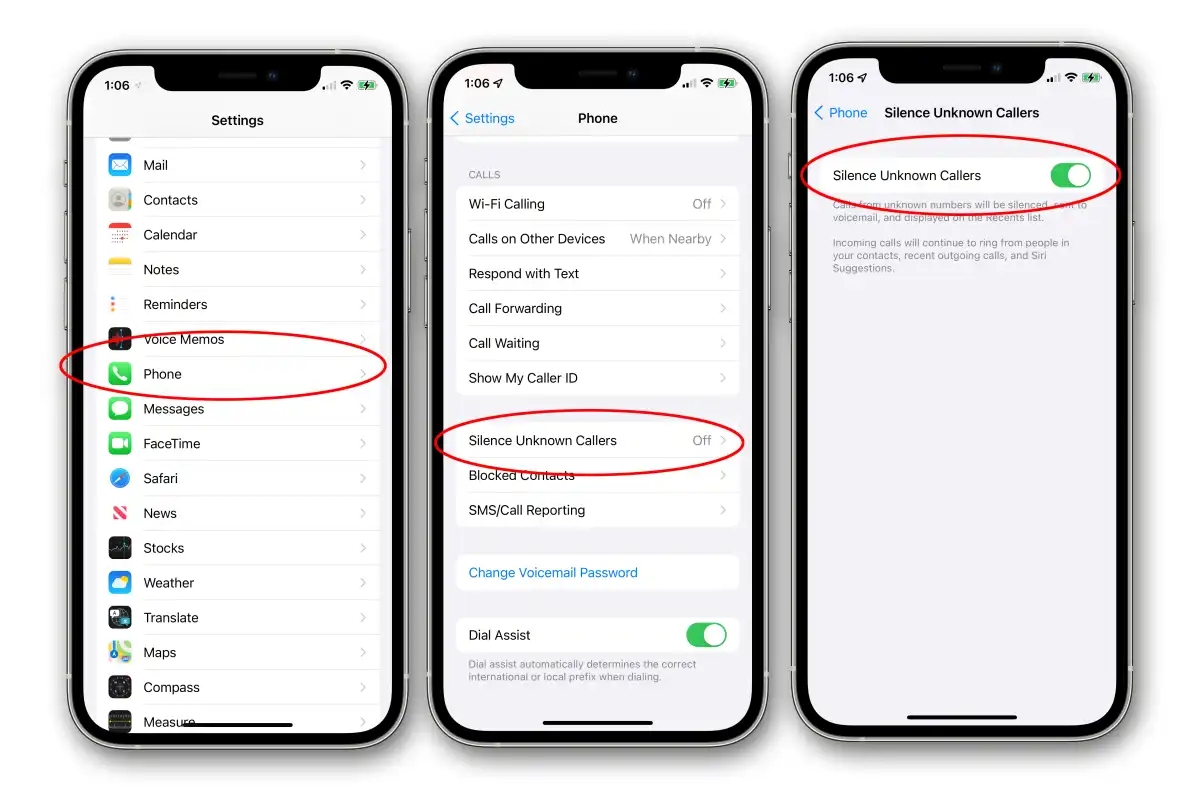
The first method to block anonymous calls on your iPhone is by using the “Silence Unknown Calls” feature in iOS settings. To do this:
- Go to Settings > Phone
- Scroll down to the section that says “Calls”
- Toggle the switch next to “Silence Unknown Callers” to ON
This will silence all unknown callers, including those with blocked numbers or private caller ID.
Method 2: Using The “Full Immersion” Feature
Another way to block anonymous calls on your iPhone is by using the “Full Immersion” feature. This feature allows you to set specific times when you don’t want to receive any calls, even from known contacts.
- Go to Settings > Full Immersion
- Choose a schedule or time frame when you don’t want to receive calls
- Select an option to block all calls during that time
This method is particularly useful if you have work or school commitments and need to focus without distractions.
Method 3: Blocking Specific Numbers
If you only want to block specific numbers, you can do so by adding them to your iPhone’s “Blocked Contacts” list.
- Go to Settings > Phone
- Scroll down to the section that says “Blocked Contacts”
- Tap on the “+” icon at the top-right corner and add a contact
You can also block numbers not saved in your contacts list by going to the Contacts app, tapping on the “+” icon, and adding a new contact.
Method 4: Using Third-party Apps
If you want more advanced features or need additional protection, consider using third-party apps designed specifically for blocking anonymous calls. Some popular options include Whooming, which can identify private numbers, and an instrument contacted to disposal directly from phone managers that displays the true caller ID.
Conclusion
Blocking anonymous calls on your iPhone is a simple yet effective way to maintain peace and quiet without distractions. By using one or more of the methods outlined above, you can ensure that unwanted calls are silenced, protecting yourself from potential scams and disturbances. Whether you choose the “Silence Unknown Calls” feature, “Full Immersion,” blocking specific numbers, or third-party apps, take control of your iPhone and enjoy a disturbance-free experience.
Frequently Asked Questions (FAQs)
- Q: How do I Block Anonymous Calls on my Iphone?
A: You can block anonymous calls by using the “Silence Unknown Calls” feature in iOS settings, setting up a “Full Immersion” schedule, blocking specific numbers, or using third-party apps. - Q: Can I Block All Unknown Calls on my Iphone?
A: Yes, you can block all unknown calls on your iPhone by using the “Silence Unknown Callers” feature and toggling it to ON. - Q: How do I Add a Contact to my Blocked Contacts List?
A: To add a contact to your Blocked Contacts list, go to Settings > Phone, scroll down to Blocked Contacts, tap on the “+” icon at the top-right corner, and add the contact. - Q: Are Third-party Apps Safe to Use?
A: Most third-party apps designed for blocking anonymous calls are safe to use; however, be cautious when downloading and installing any app, ensuring it’s from a reputable source.
Additional Resources
For more information on blocking anonymous calls or discovering who’s behind a private number, check out our guides on Whooming and taking control of your phone.


