
Blocking Unwanted Calls on Your Android or Iphone: A Step-by-step Guide
Are you tired of receiving unwanted calls from telemarketers, scammers, or annoying acquaintances? Do you wish there was a way to block these calls without resorting to complex procedures or expensive services? Look no further! In this article, we will guide you through the simple steps to block unwanted calls on your Android or iPhone.
Understanding The Problem
Receiving unwanted calls can be frustrating and time-consuming. Not only do they interrupt your daily activities, but they also consume valuable data and battery life on your mobile device. Moreover, dealing with these calls can lead to feelings of anxiety and stress.
Blocking Unwanted Calls: A Viable Solution
Fortunately, both Android and iPhone offer built-in features to block unwanted calls. In this article, we will explore the procedures for blocking calls on these two leading platforms.
Blocking Calls on Android
To block calls on your Android device:
- Open The Dialer: Start by opening the dialer app on your Android device.
- Tap Menu/settings: Tap the menu button (usually represented by three horizontal lines) and select “Settings” from the list of options.
- Select Other Settings: In the settings menu, scroll down and tap “Other settings.”
- Block Called Numbers: Tap “Block called numbers” and then choose the contacts you want to block.
- Add Contacts to Block List: To add new contacts to your block list, open the Contacts app and create a new contact with the phone number you want to block.
Blocking Calls on Iphone
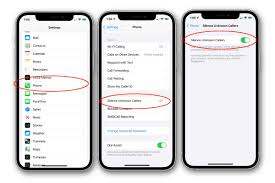
To block calls on your iPhone:
- Open Settings: Open the Settings app on your iPhone.
- Select Phone: Tap “Phone” from the list of settings options.
- Blocked Contacts: Scroll down and tap “Blocked contacts.”
- Add New Contact to Block List: To add a new contact to your block list, open the Contacts app and create a new contact with the phone number you want to block.
Using Third-party Apps to Block Calls
While the built-in features on Android and iPhone are effective in blocking unwanted calls, there are also third-party apps available that can enhance this functionality. Some popular options include:
- Should I Answer?: A highly-rated app that blocks calls from unknown numbers, telemarketers, and scammers.
- Truecaller: A well-known app that identifies and blocks spam calls, as well as provides a database of known spammers and scammers.
Blocking Calls on Landline Phones
If you’re experiencing unwanted calls on your landline phone, there are also ways to block these calls. Many modern landline phones come with built-in features to block specific numbers or create a “blacklist” of unwanted callers. If your landline phone does not have this feature, you can contact your service provider to request the activation of a remote blocking service.
Conclusion
Blocking unwanted calls on your Android or iPhone is a simple and effective way to reduce stress and save time. By following the steps outlined in this article, you can take control of who calls you and when. Remember to also explore third-party apps that can enhance this functionality and provide additional features.
Frequently Asked Questions (FAQs)
- Q: Can I Block Specific Numbers on my Iphone?
A: Yes, you can block specific numbers on your iPhone by adding them to the “Blocked contacts” list in Settings. - Q: How do I Use Truecaller to Block Unwanted Calls?
A: To use Truecaller, download and install the app on your Android or iPhone device. Then, follow the in-app instructions to add contacts to your block list. - Q: Can I Block Calls From Telemarketers on my Landline Phone?
A: Yes, you can block calls from telemarketers on your landline phone by creating a “blacklist” of unwanted numbers or contacting your service provider to request the activation of a remote blocking service. - Q: How do I Record And Report Unwanted Calls to The Public Record of Oppositions?
A: To record and report unwanted calls, visit the Public Record of Oppositions website and follow the instructions to create an account and record up to 5 phone numbers. - Q: Can I Use a Third-party App to Block Calls on my Android or Iphone?
A: Yes, there are many third-party apps available that can enhance the built-in call blocking features on your Android or iPhone device.
Blocking Unwanted Calls: A Summary
- Blocking unwanted calls is a simple and effective way to reduce stress and save time.
- Both Android and iPhone offer built-in features to block unwanted calls.
- Third-party apps, such as Truecaller, can enhance this functionality and provide additional features.
- Landline phones also have features to block specific numbers or create a “blacklist” of unwanted callers.
By following the steps outlined in this article, you can take control of who calls you and when. Remember to always explore available options and services that can help you manage unwanted calls effectively.


