
How to Block Someone on Whatsapp
Are you tired of receiving unwanted messages or calls from someone on WhatsApp? Do you want to know how to block them without any hassle? Look no further! In this article, we will guide you through the simple steps to block someone on WhatsApp, whether you’re using an Android, iPhone, or PC.
Why Block Someone on Whatsapp?
Before we dive into the instructions, let’s talk about why you might want to block someone on WhatsApp. Perhaps they’re sending you too many messages or calls, and you need some peace and quiet. Maybe they’re being annoying or spamming you with unwanted content. Whatever the reason, blocking them is a simple way to take control of your online interactions.
Blocking Someone on Whatsapp: A Step-by-step Guide
Here’s how to block someone on WhatsApp:
On Android
- Open Whatsapp: First, open the WhatsApp app on your Android device.
- Go to Chat: Tap on the chat icon in the top-right corner of the screen.
- Select Contact: Choose the contact you want to block from the list of chats.
- Tap on Menu: Tap on the three dots (⋮) at the top-right corner of the screen.
- Block Contact: Select “Block contact” from the menu.
- Confirm Block: Confirm that you want to block the contact by tapping on “Block”.
On Iphone
- Open Whatsapp: First, open the WhatsApp app on your iPhone.
- Go to Chat: Tap on the chat icon in the top-left corner of the screen.
- Select Contact: Choose the contact you want to block from the list of chats.
- Tap on Info: Tap on the “i” icon next to the contact’s name.
- Block Contact: Select “Block this contact” from the menu.
- Confirm Block: Confirm that you want to block the contact by tapping on “Block”.
On PC
- Open Whatsapp Web: First, open WhatsApp Web in your web browser.
- Go to Chat: Click on the chat icon at the top-left corner of the screen.
- Select Contact: Choose the contact you want to block from the list of chats.
- Click on Menu: Click on the three dots (⋮) at the top-right corner of the screen.
- Block Contact: Select “Block contact” from the menu.
- Confirm Block: Confirm that you want to block the contact by clicking on “Block”.
How to Block Someone Without Them Knowing
If you want to block someone without them knowing, you can do so without opening their chat. Here’s how:
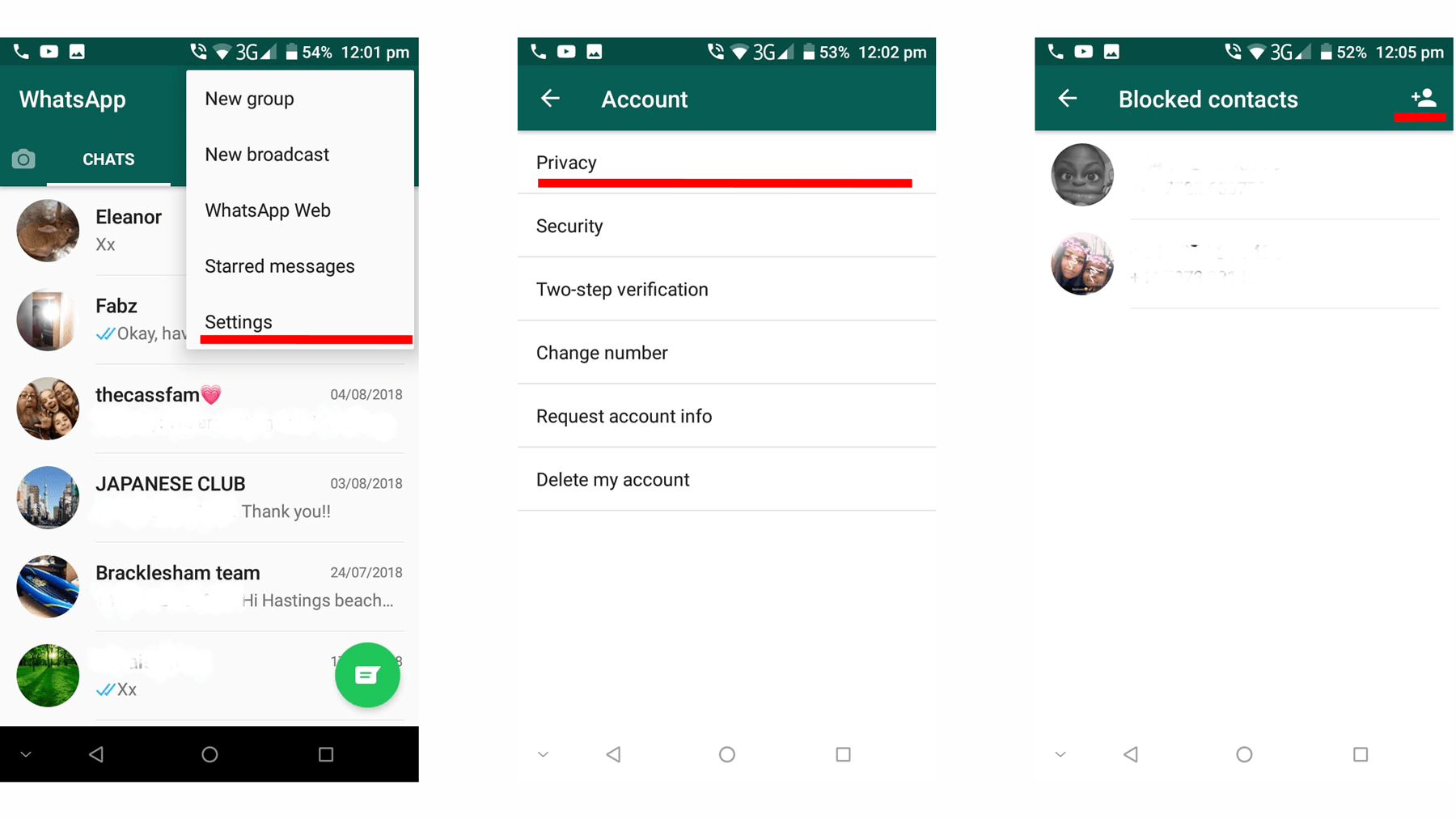
On Android
- Go to Settings: Tap on the three dots (⋮) at the top-right corner of the screen.
- Select Privacy: Choose “Privacy” from the menu.
- Block Contacts: Select “Contacts blocked” and choose the contact you want to block.
On Iphone
- Go to Settings: Tap on the “Settings” icon at the bottom-left corner of the screen.
- Select Privacy: Choose “Privacy” from the menu.
- Blocked Contacts: Select “Blocked contacts” and add the contact you want to block.
On PC
- Go to Whatsapp Web: Open WhatsApp Web in your web browser.
- Click on Menu: Click on the three dots (⋮) at the top-right corner of the screen.
- Select Privacy: Choose “Privacy” from the menu.
- Block Contacts: Select “Contacts blocked” and add the contact you want to block.
How to Block a Number Not in Your Contact List
If someone is spamming you with unwanted messages or calls, and they’re not in your contact list, here’s how to block them:
On Android
- Open Whatsapp: First, open the WhatsApp app on your Android device.
- Go to Chat: Tap on the chat icon at the top-right corner of the screen.
- Tap on Menu: Tap on the three dots (⋮) at the top-right corner of the screen.
- Block Number: Select “Block number” and enter the number you want to block.
On Iphone
- Open Whatsapp: First, open the WhatsApp app on your iPhone.
- Go to Chat: Tap on the chat icon at the top-left corner of the screen.
- Tap on Menu: Tap on the three dots (⋮) at the top-right corner of the screen.
- Block Number: Select “Block this number” and enter the number you want to block.
On PC
- Open Whatsapp Web: First, open WhatsApp Web in your web browser.
- Go to Chat: Click on the chat icon at the top-left corner of the screen.
- Click on Menu: Click on the three dots (⋮) at the top-right corner of the screen.
- Block Number: Select “Block number” and enter the number you want to block.
How to Block Someone on a Stolen Phone
If your phone has been stolen, it’s essential to block WhatsApp on that device to prevent unauthorized access to your account. Here’s how:
- Denounce Theft: First, report the theft to the authorities.
- Block Sim Card: Contact your operator and ask them to block the SIM card associated with your WhatsApp account.
- Set Up New Device: Set up a new device (you can use a temporary one) and install WhatsApp on it.
- Configure Account: Configure your WhatsApp account on the new device using the same phone number.
By following these steps, you’ll be able to block someone on WhatsApp without any hassle. Remember to also report the theft or loss of your device to the authorities and take necessary steps to secure your online presence.
Conclusion
Blocking someone on WhatsApp is a straightforward process that can help you maintain peace and quiet in your online interactions. Whether you’re using an Android, iPhone, or PC, the steps are simple and easy to follow. Remember to always report theft or loss of your device to the authorities and take necessary steps to secure your online presence.


