
How to Potentiate Your Wifi Signal at Home
Are you tired of having a weak or unstable WiFi signal in your home? Do you want to extend the range of your internet connection without breaking the bank? Look no further! In this article, we’ll explore some effective and easy-to-implement solutions to potentiate your WiFi signal at home.
Why is My Wifi Signal Weak?
Before we dive into the solutions, let’s first understand why your WiFi signal might be weak. There are several reasons for this:
- Distance from the router: The farther you are from the router, the weaker your WiFi signal will be.
- Physical barriers: Walls, floors, and ceilings can weaken or block your WiFi signal.
- Interference from other devices: Other wireless devices in your home or neighborhood can interfere with your WiFi signal.
Solution 1: Reposition Your Antennas
One of the simplest solutions to improve your WiFi signal is to reposition your antennas. If your router has external antennas, try placing them in different directions to see if you get a stronger signal. You can also experiment with placing them at a higher position or closer together.
Solution 2: Change Your Router’s Frequency Band
Another solution is to change your router’s frequency band from 2.4 GHz to 5 GHz. The 5 GHz band offers faster speeds and less interference, but its range is generally shorter than the 2.4 GHz band. Check if your router has this option by logging into its admin panel.
Solution 3: Change Your Wifi Channel
Changing your WiFi channel can also help improve your signal strength. Try changing to a different channel using your router’s admin panel or mobile app. You can use tools like Wi-Fi Analyzer to scan for nearby networks and find the least crowded channel.
Solution 4: Use a Range Extender
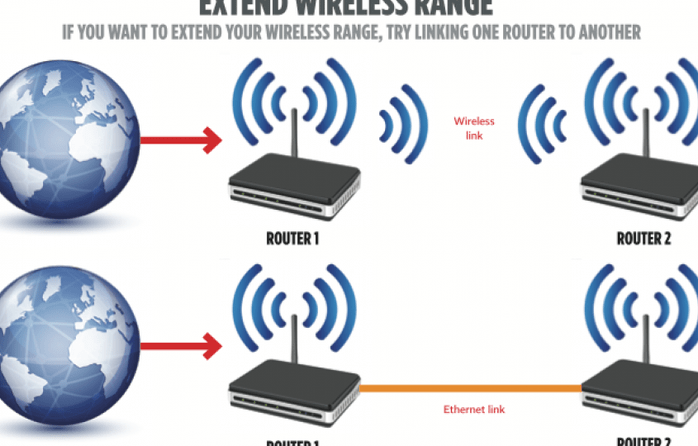
A range extender is a device that repeats your WiFi signal, allowing you to extend its range. These devices are easy to set up and can be found at most electronics stores or online. They usually have a small footprint and can be placed anywhere in your home.
Solution 5: Use Powerline Technology
Powerline technology uses your home’s electrical wiring to create a network of connected devices, extending your WiFi signal. This solution is ideal for homes with multiple floors or areas where WiFi signals are weak.
Solution 6: Add an External Antenna
If your router doesn’t have external antennas, you can add one using a DIY kit or purchase a separate antenna specifically designed for your router model. Make sure to follow the manufacturer’s instructions for installation and setup.
Conclusion
Potentiating your WiFi signal at home is easier than you think! By following these simple solutions, you can enjoy a stronger and more stable internet connection throughout your house. Remember to experiment with different options until you find the one that works best for you.
Frequently Asked Questions (FAQs)
- Q: How do I Know if my Wifi Signal is Weak?
A: If your internet speeds are slow, or you experience frequent disconnections, it’s likely that your WiFi signal is weak. - Q: What Are The Benefits of Using a Range Extender?
A: Range extenders can improve your WiFi signal strength and extend its range, allowing you to connect devices in areas where WiFi signals are weak. - Q: Can I Use Powerline Technology With my Existing Router?
A: Yes, most modern routers support Powerline technology, but make sure to check compatibility before purchasing a Powerline adapter. - Q: How do I Set up an External Antenna For my Router?
A: Follow the manufacturer’s instructions or consult online resources for step-by-step guides on setting up an external antenna for your specific router model.
Useful Resources
- Wi-Fi Analyzer (app)
- Range Extender reviews (Amazon, Best Buy)
- Powerline technology tutorials (devolo, TP-Link)
- DIY External Antenna kits (eBay, Amazon)
Disclaimer
This article is intended for informational purposes only. While we strive to provide accurate information, we take no responsibility for any damages or losses resulting from the use of the solutions presented herein.


