
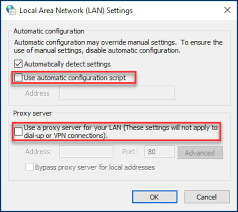
How to Bypass a Proxy on Your School or Office Computer
Are you tired of being restricted from accessing certain websites on your school or office computer? Do you want to bypass the proxy settings and access the internet freely? You’re not alone! Many people face this issue, but don’t worry, we’ve got the solution for you.
What is a Proxy?
A proxy is a server that acts as an intermediary between your computer and the internet. It helps to filter and block certain websites, often based on their content or location. While proxies are useful in some situations, they can be restrictive when it comes to accessing certain websites.
Why Do Schools And Offices Use Proxies?
Schools and offices use proxies to:
- Block access to adult or explicit content
- Filter out malware and viruses
- Monitor employee internet usage
- Improve network security
While these measures are necessary, they can sometimes restrict your freedom on the internet. That’s where our solutions come in.
Solution 1: Use a Vpn (Virtual Private Network)
One of the most effective ways to bypass a proxy is by using a VPN. A VPN creates a secure and encrypted tunnel between your computer and the internet, masking your IP address and location. This way, you can access websites that are blocked by the proxy without being detected.
Why Choose Nordvpn?
NordVPN is one of the most popular and reliable VPN services available. With over 6000 servers in 61 countries, it offers a high level of security, speed, and anonymity. Here are some reasons why you should choose NordVPN:
- High-speed Connections: NordVPN’s servers are optimized for fast speeds, ensuring that your internet experience is seamless.
- Strong Encryption: NordVPN uses AES-256 encryption, which is the most secure encryption standard available.
- No Logs Policy: NordVPN keeps no logs of your browsing activity, ensuring that your data remains private.
- Multi-device Support: NordVPN supports up to 6 devices at a time, making it perfect for families or individuals who use multiple devices.
How to Set Up Nordvpn
Setting up NordVPN is easy and straightforward. Here’s how:
- Sign up For an Account: Create an account on the NordVPN website.
- Choose Your Subscription Plan: Select your preferred subscription plan, which includes options like monthly, annual, or biennial plans.
- Download And Install The Client Software: Download the client software from the NordVPN website and follow the installation instructions.
- Launch The Application: Launch the NordVPN application on your computer and log in with your credentials.
- Connect to a Server: Select a server location and connect to it using the NordVPN application.
Solution 2: Use The Tor Network
The Tor network is another alternative to bypassing a proxy. It’s a decentralized, open-source network that anonymizes your browsing activity by routing your traffic through multiple nodes.
What is Tor?
Tor (The Onion Router) is a system that allows users to access the internet anonymously by encrypting and anonymizing their web traffic. It does this by routing your traffic through multiple nodes on the Tor network, making it difficult for anyone to track your online activity.
How to Use Tor
Using Tor is relatively simple:
- Download The Tor Browser: Download the Tor browser from the official website.
- Launch The Browser: Launch the Tor browser and follow the installation instructions.
- Connect to The Tor Network: Connect to the Tor network by clicking on the “Connect” button.
Solution 3: Use a Web Proxy
A web proxy is another way to bypass a proxy, although it’s less secure than using a VPN or Tor. A web proxy allows you to access blocked websites without installing any software on your computer.
What Are Some Popular Web Proxies?
Some popular web proxies include:
- Hide.Me: Hide.Me is a free web proxy that offers high-speed connections and strong encryption.
- Proxfree: ProxFree is another popular web proxy that allows you to access blocked websites without installing any software.
How to Use a Web Proxy
Using a web proxy is easy:
- Visit The Website: Visit the website of your chosen web proxy (e.G., Hide.Me or proxfree).
- Enter The Url: Enter the URL of the website you want to access in the address bar.
- Click on The “Go” Button: Click on the “Go” button to connect to the website.
Conclusion
In conclusion, bypassing a proxy on your school or office computer can be done using various methods, including VPNs, Tor, and web proxies. While these solutions are effective, it’s essential to note that they may not work in all situations, especially if the proxy is configured to block access to specific websites.
Final Tips
Before attempting to bypass a proxy, consider the following tips:
- Check Your School or Office Policies: Ensure that you’re allowed to use VPNs or Tor on your school or office computer.
- Be Cautious When Using Public Wi-fi Networks: Public Wi-Fi networks can be insecure and may compromise your online activity.
- Choose a Reputable Vpn Service: When selecting a VPN service, choose one with strong encryption, high-speed connections, and no logs policy.
I hope this guide has been helpful in answering your question!


