
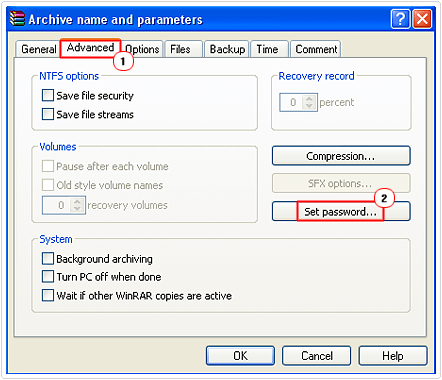
If you’ve found yourself locked out of an old RAR archive because you’ve forgotten the password, you’re not alone. Fortunately, there are several methods available to help you bypass or recover the password on a WinRAR archive. However, results are not always guaranteed, as the success depends on the complexity of the password and the encryption method used on the archive.
In this guide, we’ll walk you through various tools and techniques that can assist you in bypassing the password on a WinRAR file. From online services to specialized software, and even coding scripts, this comprehensive tutorial will give you insights into each method.
1. What is WinRAR?
Before diving into bypassing passwords, it’s important to understand what WinRAR is. WinRAR is a widely used file archiver that allows you to compress and extract files into .rar format, among others. It provides an option to set passwords for added security, which can be difficult to bypass without the proper tools.
2. Why Do You Need to Bypass WinRAR Password?
There are several legitimate reasons to bypass a WinRAR password. You might have:
- Forgotten the password for an archive containing important files.
- Received a password-protected archive from someone who forgot the password.
- Lost access to old work archives.
It’s important to note that these techniques should only be used for archives you own or have permission to access.
3. Legal Disclaimer
This guide is intended for educational purposes only. The tools and methods mentioned here are meant to be used on your own files or files you have permission to access. Misuse of these methods on files without authorization may lead to legal consequences.
4. Tools for Bypassing WinRAR Passwords
There are several tools available for recovering or bypassing the password on a WinRAR archive. These tools can be categorized into online services, downloadable software, and custom scripts.
5. Online Tools for Bypassing WinRAR Password
One of the easiest ways to bypass a WinRAR password is by using online services that specialize in password recovery.
6. LostMyPass (Online)
LostMyPass is an online service that can help you recover simple passwords from RAR files. It works for free on simple passwords, but you may have to pay for more complex ones.
How It Works:
- Upload your RAR file to the website.
- The service attempts to crack the password and displays it if successful.
- If the password is too complex, you may need to pay a fee.
7. Advantages of LostMyPass:
- Free for simple passwords.
- Easy to use with no installation required.
8. Limitations of LostMyPass:
- Limited to 100MB file sizes.
- Success rates vary: 22% for free services and 61% for paid ones.
9. Desktop Software for Bypassing WinRAR Password
For more robust solutions, several desktop applications are available. These offer more control over the process and can work on more complex passwords.
10. PassFab for RAR (Windows)
PassFab for RAR is a powerful desktop application designed to recover WinRAR passwords. It is available as a free trial to test whether the software can crack the password, but you’ll need to pay for the full version to retrieve the password.
Steps to Use PassFab:
- Download and install the software from their official website.
- Select one of the three attack methods: Dictionary Attack, Brute-force with Mask Attack, or Brute-force Attack.
- Upload the RAR file and let the software work on finding the password.
Attack Methods:
- Dictionary Attack: Tries passwords from a pre-set list.
- Brute-force with Mask: Tests all combinations within the parameters you define (e.g., number of characters).
- Brute-force Attack: Tests all possible character combinations (this can take a long time).
11. Advantages of PassFab:
- High success rate for both simple and complex passwords.
- Supports multiple attack methods.
12. Limitations of PassFab:
- The free version doesn’t display the recovered password.
- The full version costs €15.99 for a month, or €39.99 for a lifetime license.
13. Creating a .bat Script for WinRAR Password Recovery
For a completely free solution, you can use a simple Windows script in Notepad to try and crack a RAR password. This method only works for numeric passwords and is quite limited in its functionality.
Steps to Create a .bat Script:
- Open Notepad on your Windows PC.
- Paste the pre-written script (provided above in the article).
- Replace the file path of WinRAR in the script.
- Save the file with a .bat extension and run it.
This method is quite limited, but it’s a free solution if you suspect the password is numeric.
14. Using John the Ripper (Linux)
For advanced users, John the Ripper is one of the most comprehensive password-cracking tools available. It’s most effective when used on Linux, particularly on a distribution like Kali Linux.
How to Use John the Ripper:
- Install Kali Linux or run it on a virtual machine.
- Convert the RAR file into a format that John the Ripper can read.
- Use either a brute-force attack or a dictionary attack to recover the password.
15. Dictionary Attack with John the Ripper:
You can speed up the password recovery process by using a dictionary file like rockyou.txt, which contains millions of commonly used passwords.
Conclusion
Recovering a WinRAR password can be a time-consuming task, especially if the password is complex. Whether you choose to use online services, desktop software, or even write your own scripts, each method comes with its own set of advantages and limitations. Ultimately, the method you choose will depend on the complexity of the password and your technical comfort level.
Always remember to use these methods responsibly and legally.
FAQs
1. Can I recover a WinRAR password for free?
Yes, some online services like LostMyPass offer free recovery for simple passwords, but more complex passwords may require payment.
2. How long does it take to recover a password with brute-force?
It depends on the complexity of the password and the computational power of your system. Brute-force attacks on complex passwords can take hours or even days.
3. What is the best software for recovering WinRAR passwords?
PassFab for RAR is one of the best software options, offering multiple attack methods and a high success rate.
4. Can I use John the Ripper on Windows?
While John the Ripper is primarily designed for Linux, it can be run on Windows via a virtual machine or Cygwin.
5. Is it legal to bypass a WinRAR password?
Bypassing a password is legal if you are trying to recover your own files or have permission to access the file. Unauthorized attempts may lead to legal issues.
6. Can LostMyPass recover any RAR password?
No, LostMyPass has limitations, especially with complex passwords or files larger than 100MB.
7. Do these methods work for encrypted RAR files?
Yes, these methods work for encrypted RAR files, but the complexity of encryption can make recovery more difficult.
8. What’s the difference between brute-force and dictionary attacks?
A brute-force attack tries every possible combination of characters, while a dictionary attack uses a list of common passwords.


