
How to Cancel a Command on Zalando
Have you ever searched for a product on Zalando, only to find it in sale after months of searching? Or perhaps you’ve added an item to your shopping cart, only to realize that you’ve chosen the wrong color or size? Whatever the reason, cancelling a command on Zalando can be a bit tricky. But don’t worry, we’re here to guide you through the process.
Can I Cancel a Command on Zalando?
Before we dive into the tutorial, it’s essential to know that not all commands can be cancelled on Zalando. If the command is already in preparation or has been dispatched, the options for cancellation are limited. However, if you’re still within the timeframe for cancelling (usually 30 days from receipt), you may be able to cancel the entire order or return individual items.
How to Cancel a Command in Preparation on Zalando
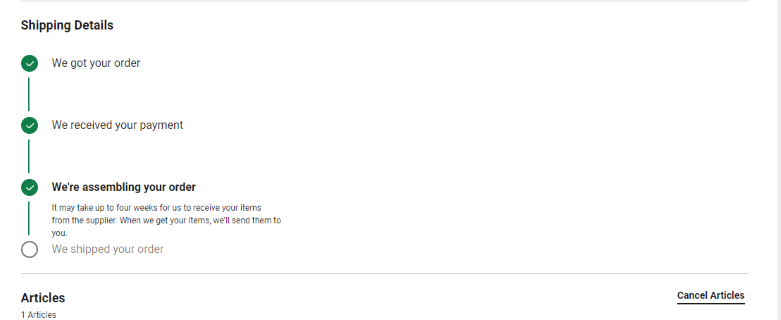
If your command is still in preparation, follow these steps:
- Access the Zalando website and log in to your account.
- Click on “My Account” and select “Your Last Commands.”
- Find the command you want to cancel and click on it.
- If you’re cancelling an entire order, select the “Delete an article” option and check the box next to all items.
- If you’re returning individual items, uncheck the box next to each item you don’t want to return.
- Click on the “Cancellation” button.
How to Cancel a Command Accepted on Zalando
Unfortunately, it’s not possible to cancel an accepted command on Zalando. However, if you’ve received your order and realize that you made a mistake, you can initiate a return within 30 days of receipt. To do this:
- Access the Zalando website and log in to your account.
- Click on “My Account” and select “Your Last Commands.”
- Find the command you want to cancel and click on it.
- Select the “Return an article” option and follow the instructions.
Can I Cancel a Command on Zalando Privé?
Yes, if you’ve placed an order through Zalando Privé, you can cancel it using the same steps as above. Simply access your account, select the command you want to cancel, and follow the instructions to erase the article or return individual items.
Why Can’t I Cancel a Command on Zalando?
There are several reasons why you might not be able to cancel an order on Zalando:
- The command is already in preparation or has been dispatched.
- You’ve used coupons or other types of discounts that can’t be cancelled separately from the entire order.
- You’re outside the 30-day timeframe for cancelling orders.
What Happens if I Cancel a Command?
If you cancel an order on Zalando, your account will reflect this change. The status of the command will change to “Cancelled,” and any payments made will be refunded within 14 days of dispatching the returned items.
Can I Return Items Instead of Cancelling an Order?
Yes, if you’ve received your order and realize that it’s not what you wanted, you can return individual items instead of cancelling the entire order. This is usually possible for a limited time after receiving the order.
Why Can’t I Cancel a Command on Zalando Privé?
There are several reasons why you might not be able to cancel an order on Zalando Privé:
- The command is already in preparation or has been dispatched.
- You’ve used coupons or other types of discounts that can’t be cancelled separately from the entire order.
How Do I Return Items on Zalando?
To return items on Zalandon, follow these steps:
- Access the Zalando website and log in to your account.
- Click on “My Account” and select “Your Last Commands.”
- Find the command you want to cancel and click on it.
- Select the “Return an article” option and follow the instructions.
What Happens if I Return Items on Zalandon?
If you return items on Zalando, your account will reflect this change. The status of the command will change to “Cancelled,” and any payments made will be refunded within 14 days of dispatching the returned items.
Can I Cancel a Command on Zalandon Using My Smartphone or Tablet?
Yes, if you’re using a smartphone or tablet, you can cancel a command on Zalando using the app. Follow these steps:
- Access the Zalando app and log in to your account.
- Tap on the icon of the omino (the shopping cart) and select “My commands.”
- Find the command you want to cancel and tap on it.
- Select the option to delete an article or return individual items.
- Follow the instructions to complete the cancellation.
Conclusion
Cancelling a command on Zalando can be a bit tricky, but with this guide, you should be able to navigate the process successfully. Remember that not all commands can be cancelled, and some orders may require returns instead of cancellations. If you have any questions or concerns, feel free to ask.


