
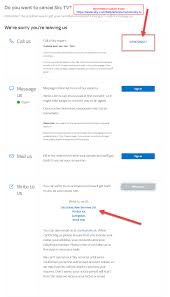
How to Cancel Your Sky Subscription
Are you looking to cancel your Sky subscription? Look no further! In this article, we will guide you through the simple steps to cancel your Sky contract without any hassle.
Why Cancel Your Sky Subscription?
Before we dive into the cancellation process, let’s take a look at why people might want to cancel their Sky subscription. Perhaps you’ve found another provider that offers better services at a lower price point. Maybe you’re just not using your Sky subscription as much as you thought you would.
Whatever the reason, cancelling your Sky subscription is easier than you think!
How to Cancel Your Sky Subscription: A Step-by-step Guide
Here are the steps to cancel your Sky subscription:
Canceling Your Sky Subscription Online
If you’re looking to cancel your Sky subscription online, follow these simple steps:
- Log in to your Sky account using your username and password.
- Click on the “My Account” tab.
- Scroll down to the “Subscription Details” section.
- Click on the “Cancel Subscription” button.
- Confirm that you want to cancel your subscription by clicking “Yes, Cancel My Subscription”.
That’s it!
Canceling Your Sky Subscription Over The Phone
If you’d rather cancel your Sky subscription over the phone, here’s what you need to do:
- Call the Sky customer service number: 170.
- Follow the automated menu prompts until you reach a customer service representative.
- Let them know that you’d like to cancel your Sky subscription.
- Confirm that you want to cancel by saying “Yes, I’m sure”.
That’s it!
Canceling Your Sky Subscription Via Pec
If you’re looking to cancel your Sky subscription using PEC (Certified Electronic Mail), here are the steps:
- Go to the Sky website and log in to your account.
- Click on the “My Account” tab.
- Scroll down to the “Subscription Details” section.
- Click on the “Cancel Subscription” button.
- Fill out the online cancellation form with all required information.
- Submit the form.
Canceling Your Sky Subscription Via Email
If you’d rather cancel your Sky subscription via email, here’s what you need to do:
- Send an email to the Sky customer service team at [email protected].
- Be sure to include all required information in the email.
Canceling Your Sky Subscription Via Phone With a Consultant
If you’d rather cancel your Sky subscription over the phone with a consultant, here’s what you need to do:
- Call the Sky customer service number: 170.
- Follow the automated menu prompts until you reach a consultant.
- Let them know that you’d like to cancel your Sky subscription.
- Confirm that you want to cancel by saying “Yes, I’m sure”.
That’s it!
What Happens After You Cancel Your Sky Subscription?
After you’ve cancelled your Sky subscription, here are some things to expect:
- You’ll no longer be charged for the service.
- You’ll receive a confirmation email from Sky confirming that your subscription has been cancelled.
- Any outstanding bills will still need to be paid in full.
Frequently Asked Questions (FAQs)
Here are some frequently asked questions about cancelling your Sky subscription:
Q: Can I cancel my Sky subscription if it’s been less than 14 days since activation?
A: Yes, you can cancel your Sky subscription within the first 14 days of activation.
Q: Will I be charged a fee to cancel my Sky subscription?
A: No, cancelling your Sky subscription is free as long as it meets certain conditions.
Q: How do I know if I’m eligible for a refund when cancelling my Sky subscription?
A: You’ll need to check the terms and conditions of your contract to see if you’re eligible for a refund.
Q: What happens to my equipment after I cancel my Sky subscription?
A: You’ll be expected to return any equipment provided by Sky within 60 days of cancellation. If not, you may face penalties.
Q: Can I cancel my Sky subscription over the phone with a consultant?
A: Yes, you can cancel your Sky subscription over the phone with a consultant by calling the customer service number and following the prompts.
Conclusion
Cancelling your Sky subscription is easier than you think! Whether you’re cancelling online, via PEC, email, or over the phone, the process is simple and straightforward. Make sure to follow the steps outlined above to ensure that your cancellation goes smoothly.
If you have any further questions or concerns, please don’t hesitate to reach out to us. We’re here to help!
Frequently Asked Questions (FAQs)
Here are some frequently asked questions about cancelling your Sky subscription:
Q: How do I know if my Sky subscription has been cancelled?
A: You’ll receive a confirmation email from Sky confirming that your subscription has been cancelled.
Q: What happens to my equipment after I cancel my Sky subscription?
A: You’ll be expected to return any equipment provided by Sky within 60 days of cancellation. If not, you may face penalties.
Q: Can I get a refund when cancelling my Sky subscription?
A: Check the terms and conditions of your contract to see if you’re eligible for a refund.
Q: How long does it take to cancel my Sky subscription?
A: Cancellation is typically processed within 24-48 hours of submitting your request.
Q: Can I cancel my Sky subscription over the phone with a consultant?
A: Yes, you can cancel your Sky subscription over the phone with a consultant by calling the customer service number and following the prompts.
Additional Resources
If you’re looking for more information on cancelling your Sky subscription or have other questions, please don’t hesitate to reach out to us. We’re here to help!
You can also visit the official Sky website for more information on cancellation policies and procedures.
We hope this article has been helpful in guiding you through the process of cancelling your Sky subscription.


