
How to Centre a Picture in Html: A Step-by-step Guide
Are you struggling to centre a picture in your HTML page? Look no further! In this article, we will explore the various ways to centre a picture in HTML using CSS.
What is Html And Css?
HTML (HyperText Markup Language) is a standard markup language used to create web pages. It is the backbone of any website, providing the structure and content. CSS (Cascading Style Sheets), on the other hand, is a styling language used to control the layout and visual appearance of web pages.
Why Centre a Picture in Html?
Centring a picture in HTML can be useful when you want to:
- Create a visually appealing website with symmetrical design elements
- Highlight important images or graphics
- Improve user experience by making content more readable
Method 1: Centring All Pictures in a Page
To centre all pictures in a page, you can insert a class in the <head> section of your HTML document. This will apply the centreing style to all pictures on the page.
“`Html

“`
Method 2: Centring a Specific Picture
To centre a specific picture, you can insert the CSS code directly in the <table> or <div> element containing the image.
“`Html
|
“`
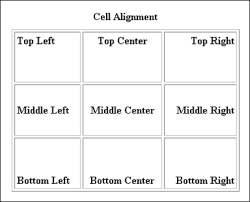
How to Centre Text in a Picture
Centring text within an image is also possible using CSS. You can use the following code to centre the text:
Css

Th, td {

  Text-align: Center;

}
This will centre all text within table headers and cells.
Other Useful Options For Photo Editing
While we’ve focused on centring pictures in HTML, there are other useful options for photo editing that you might find helpful. Some popular photo editing apps include:
- Snapseed
- VSCO
- Pixlr
These apps can help you to:
- Apply filters and effects to your photos
- Crop and resize images
- Adjust brightness, contrast, and saturation levels
Faqs
Here are some frequently asked questions about centring pictures in HTML:
- Q: How do I Centre a Picture Using Css?
A: You can use thedisplay: Flex;property to centre an image. - Q: Can I Centre All Pictures on my Website?
A: Yes, you can centre all pictures by inserting a class in the<head>section of your HTML document. - Q: How do I Centre Text Within an Image?
A: You can use thetext-align: Center;property to centre text within an image.
Conclusion
Centring a picture in HTML using CSS is a straightforward process that can be achieved through various methods. By understanding how to centre pictures, you can create visually appealing websites with symmetrical design elements and improve user experience by making content more readable. Remember to explore other useful options for photo editing apps to enhance your photos!


