
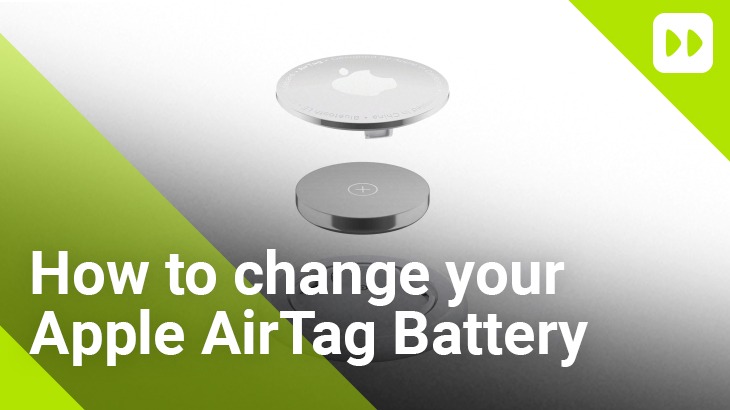
The Ultimate Guide to Replacing Your Airtag Battery: A Step-by-step Tutorial
Are you an Apple fan who’s always on the go? Do you use your AirTag to keep track of your valuables, but have found yourself wondering how to replace its battery when it runs out? Look no further! In this article, we’ll take you through a step-by-step guide on how to replace your AirTag battery like a pro.
Why Replace Your Airtag Battery?
Before we dive into the tutorial, let’s talk about why replacing your AirTag battery is so important. The AirTag uses a small CR2032 lithium button cell battery, which has a relatively short lifespan of around 1-2 years, depending on usage. When the battery runs out, your AirTag will no longer be able to function correctly, and you might lose track of your belongings.
How to Check Your Airtag Battery Level
Before attempting to replace your AirTag battery, it’s essential to check its current level. Here’s how:
- Open the Find My app on your iPhone or iPad.
- Tap on the “Objects” tab.
- Select your AirTag from the list of devices.
- Look for a notification that says “Level low battery with AirTag.” If you see this message, it’s time to replace your battery.
Step-by-step Guide to Replacing Your Airtag Battery
Now that we’ve covered why replacing your AirTag battery is so important and how to check its level, let’s move on to the step-by-step guide:
Step 1: Remove The Cover
- Carefully take off any external accessories or covers from your AirTag.
- Hold the AirTag in one hand and use the other hand to rotate the stainless steel covering in a counterclockwise direction until it comes loose.
Step 2: Access The Battery Compartment
- Once you’ve removed the cover, look for three rigid tongues that will be visible on the back of your AirTag.
- Rotate the cover further until it stops rotating. This should expose the battery compartment.
- Gently pull out the covering to access the battery.
Step 3: Remove The Old Battery
- Carefully take out the old CR2032 lithium button cell battery from its compartment.
- Make sure not to touch any of the internal components or contacts on the AirTag.
Step 4: Install a New Battery
- Take a new CR2032 lithium button cell battery (available at most electronics stores or online) and insert it into the compartment, ensuring that the positive terminal (+) is facing upwards.
- Make sure the battery is securely seated in its compartment.
Step 5: Reattach The Cover
- Place the covering back onto the AirTag, aligning the tongues with the corresponding slots on the device.
- Rotate the cover clockwise until it clicks into place to secure it.
Common Issues And Solutions
If you’re experiencing issues replacing your AirTag battery, here are some common problems and their solutions:
- Battery Not Functioning: Ensure that the new battery is compatible with your AirTag’s specifications. Check if there are any films or coatings on the battery that might be obstructing its connection to the device.
- Airtag Still Not Working: Try cleaning the battery compartment to ensure no dust or debris is affecting the connections.
Conclusion
Replacing your AirTag battery is a relatively simple process that can help you continue tracking your valuables with confidence. By following these steps, you should be able to successfully replace your battery and keep using your AirTag without any issues.
Frequently Asked Questions (FAQs)
- How Often do I Need to Replace my Airtag Battery?
The battery lifespan of an AirTag depends on usage, but it’s typically around 1-2 years.
- Can I Use a Different Type of Battery in my Airtag?
No, you should only use a CR2032 lithium button cell battery specifically designed for the AirTag to avoid damaging your device.
- How do I Check if my Airtag Battery is Low?
Open the Find My app and select your AirTag from the list of devices. If it says “Level low battery with AirTag,” it’s time to replace your battery.
- What Happens if I Insert a Low-battery or Dead Battery Into my Airtag?
If you put a low-battery or dead battery in your AirTag, it might not function correctly, and you could lose track of your belongings.
- Can I Use Any External Accessories With my Airtag While Replacing The Battery?
No, remove any external covers or accessories before attempting to replace the battery.
- How do I Clean my Airtag’s Battery Compartment if I Encounter Issues?
Use a soft cloth and gentle soap solution to clean out any dust or debris from the compartment.
- What Should I do if my New Battery Doesn’t Seem to be Working?
Try cleaning the contacts on both the old and new batteries, then reinstall them in the AirTag.
Product Recommendations
If you’re looking for a reliable CR2032 lithium button cell battery to replace your AirTag’s, consider these options:
- Panasonic CR2032
- VARTA Batteries CR2032
- LiCB CR2032 Battery Button
Hope this helps!


