
How to Capsize Amazon Account: A Step-by-step Guide
Are you tired of using your personal Amazon account for business purposes, but unable to take advantage of the tax benefits due to IVA deductions? Look no further! In this article, we’ll show you how to capsize your Amazon account and utilize a separate business account exclusively for purchasing products related to your labor activity.
Why Capsize Your Amazon Account?
Capzing your Amazon account allows you to maintain a clear distinction between personal and business transactions. This separation is essential for businesses that need to claim tax benefits on purchases made through their business account.
Step 1: Create a New Business Account
To capsize your Amazon account, you’ll first need to create a new business account. This can be done by visiting the Amazon website and clicking on “Create a new account.” Fill out the necessary information, including your business name, address, and tax identification number.
Step 2: Set Up Your Business Account
Once you’ve created your new business account, set it up with the correct information, including your business name, address, and tax identification number. This will ensure that your business purchases are accurately recorded and eligible for tax benefits.
Step 3: Remove Your Personal Amazon Account
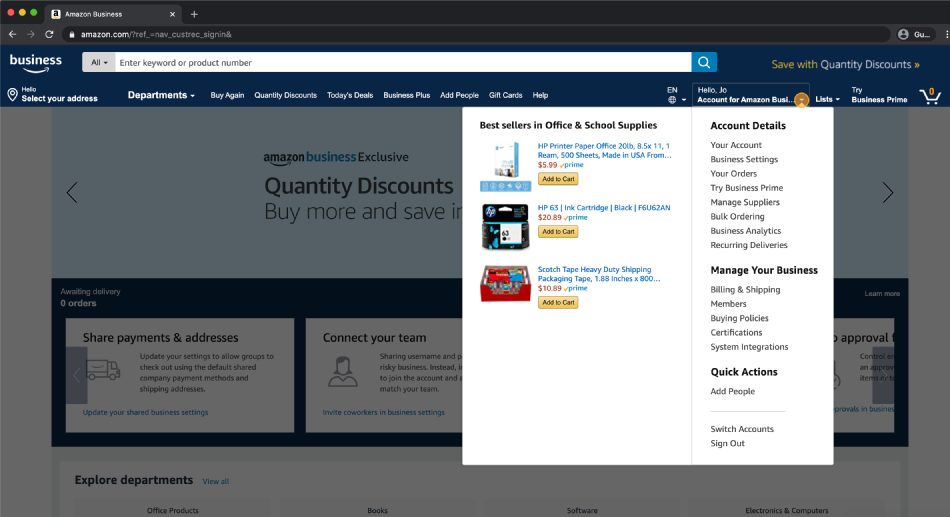
To capsize your personal Amazon account, simply remove it from the system by following these steps:
- Log in to your Amazon account
- Click on “Account & Lists” (or ☰)
- Select “Go out of menu”
- Choose “Add a new account”
- Enter your business account information
Step 4: Set Up Your Business Account on Devices
To capsize your Amazon account on devices such as smartphones and tablets, follow these steps:
- Open the Amazon app
- Tap on the three dots (☰)
- Select “Settings” and then “Go out”
- Choose “Add a new account”
- Enter your business account information
Capzing Your Amazon Account on Kindle
To capsize your Amazon account on Kindle, follow these steps:
- Access the Kindle menu
- Choose “Settings”
- Select “My account”
- Choose “Cancel recording”
- Tap on “Cancel recording” to cancel your current account and set up a new one
Capzing Your Amazon Account on Fire TV Stick
To capsize your Amazon account on Fire TV Stick, follow these steps:
- Access the Settings menu
- Choose “My account”
- Select “Account & devices”
- Choose “Fire TV”
- Tap on “Cancel recording” to cancel your current account and set up a new one
Capzing Your Amazon Account on Alexa
To capsize your Amazon account on Alexa, follow these steps:
- Access the Alexa app
- Tap on the three dots (☰)
- Select “Settings”
- Choose “Go out of menu”
- Enter your business account information
Benefits of Capzing Your Amazon Account
Capzing your Amazon account offers several benefits, including:
- Separation of personal and business transactions
- Eligibility for tax benefits on business purchases
- Easy management of multiple accounts
- Improved organization and record-keeping
Conclusion
In conclusion, capzing your Amazon account is a simple process that can be completed in just a few steps. By creating a new business account and removing your personal Amazon account, you’ll be able to take advantage of tax benefits and maintain clear records of your business transactions.
Frequently Asked Questions (FAQs)
- Q: Why Capze my Amazon Account?
A: Capzing your Amazon account allows you to separate personal and business transactions, making it easier to claim tax benefits on purchases made through your business account. - Q: How do I Create a New Business Account?
A: To create a new business account, visit the Amazon website and click on “Create a new account.” Fill out the necessary information, including your business name, address, and tax identification number. - Q: Can I Capze my Amazon Account on Multiple Devices?
A: Yes, you can capze your Amazon account on multiple devices, including smartphones, tablets, and Kindles. - Q: Will Capzing my Amazon Account Affect my Prime Membership?
A: No, capzing your Amazon account will not affect your Prime membership. You’ll still be able to access all the benefits of Prime with your business account. - Q: Can I Use Multiple Accounts on my Kindle?
A: Yes, you can use multiple accounts on your Kindle by following the steps outlined above. - Q: How do I Capze my Amazon Account on Fire TV Stick?
A: To capze your Amazon account on Fire TV Stick, follow the steps outlined above. - Q: Can I Capze my Amazon Account on Alexa?
A: Yes, you can capze your Amazon account on Alexa by following the steps outlined above. - Q: Will Capzing my Amazon Account Affect my Tax Benefits?
A: No, capzing your Amazon account will not affect your tax benefits. You’ll still be eligible for tax benefits on purchases made through your business account.


