
How to Bypass App Store Restrictions on Iphone
Are you tired of searching for a specific app on the App Store only to find that it’s not available in your country? Have you ever wondered how people download apps from foreign countries without breaking any rules? Look no further! In this guide, we will show you how to bypass App Store restrictions and download apps from other countries.
Understanding The Problem
The App Store has a feature called “Country/Region” that restricts app availability based on your device’s location. This means that if an app is not available in your country, it won’t show up in the search results. However, there are ways to bypass this restriction and download apps from other countries.
Step 1: Create a New Apple ID
To start, you’ll need to create a new Apple ID associated with a foreign country. This will allow you to access the App Store of that country and download apps available only in that region. To do this:
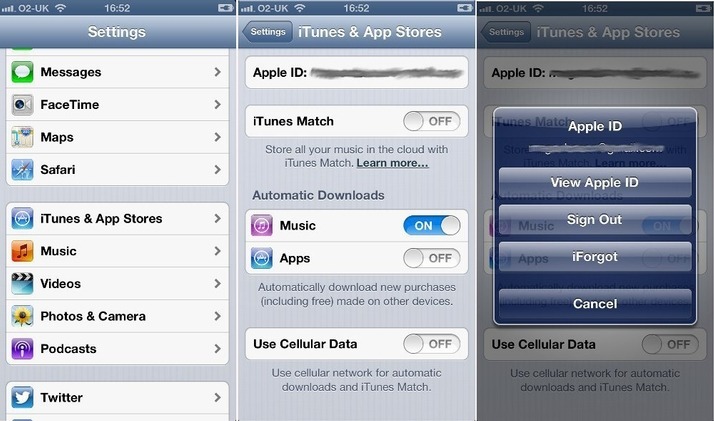
- Go to the Settings app on your iPhone
- Tap on your name at the top of the screen
- Select “Sign Out”
- Create a new Apple ID by tapping on “Create a New Apple ID”
- Fill out the required information, including your name, email address, and password
- Choose a country that has the app you want to download
Step 2: Remove Your Old Apple ID
Before proceeding, make sure you remove your old Apple ID from your device. To do this:
- Go to the Settings app on your iPhone
- Tap on your name at the top of the screen
- Select “Sign Out”
- Confirm that you want to sign out
Step 3: Sign In With Your New Apple ID
Now, sign in with your new Apple ID by going to the App Store and tapping on the “Account” button. You’ll be prompted to enter your email address and password.
Step 4: Download The App
Once you’re signed in with your new Apple ID, you can search for the app you want to download. If it’s available in the foreign country associated with your new Apple ID, you should see it in the search results.
Using Alternative App Stores on Android
If you have an Android device and want to access apps from other countries, there are alternative app stores you can use. These include Amazon Appstore and HUAWEI AppGallery.
To use these alternative app stores:
- Download the APK file for the app store you want to use
- Install the APK file on your device
- Open the app store and search for the app you want to download
Tips And Precautions
Before attempting to bypass App Store restrictions, keep in mind that this method may not work for all apps. Some apps may have specific requirements or limitations that prevent them from being downloaded in certain countries.
Also, be aware that using alternative app stores can increase your risk of downloading malware or other malicious software.
Conclusion
Bypassing App Store restrictions on iPhone is a relatively simple process that involves creating a new Apple ID associated with a foreign country. This will allow you to access apps available only in that region and download them onto your device. However, be sure to follow the steps carefully and take necessary precautions to avoid any potential risks.
Faqs
- Q: Why Can’t I Find The App I Want on The App Store?
A: The app may not be available in your country or region. - Q: How do I Create a New Apple ID Associated With a Foreign Country?
A: Go to Settings > [Your Name] > Create a New Apple ID and follow the prompts. - Q: What Are The Risks of Using Alternative App Stores on Android?
A: Using alternative app stores can increase your risk of downloading malware or other malicious software. - Q: Can I Use my Existing Apple ID to Bypass App Store Restrictions?
A: No, you’ll need to create a new Apple ID associated with a foreign country to access apps available only in that region. - Q: How do I Download an App From a Foreign Country on Android?
A: You can use alternative app stores such as Amazon Appstore or HUAWEI AppGallery. - Q: Are There Any Other Ways to Bypass App Store Restrictions?
A: Yes, you can also use jailbreaking methods, but these are not recommended and may void your warranty. - Q: Can I Use my New Apple ID to Access Apps Available Only in The Us?
A: If you created a new Apple ID associated with a foreign country, you’ll need to change your country/region settings to access apps available only in the US. - Q: How do I Remove my Old Apple ID From my Device?
A: Go to Settings > [Your Name] > Sign Out and confirm that you want to sign out.
Conclusion
Bypassing App Store restrictions on iPhone or Android can be a convenient way to access apps available only in certain countries. However, it’s essential to follow the steps carefully and take necessary precautions to avoid any potential risks. If you have any further questions or concerns, feel free to ask!


