
The Ultimate Guide to Swapping Your Apple Watch Strap: A Step-by-step Tutorial
Are you tired of using the same old strap with your Apple Watch? Do you want to give it a fresh new look without breaking the bank? Look no further! In this article, we will guide you through the process of swapping your Apple Watch strap like a pro.
Why Swap Your Strap?
Before we dive into the tutorial, let’s talk about why you might want to swap your strap in the first place. Perhaps you’re tired of the same old design or want to match it with your outfit. Whatever the reason, swapping your strap is an easy and affordable way to give your Apple Watch a new look.
Choosing The Right Strap
Before we begin, it’s essential to choose the right strap for your Apple Watch. You can choose from a vast range of straps available on the Apple Store or through third-party retailers. The prices vary depending on the material and design, but you can find something that fits your budget.
Step 1: Remove Your Old Strap
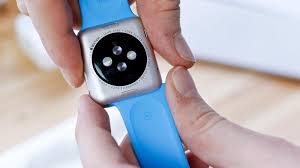
To begin, remove your old strap by pressing the release button and sliding it out of the watch body. This is a relatively straightforward process, but if you’re unsure, follow these steps:
- Place your Apple Watch on a flat surface with the screen facing up.
- Press the release button located on the back of the watch.
- Slide the strap out of the watch body in one smooth motion.
Step 2: Prepare Your New Strap
Now that your old strap is removed, it’s time to prepare your new one. Make sure it’s compatible with your Apple Watch model and follow these steps:
- Check the packaging for any specific instructions.
- Ensure the strap is clean and free of any debris.
- Align the pinholes on the strap with the corresponding holes on the watch body.
Step 3: Attach Your New Strap
To attach your new strap, follow these simple steps:
- Place the strap over the watch body, ensuring it’s properly aligned.
- Press the release button to secure the strap in place.
- Slide the strap into position until it clicks into place.
Tips And Tricks
Swapping your Apple Watch strap is a straightforward process, but here are some tips and tricks to keep in mind:
- Make sure the strap is properly aligned before attaching it to the watch body.
- Use a soft cloth or microfiber material to clean any debris from the watch band.
- Avoid using harsh chemicals or abrasive materials that may damage your Apple Watch.
Troubleshooting Common Issues
If you encounter any issues while swapping your strap, don’t panic! Here are some common problems and their solutions:
- Strap Not Fitting Properly: Check if the strap is properly aligned with the watch body. Try adjusting it slightly before reattaching it.
- Release Button Not Working: Ensure that the release button is clean and free of debris. If it still doesn’t work, try cleaning the button or replacing it entirely.
Conclusion
Swapping your Apple Watch strap is a simple process that can give your device a fresh new look without breaking the bank. By following these steps and tips, you’ll be able to swap your strap like a pro in no time. Whether you’re looking for a change of pace or want to match it with your outfit, swapping your strap is an easy and affordable way to customize your Apple Watch.
Faqs
- Can I Use Any Strap With my Apple Watch?
Yes, but make sure the strap is compatible with your Apple Watch model. - How do I Remove a Stubborn Strap?
Try using a soft cloth or microfiber material to clean any debris from the watch band. - What if I Encounter Problems While Swapping my Strap?
Refer to our troubleshooting section for common issues and their solutions. - Can I Use a Third-party Strap With my Apple Watch?
Yes, but ensure it’s compatible with your Apple Watch model. - How Often Should I Swap my Strap?
Swap your strap whenever you want to give your Apple Watch a fresh new look! - What if I Lose or Damage my Release Button?
Try cleaning the button or replacing it entirely. - Can I Use a Different Material For my Strap?
Yes, but ensure it’s compatible with your Apple Watch model.
Recommended Reading
- How to Clean Your Apple Watch Strap: Learn how to keep your Apple Watch strap clean and free of debris.
- Apple Watch Straps: A Guide: Explore the various types of Apple Watch straps available on the market.
- Troubleshooting Common Apple Watch Issues: Refer to our guide for common issues and their solutions.


