
Creating a Facebook Avatar: A Step-by-step Guide
Are you tired of using the same old profile picture on Facebook? Do you want to create a unique and personalized avatar that reflects your personality? Look no further! In this article, we will guide you through the process of creating a Facebook avatar, step by step.
What is a Facebook Avatar?
A Facebook avatar is a digital representation of yourself that can be used as your profile picture on Facebook. It’s a fun and creative way to express yourself and showcase your personality online.
How to Create a Facebook Avatar
Creating a Facebook avatar is a simple process that can be completed in just a few steps. Here’s how:
Step 1: Access The Facebook Avatar Feature
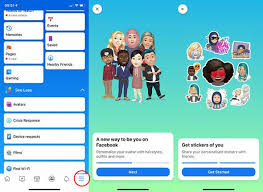
To access the Facebook avatar feature, you need to have the latest version of the Facebook app on your mobile device or computer.
On Mobile Devices
If you’re using a mobile device, open the Facebook app and navigate to the “Menu” option (represented by three horizontal lines).
On Computers
If you’re using a computer, log in to your Facebook account and click on the profile picture at the top right corner of the screen.
Step 2: Select Your Avatar
Once you’ve accessed the avatar feature, select the avatar that you want to use as your profile picture. You can choose from various pre-made avatars or create a custom one using the “Create a New Avatar” option.
Creating a Custom Avatar
If you want to create a custom avatar, click on the “Create a New Avatar” option and follow these steps:
- Choose a photo of yourself that you want to use as the base for your avatar.
- Select the features that you want to include in your avatar, such as hair color, eye shape, nose size, etc.
- Adjust the various features until you’re satisfied with the final result.
Step 3: Save Your Avatar
Once you’ve created or selected your avatar, save it by clicking on the “Save” button.
How to Modify an Existing Facebook Avatar
If you already have a Facebook avatar and want to modify it, follow these steps:
- Access the avatar feature by following the same steps as above.
- Click on the “Modify Avatar” option.
- Make any necessary changes to your avatar, such as adjusting the features or changing the outfit.
How to Delete a Facebook Avatar
If you no longer want to use a particular avatar, you can delete it by following these steps:
- Access the avatar feature by following the same steps as above.
- Click on the “Delete Avatar” option.
- Confirm that you want to delete the avatar.
Tips And Tricks For Creating a Facebook Avatar
Here are some tips and tricks to keep in mind when creating a Facebook avatar:
- Experiment With Different Features: Don’t be afraid to try out different features, such as hair color, eye shape, or nose size.
- Have Fun With It: Remember, your avatar is a representation of yourself online. Have fun with it and get creative!
- Be Yourself: Your avatar should reflect your personality and style.
Conclusion
Creating a Facebook avatar is a simple process that can be completed in just a few steps. Whether you want to create a custom avatar or modify an existing one, this guide has shown you how to do it. Remember to have fun with it and experiment with different features until you find the perfect representation of yourself online.
Frequently Asked Questions (FAQs)
Here are some frequently asked questions about Facebook avatars:
Q: What is a Facebook Avatar?
A: A Facebook avatar is a digital representation of yourself that can be used as your profile picture on Facebook.
Q: How do I Create a Facebook Avatar?
A: To create a Facebook avatar, access the avatar feature by following the steps outlined in this article.
Q: Can I Modify an Existing Facebook Avatar?
A: Yes, you can modify an existing Facebook avatar by accessing the avatar feature and clicking on the “Modify Avatar” option.
Q: How do I Delete a Facebook Avatar?
A: To delete a Facebook avatar, access the avatar feature and click on the “Delete Avatar” option.
Q: Can I Use my Facebook Avatar on Other Social Media Platforms?
A: Yes, you can use your Facebook avatar on other social media platforms. However, please note that some platforms may have their own specific requirements for avatars.
Q: Can I Create a Custom Avatar Using a Photo of Myself?
A: Yes, you can create a custom avatar using a photo of yourself by selecting the “Create a New Avatar” option and following the steps outlined in this article.
Q: What Are Some Tips For Creating a Great Facebook Avatar?
A: Some tips for creating a great Facebook avatar include experimenting with different features, having fun with it, and being yourself.


