
How to Modify Payment Form on Amazon
Are you tired of using the same old payment method on Amazon? Do you want to change your form of payment but don’t know how? Look no further! In this article, we’ll guide you through the simple steps to modify your payment form on Amazon, whether you’re using a PC or mobile device.
Modifying Payment Form on Amazon From PC
If you usually shop on Amazon from your PC, modifying the payment form is a straightforward process. Here’s how:
- Login to Your Account: Log in to your Amazon account by clicking on “Sign In” at the top right corner of the page.
- Click on “Your Orders”: Click on “Your Orders” in the menu bar and then select “Order History.”
- Select an Order: Choose an order for which you want to modify the payment form.
- Click on “Payment Method”: In the details section of your chosen order, click on “Payment Method.”
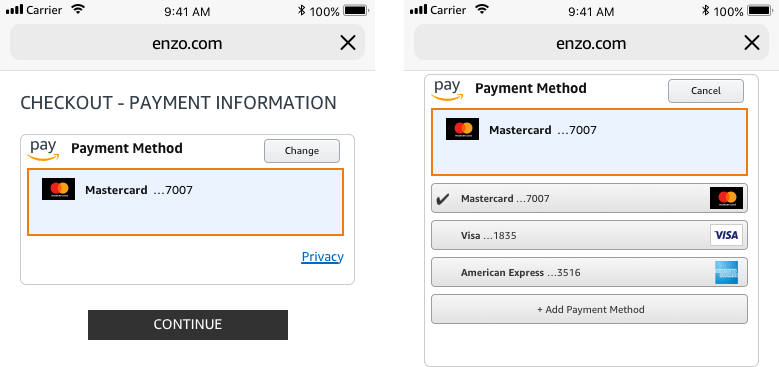
- Modify Payment Form: You can now choose a different payment method from the list or add a new one by clicking on “Add a new payment method.”
Modifying Payment Form on Amazon From Mobile
If you usually shop on Amazon using your mobile device, modifying the payment form is just as easy:
- Open The Amazon App: Open the Amazon app on your smartphone or tablet.
- Tap on Your Profile: Tap on your profile icon at the top right corner of the screen.
- Select “Your Orders”: Select “Your Orders” from the menu.
- Choose an Order: Choose an order for which you want to modify the payment form.
- Tap on “Payment Method”: In the details section of your chosen order, tap on “Payment Method.”
- Modify Payment Form: You can now choose a different payment method from the list or add a new one by tapping on “Add a new payment method.”
Modifying Payment Form For Amazon Prime
If you’re an Amazon Prime member and want to modify your payment form, you can do so through the Amazon website or mobile app. Here’s how:
- Login to Your Account: Log in to your Amazon account.
- Click on “Your Orders”: Click on “Your Orders” and select “Order History.”
- Select an Order: Choose an order for which you want to modify the payment form.
- Click on “Payment Method”: In the details section of your chosen order, click on “Payment Method.”
- Modify Payment Form: You can now choose a different payment method from the list or add a new one by clicking on “Add a new payment method.”
Modifying Payment Form For Amazon Music
If you’re an Amazon Music subscriber and want to modify your payment form, you can do so through the Amazon website or mobile app. Here’s how:
- Login to Your Account: Log in to your Amazon account.
- Click on “Your Orders”: Click on “Your Orders” and select “Order History.”
- Select an Order: Choose an order for which you want to modify the payment form.
- Click on “Payment Method”: In the details section of your chosen order, click on “Payment Method.”
- Modify Payment Form: You can now choose a different payment method from the list or add a new one by clicking on “Add a new payment method.”
Frequently Asked Questions
Here are some frequently asked questions about modifying payment forms on Amazon:
- Q: Can I Modify my Payment Form on Amazon From Mobile?
A: Yes, you can modify your payment form on Amazon from your mobile device. - Q: How do I Add a New Payment Method on Amazon?
A: To add a new payment method on Amazon, go to Your Orders and select an order for which you want to modify the payment form. Then click on “Add a new payment method.” - Q: Can I Use Cash as a Payment Method on Amazon?
A: Yes, you can use cash as a payment method on Amazon. - Q: How do I Update my Payment Information on Amazon Prime?
A: To update your payment information on Amazon Prime, go to Your Orders and select an order for which you want to modify the payment form. Then click on “Update your payment information.” - Q: Can I Use a Gift Card as a Payment Method on Amazon Music?
A: Yes, you can use a gift card as a payment method on Amazon Music.
Conclusion
Modifying your payment form on Amazon is a simple process that can be done from either PC or mobile device. Whether you’re using the Amazon website or mobile app, you can easily choose a different payment method from the list or add a new one by following the steps outlined in this article. If you have any questions or concerns about modifying your payment form on Amazon, feel free to ask!


