
How to Downsize Resolution Video: A Step-by-step Guide
Are you tired of dealing with videos that are too high in resolution, only to find out they won’t play smoothly on your devices? Look no further! In this article, we’ll show you how to downsize resolution video like a pro.
What is Downsizing Resolution Video?
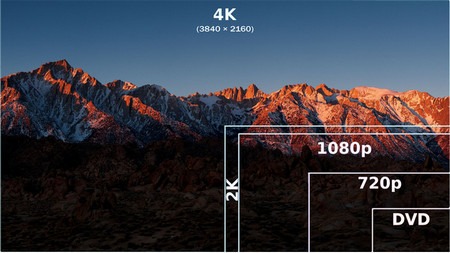
Downsizing resolution video refers to the process of reducing the resolution of a video file to make it more compatible with different devices and playback platforms. This can be useful when you want to share videos online or watch them on lower-end devices that may not support high-resolution video playback.
Why Downsize Resolution Video?
There are several reasons why you might want to downsize resolution video:
- To save storage space: High-resolution videos take up a lot of space, and downsizing them can help free up room on your device.
- To improve playback performance: Lower-resolution videos may play more smoothly on lower-end devices or in situations where internet speeds are limited.
- To make sharing easier: Downsized videos are often smaller files that can be shared more easily with others.
How to Downsize Resolution Video
Now that we’ve covered the why, let’s talk about the how. Here are the steps to downsize resolution video:
- Choose a Video Editing Software: You’ll need a software program that allows you to edit and manipulate videos. Some popular options include Avidemux, DaVinci Resolve, and Adobe Premiere Pro.
- Import Your Video: Open your chosen software and import the video file you want to downsize.
- Select a New Resolution: Look for an option in your software that allows you to change the video’s resolution. This might be under the “File” or “Settings” menu, depending on your specific program.
- Choose a Lower Resolution: Select a lower resolution than the original one to downsize the video.
Specific Instructions
Here are some more detailed instructions for working with different types of devices and platforms:
- Windows Pc: On Windows PCs, you can use software like Avidemux or DaVinci Resolve to downsize resolution video. Simply import your video file into the software and select a new resolution under the “File” menu.
- Mac: On Macs, you’ll need to use software like DaVinci Resolve or Adobe Premiere Pro to downsize resolution video. These programs have built-in features for changing video resolutions.
- Android Device: To downsize resolution video on an Android device, open the Gallery app and select the video file you want to edit. Tap the “Edit” button and then select a lower resolution under the “Resolution” menu.
- Iphone or Ipad: On iPhones and iPads, you can use software like iMovie or Compressor to downsize resolution video. These programs have built-in features for editing videos.
Conclusion
Downsizing resolution video is a useful technique that allows you to make your videos more compatible with different devices and platforms. By following these steps and using the right software tools, you can easily downsize resolution video and share it with others.
Frequently Asked Questions (FAQs)
-
What Are The Benefits of Downsizing Resolution Video?
- Saving storage space
- Improving playback performance
- Making sharing easier
-
How do I Downsize Resolution Video on a Windows Pc?
-
Use software like Avidemux or DaVinci Resolve
- Import your video file into the software
- Select a new resolution under the “File” menu
-
Can I Downsize Resolution Video on a Mac?
-
Yes, you can use software like DaVinci Resolve or Adobe Premiere Pro to downsize resolution video.
- These programs have built-in features for changing video resolutions.
-
How do I Downsize Resolution Video on an Android Device?
-
Open the Gallery app and select the video file you want to edit
- Tap the “Edit” button and then select a lower resolution under the “Resolution” menu
Additional Resources
If you’re looking for more information or have specific questions about downsize resolution video, we recommend checking out these resources:
- Avidemux Documentation: This software has extensive documentation that covers everything from basic usage to advanced features.
- Davinci Resolve Tutorials: DaVinci Resolve offers a range of tutorials and guides on its official website, including ones specifically focused on downsize resolution video.
- Adobe Premiere Pro Resources: Adobe Premiere Pro has a wealth of resources available online, including tutorials, blog posts, and more.


