
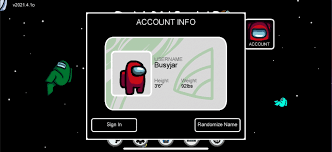
How to Change Your Name on Among Us
Are you tired of having a boring name on Among Us? Do you want to personalize your experience and make it more fun with your friends? Look no further! In this article, we will guide you through the process of changing your name on Among Us, whether you’re playing on a smartphone or computer.
Why Change Your Name on Among Us?
Changing your name on Among Us can be a great way to express yourself and have more fun with the game. With a custom name, you can create a unique identity for yourself and stand out from other players. Plus, it’s always exciting to try out new names and see how they look in-game.
Changing Your Name on Among Us Without an Account
If you’re playing Among Us without an account, you’ll be assigned a random name by the game. However, if you want to change this name, you can do so by accessing the “Account” section of the game.
How to Change Your Name on Among Us Without an Account (Smartphone And Tablet)
To change your name on Among Us without an account on your smartphone or tablet:
- Open the game and go to the “Account” section.
- Tap on the option to get a new name.
- Select the option for “Casual Name”.
- You will be assigned a new, random name.
How to Change Your Name on Among Us Without an Account (Computer)
To change your name on Among Us without an account on your computer:
- Open the game and go to the main menu.
- Click on the option for “Account”.
- Select the option for “Casual Name”.
- You will be assigned a new, random name.
Changing Your Name on Among Us With an Account
If you have an account on Among Us, you can change your name in just a few steps:
How to Change Your Name on Among Us With an Account (Smartphone And Tablet)
To change your name on Among Us with an account on your smartphone or tablet:
- Open the game and go to the “Account” section.
- Select the option to access your Google account on Android or your ID Apple on iPhone/iPad.
- Follow the prompts to connect your account.
- Once connected, tap on the option for “Modify name”.
- Enter a new name of your choice (minimum 1 and maximum 10 characters).
- Tap on the option to confirm.
How to Change Your Name on Among Us With an Account (Computer)
To change your name on Among Us with an account on your computer:
- Open the game and go to the main menu.
- Click on the option for “Account”.
- Select the option to access your Steam or Epic Games account.
- Follow the prompts to connect your account.
- Once connected, click on the option for “Modify name”.
- Enter a new name of your choice (minimum 1 and maximum 10 characters).
- Click on the option to confirm.
Tips For Choosing The Perfect Name
When choosing a name for Among Us, keep in mind that it should be short and memorable. Avoid using names that are too long or complicated, as they may not display properly in-game.
Frequently Asked Questions (FAQs)
Q: How do I change my name on Among Us?
A: To change your name on Among Us, access the “Account” section of the game and follow the prompts to modify your name.
Q: Can I change my name without an account?
A: Yes, you can change your name on Among Us without an account by accessing the “Account” section of the game.
Q: How do I connect my account to Among Us?
A: To connect your account to Among Us, access the “Account” section of the game and follow the prompts to link your Google or ID Apple account on Android or iPhone/iPad.
Q: Can I change my name on Among Us on computer?
A: Yes, you can change your name on Among Us on computer by accessing the main menu and following the prompts to modify your name.
Conclusion
Changing your name on Among Us is a simple process that can enhance your gaming experience. Whether you’re playing with friends or trying out new names, having a custom name can make the game more fun and engaging. With these steps, you’ll be able to change your name in no time!
| Device | Steps |
|---|---|
| Smartphone/Tablet (Without Account) | Access “Account” section, tap on option for “Casual Name”, select new random name. |
| Smartphone/Tablet (With Account) | Open game, access “Account” section, connect Google or ID Apple account, modify name. |
| Computer (Without Account) | Open game, go to main menu, click on “Account”, select “Casual Name”, assign new random name. |
| Computer (With Account) | Open game, go to main menu, click on “Account”, access Steam or Epic Games account, connect account, modify name. |


